20
Service manual April 2017 Uber boiler
3.2 UBER BOILER CALIBRATION INSTRUCTIONS
Initial Setup & Weighing Scale Calibration:
Plumb in and turn on the machine, when the machine is turned on the Version number will
be shown on the screen (e.g. 1.8).
Enter calibration mode by pressing down all 4 buttons at the same time. Enter your settings
as shown on the calibration sheet, some will already be set by default .
1. Tank Temp Offset: This will be set later
2. Font Temp Offset: This will be set later
3. Prime Temp: 90°C (this is your tank standby temp)
4. Max Temp: 97.5°C
5. Delta Value: 13.0 (this will change to 8.0 if a customer requests a preset 2L tank or if
they are operating at a different voltage it will be a different value –see R&D)
6. Inlet Time: 00:03
7. Dead Time: 00:12
8. Boost Timeout: 06:00
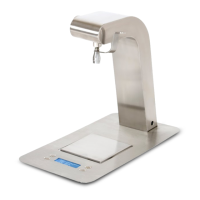
9. Weighing Scale: A calibration should be performed if a New load cell is fitted or if
the scale is reading incorrectly. Please see Section 3.2.1 Weighing scale calibration.
10. Tank Size: LARGE (this is 6L, it could be set to small if a customer requests it
preset.)
11. Save & Exit: Once settings are correct press Time to save.
3.2.1 WEIGHTING SCALE CALIBRATION INSTRUCTIONS
• Enter Service set-up by pressing all 4 buttons for 6 secs
• Scroll the menu using the left hand buttons. Prime = up
• Scroll to Menu 9 weight
• Select top right hand button “Time” to zero scales
• Place the 1kg weight on the centre of the scales and press bottom right button “boost”
to enter the weight.
• To save press bottom left button and scroll to the words “Save and Enter” appear.
• Press “Timer” button, top right to Exit
• The load cell is now calibrated and ready for use.
NOTE: If you do not have a 1 kg weight use a scales to measure a weight of 1kg jug
containing water. Accuracy of scales plus or minus 1gram


 To Next Page