SIGNALLING (sequential calling
tones)
There are eight sequential calling
tone standards
available,
each
having
16 set tones, see
Tone Standard Selection Menu, Fig.
3-1-16.
They are, CCIR, EURO, DZVEI,
ZVEI1,
ZVEI2,
EEA, EIA
and
NATEL.
There is also provision for
the user
to define
sets
of
user tones in
USER1 and USER2. DTMF signalling
tones can also be generated if the second modulation
oscillator (Option
001)
is fitted.
Sequential calling tones
are set up from a utility menu, Fig.
3-1-26,
and are activated
by
pressing
[Send Tones]
which
appears on the main menu
after the tones
have
been set
up.
[Send
Tones] also appears on the calling
tones menu.
Tone selection
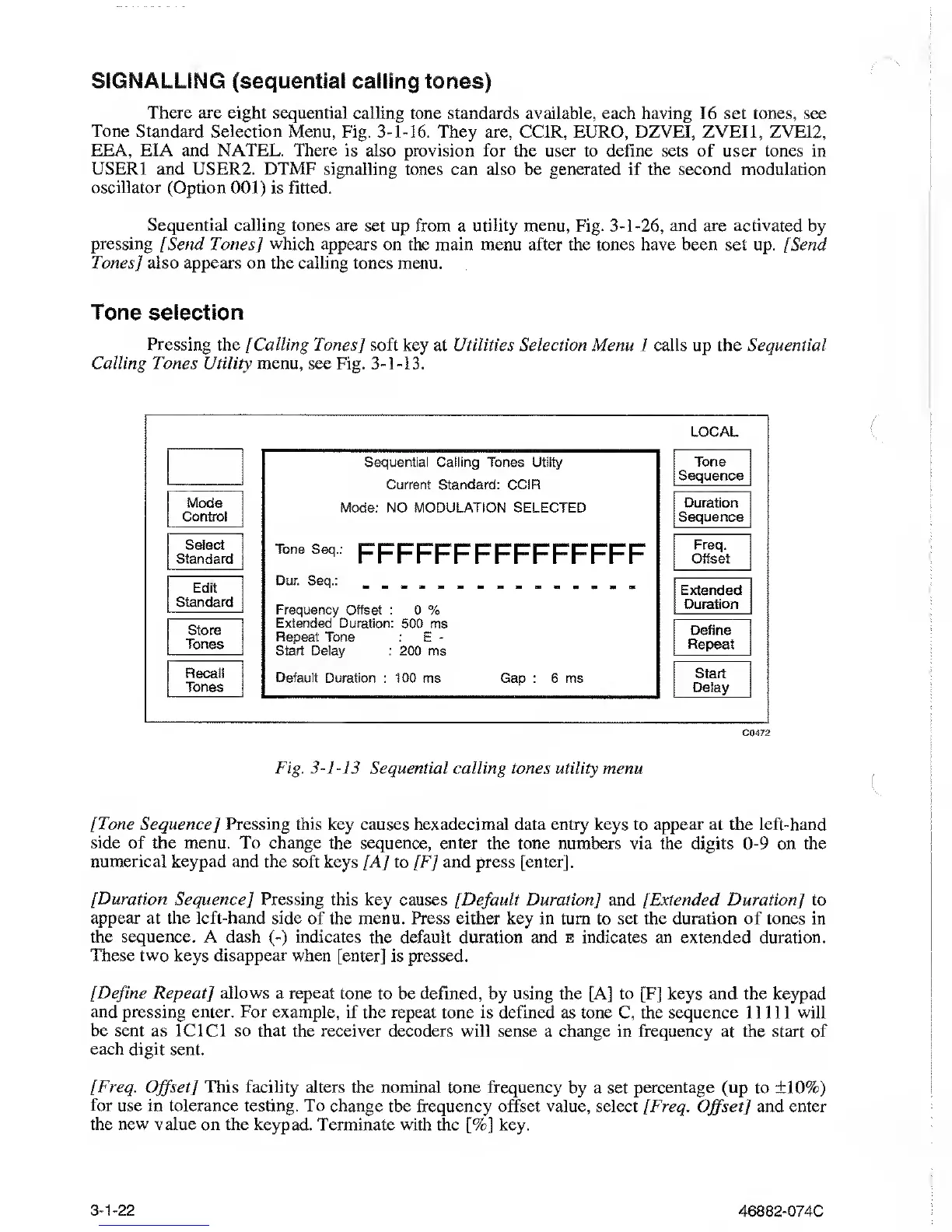
Pressing the
]
Calling Tones] soft
key at Utilities Selection Menu 1 calls up the Sequential
Calling Jones Utility menu,
see Fig.
3-1-13.
Mode
Control
Select
Standard
Edit
Standard
Store
Tones
Recall
Tones
C0472
LOCAL
Sequential Calling Tones Utilty
Current Standard: CCIR
Mode: NO MODULATION SELECTED
Tone Sep,
FFFFFFFFFFFFFFF
Dur. Seq.:
Frequency Offset
: 0 %
Extended Duration:
500 ms
Repeat
Tone
: E
-
Start Delay
: 200 ms
Default
Duration
:
100
ms Gap : 6 ms
Tone
Sequence
Duration
Sequence
Freq,
Offset
Extended
Duration
Define
Repeat
Start
Delay
Fig.
3-1-13
Sequential calling
tones utility menu
[Tone Sequence] Pressing this
key causes hexadecimal data entry keys to appear at the left-hand
side of the menu. To change
the sequence, enter the tone numbers via
the
digits
0-9
on the
numerical keypad and the soft
keys [A] to [F] and press [enter].
[Duration Sequence] Pressing this
key causes [Default Duration
]
and [Extended Duration] to
appear at the left-hand side
of the menu. Press either key in turn
to set
the duration of
tones in
the
sequence. A dash
(-)
indicates the
default duration and e indicates an extended duration.
These two keys disappear
when [enter] is pressed.
[Define
Repeat] allows a repeat
tone to be defined, by using the [A] to [F] keys and the keypad
and pressing
enter. For example, if the repeat
tone
is
defined as tone C, the sequence 11111 will
be sent as ICICI so that the receiver
decoders will sense a change in frequency at the start of
each digit
sent.
[Freq.
Offset]
This facility
alters the nominal tone frequency
by a set
percentage
(up to
±10%)
for
use in tolerance testing. To change
the frequency offset
value,
select [Freq.
Offset]
and enter
the new value on the keypad.
Terminate with the
[%]
key.
3-1-22
46882-074C



 To Next Page