Selecting
alternative tone
standards
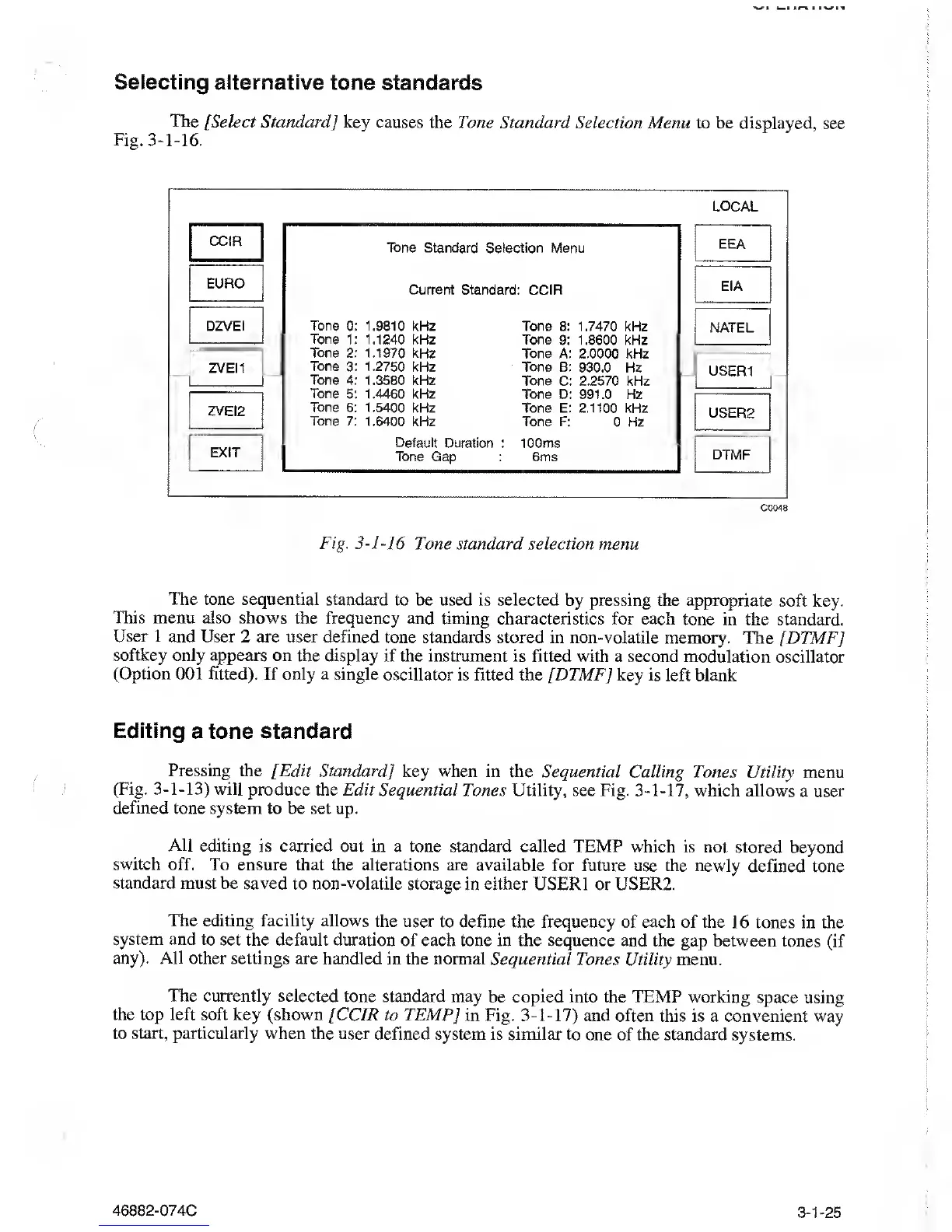
The
[Select Standard] key causes
the Tone Standard Selection Menu
to be displayed,
see
Fig.
3-1-16.
LOCAL
CCIR
EURO
DZVEi
ZVEI1
ZVEI2
EXIT
Tone Standard Selection
Menu
Current Standard CCIR
Tone
0: 1.9810 kHz Tone 8:
1.7470 kHz
Tone
1:
1.1240
kHz Tone
9:
1.8600
kHz
Tone 2: 1.1970 kHz
Tone A: 2.0000 kHz
Tone
3:
1.2750
kHz Tone B:
930.0 Hz
Tone 4:
1.3580 kHz
Tone C: 2.2570 kHz
Tone
5: 1.4460 kHz
Tone D: 991.0 Hz
Tone 6: 1.5400
kHz Tone E: 2.1100 kHz
Tone 7:
1.6400 kHz Tone F:
0 Hz
Default
Duration : 100ms
Tone Gap
:
6ms
EEA
EIA
NATEL
USER1
USER2
DTMF
C0048
Fig.
3-1-16
Tone
standard
selection
menu
The tone sequential standard
to be used
is
selected
by pressing the appropriate
soft key.
This menu also
shows the frequency and
timing characteristics for each
tone in the standard.
User 1 and User 2 are user defined
tone standards
stored in non-volatile memory.
The [DTMF]
softkey
only appears on the display
if
the
instrument is fitted with a second
modulation oscillator
(Option
001 fitted). If only
a
single
oscillator is fitted
the
[DTMF]
key is left blank
Editing
a tone standard
Pressing
the [Edit Standard
]
key when in the Sequential
Calling Tones Utility
menu
(Fig.
3-1-13)
will produce the
Edit Sequential
Tones Utility, see Fig.
3-1-17,
which
allows a user
defined tone
system to be set up.
All editing
is carried out in
a tone standard called TEMP which
is not stored
beyond
switch
off. To ensure that
the alterations are available
for future use the newly
defined tone
standard must be saved
to non-volatile
storage in either USER1 or USER2.
The editing facility
allows the user
to define the frequency of each of
the 16 tones in the
system
and to set the default duration
of each tone in the sequence
and the gap between
tones (if
any). All other settings
are handled in the normal
Sequential Tones Utility menu.
The currently selected
tone standard may
be
copied into
the TEMP working
space using
the top left soft
key (shown [CCIR to TEMP]
in Fig.
3-1-17)
and often
this is a convenient way
to
start,
particularly when the user
defined system is similar to
one of the standard
systems.
46882-074C 3-1-25



 To Next Page