- 12
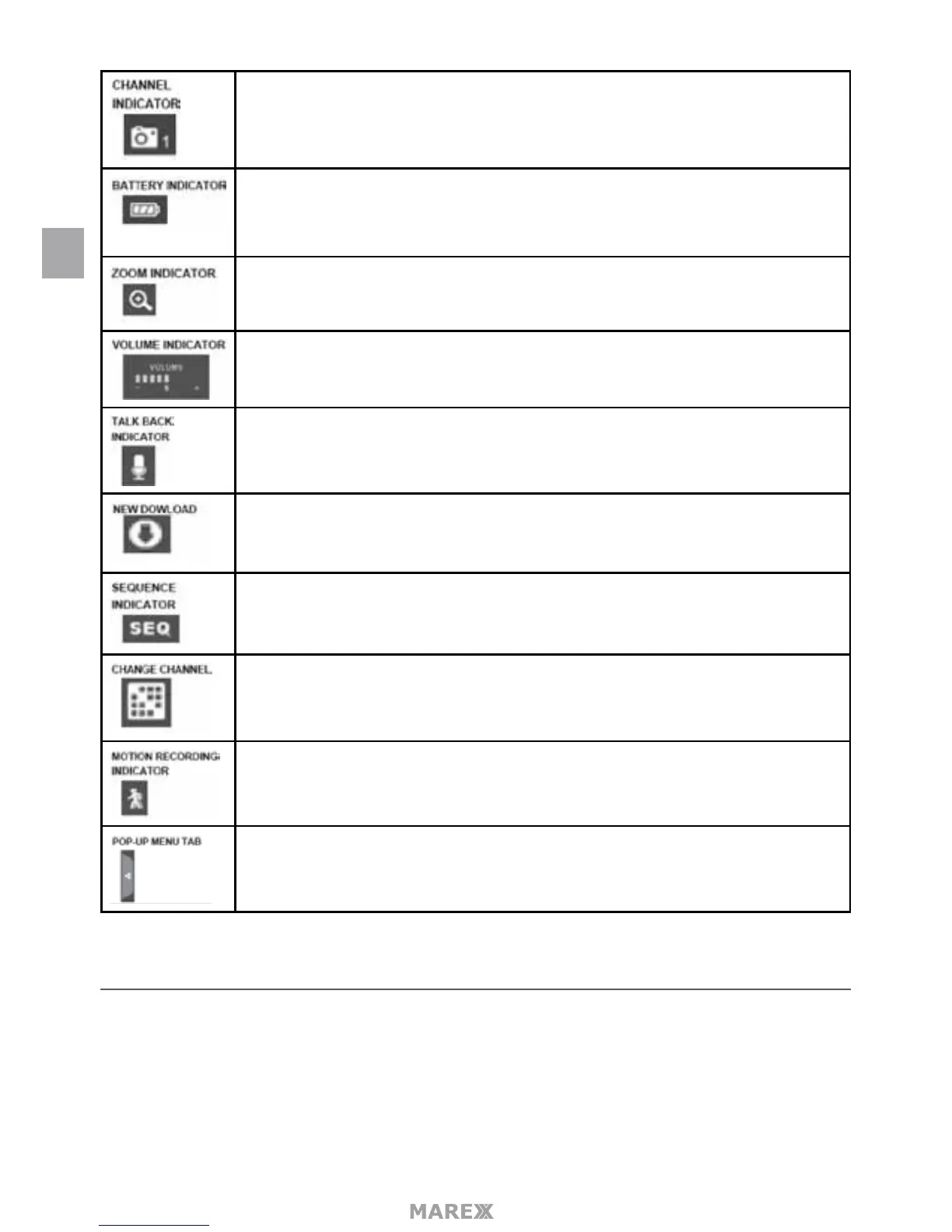
Displays the current channel number you are currently viewing. If viewing multiple
cameras at once, the camera indicator will appear above each video display.
Indicates the monitor’s battery life:
• Flashing Red – Low battery
• Green – Full battery
• Flashing Green – Charging
When you tap this icon on the screen, the monitor breaks the screen image into 5
areas. Tap the area you want to see in Zoom. That area displays in 2x size. Tap the icon
again to exit Zoom mode.
Indicates current audio volume. You must be in single channel viewing mode to
change volume. Tap + or – to raise or lower the volume.
Displays when TALK is pressed. Press and hold TALK on the side of the monitor to talk
back through the camera. Release TALK to wait for a reply.
Displays if new rmware is available.
Displays when the monitor is in auto switch mode; it will change channels automati-
cally.
Tap this icon to manually change channels.
Indicates motion detection status
• Blue – Automatic recording is OFF
• Red – Automatic recording is ON.
Tap to access the pop up menu system.
MENU
This section describes the Marex pop-up menu screens in detail. These pop-up menus enable you to:
• Play back recorded video les
• Set alarms
• Set the brightness level for each camera connected (single channel display only)
• Set up cameras for recording, motion detection, and other system and network requirements.
EN


 To Next Page