9 © 2010 Martin Professional A/S
Martin M1 Safety and Installation Guide
Connections
Front panel
The surface panel offers a USB device socket in the top right corner. This connector is ideally suited
for USB memory sticks or a USB desklamp.
On the front of the console are two additional USB device sockets for additional peripherals like
keyboard or mouse.
USB connections on the front panel are not suitable for boot operations (e.g. installation of an
operating system). Use the USB connectors on the back of the console instead.
Do not exceed a current of 500ma on a USB device port.
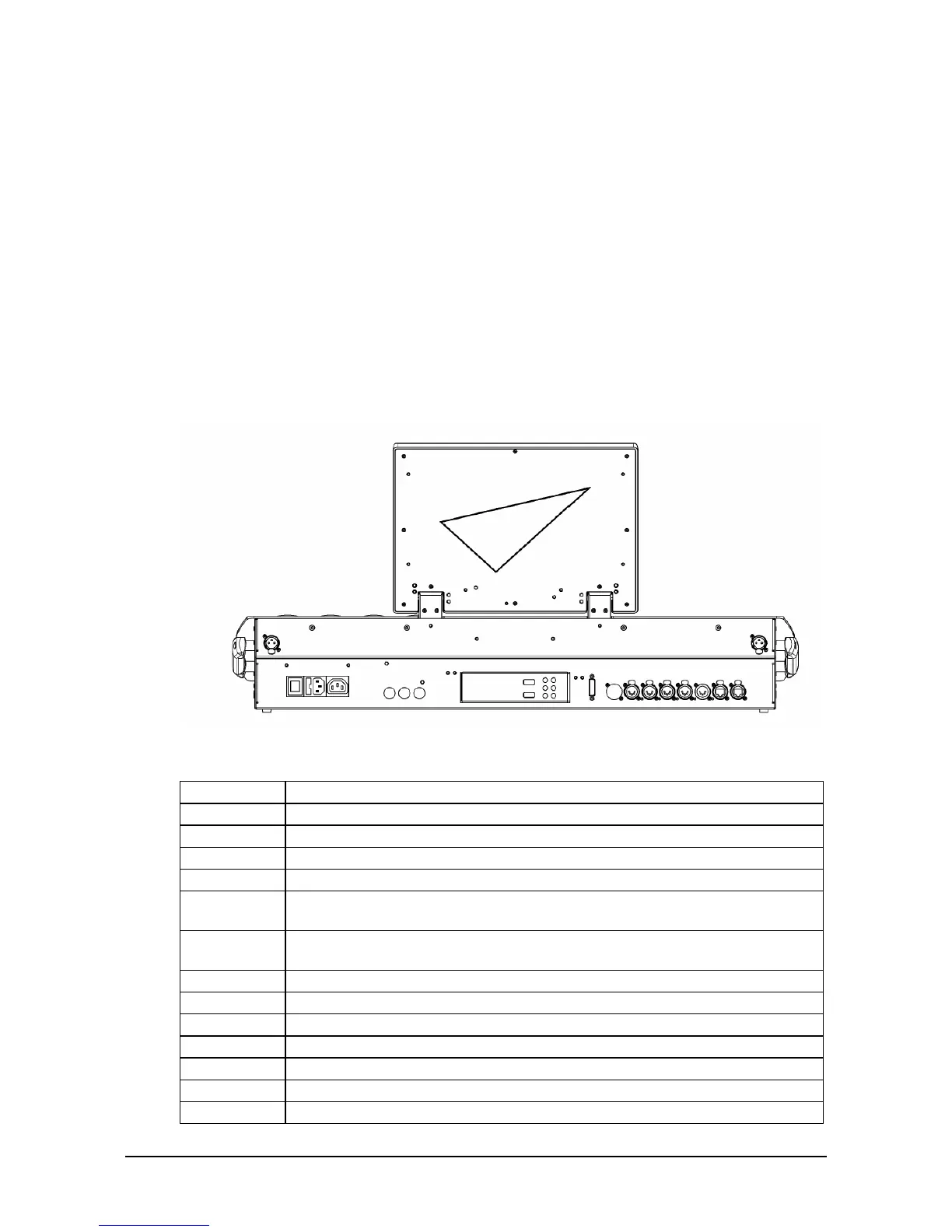
Back panel
IEC C13 Power Output (4A)
XLR 3-Pin female, 12V, 200ma for Littlite Type gooseneck desklights
XLR 5-pin female DMX Outputs, RDM compatible
RJ45 Ethercon connections for MaxModules. Do not connect standard Ethernet
devices to these ports.
Optional MIDI connections, 5-pin DIN
USB device connections (max. 500ma.)
RJ45 Gigabit Remote network connection
RJ45 Gigabit DMX Ethernet connection
15-pin monitor connection
DVI-Digital monitor connection



 To Next Page