13 © 2010 Martin Professional A/S
Martin M1 Safety and Installation Guide
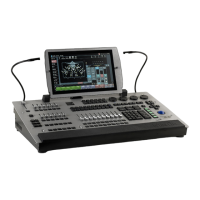
Control/User Interface
Main Playback
10 x 60mm playback faders, each with four function-assignable buttons
Sub Playback
24 playbacks
12 x 40mm playback faders with one assignable button
12 x single assignable buttons
2 x Scrollwheel for Bank changes
12 x customizable multipurpose keys
Playback Select button
Master GO Section with Go, Pause, Snap, Release
4 x digital rotary encoders with push function and status LED for fixture parameter control
5 x dynamically labeled digital LCD buttons for parameter groups, effect parameters, fanning, global
timings
Grand master fader and button
Blind/preview button
Customizable highlight/lowlight function
Customizable parameter defaults
Next/last fixtures/groups
Trackball with pan/tilt control switch
Left/right mouse button
Numerical keypad surrounded
Large command keys
Playback
Assign a cue, cuelist or effect to any playback fader
100 playback banks, each containing 10 playbacks
100 sub playback banks, each containing 24 playbacks
No limit to cues per cuelist
100 pages of 100 playbacks activated by touch screen button
Full 16-bit fading for high-resolution fixtures
Individual fade in/fade out times for all playbacks
Manual override available at all times
Live 0-1000% override of global cue timings
Live programmer timing
Cuelists can be executed in tracking or non-tracking mode
Included Items
1.5 m (4.9 ft.) power cable, 3-pin IEC P/N 11501012 (for use outside US and Canada)
1.5 m (4.9 ft.) power cable, 3-pin IEC P/N 11501502 (with NEMA 15-5P plug for use within the US and
Canada)
User software + documentation CD P/N 39201505
Ordering Information
M1 ts Console P/N 90732040
M1 DMX License 2048 channels P/N 39808013



 To Previous Page