14
•Möchten Sie aus dem Lokwahlmenü wieder
zurückkehren, ohne eine neue Lok zu wählen,
könnenSiedurchDrückenderTasteM3 in
den Fahrmodus zurückspringen, wenn Sie
noch keine neue Adresse eingegeben oder Lok
ausgewählt haben.
3.3.1. Belegte Lok
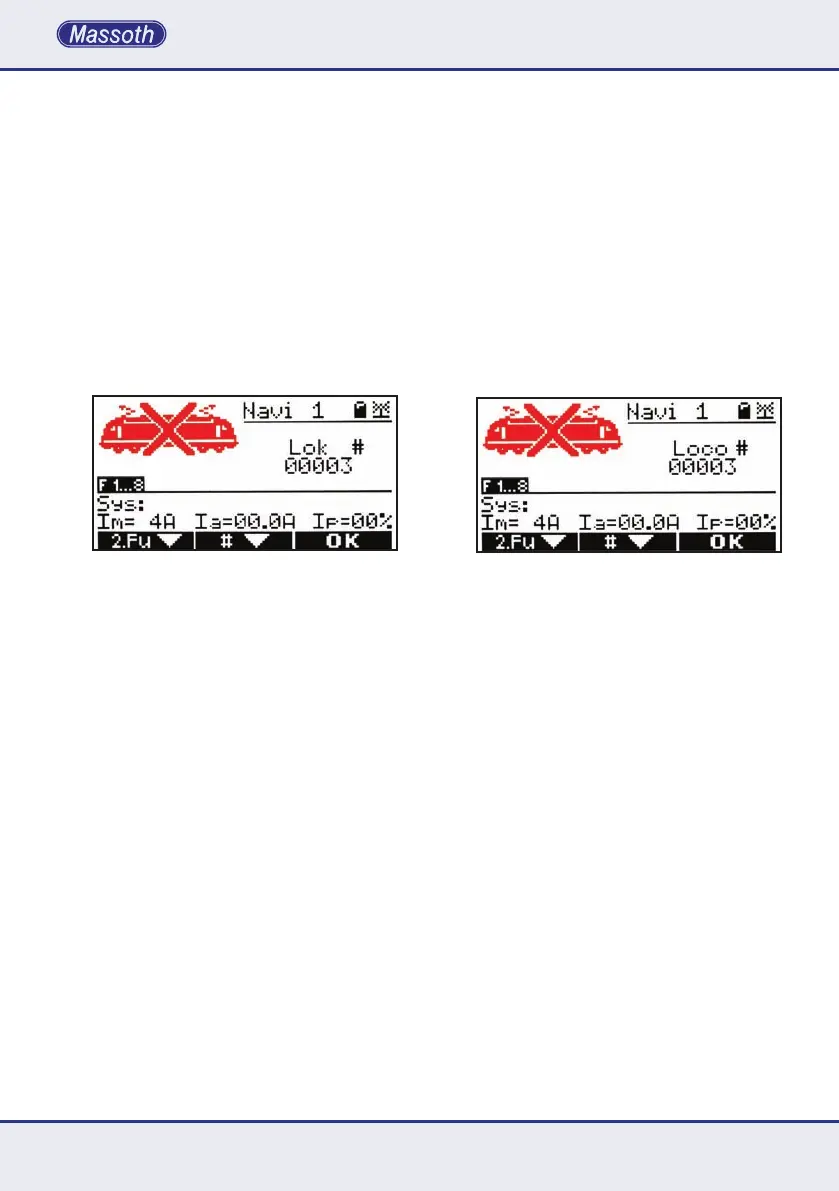
Wenn Sie eine belegte Lok auswählen, wird dies
imDisplaymiteinemLoksymbolmitdurchge-
kreuztemLoksymbolangezeigt.Dasbedeutet
die angezeigte Lok ist in der Zentrale als belegt
gekennzeichnet.Diesemusserstordnungsge-
mäß abgemeldet werden.
Zusätzlich gibt es noch Sondermeldungen
imDisplay,diefolgendeBedeutunghaben:
•„T“=Timeout:ZentraleantwortetaufLokanmel-
dung nicht
•„L“=Lokspeichervoll:AnzahlaktivierterLoksin
Zentrale erhöhen
3.3.2. Abmelden einer Lok
EineaufdemDiMAXNavigatorangemeldete
Lokomotiveistreserviertundkanndurchandere
Teilnehmer nicht übernommen werden, wenn
diesevonIhnennichtexplizitfreigegebenwird.
DiesgeschiehtganzeinfachdurchdasÖffnen
des Lokwahlmenüs (Kurz Taste M2).Dabeiwird
die gesteuerte Lok automatisch abgemeldet.
•You may return to the operation mode without
selectinganewlocomotive,ifyouhavenot
selected or entered a new loco address with M3.
3.3.1. Occupied Loco
If you select an occupied loco, this is in-
dicated in the display with a loco symbol
with a dwarted loco symbol. This means the
displayed loco is characterized in the as oc-
cupied.Thesemustrstbeloggedproperly.
In addition there are special messages in
thedisplayhavethefollowingmeanings:
•„T“=Timeout:Centralstationdoesnotreplyto
loco registration
•„L“=Locomemoryfull:Increasenumberof
activatedlocosinthecentralstation
3.3.2. Deselecting a locomotive
Operatedlocomotivesareassignedtothe
usedNavigatorandarenotavailableforoth-
ers unless it is deselected. The actual loco
is automatically deselected when the loco
selection mode is started with M2. The
recentlyusedlocomotiveimmediatelyreleased
and may be selected by other players.


 To Next Page