9
2.3 Anzeige und Grundbedienung
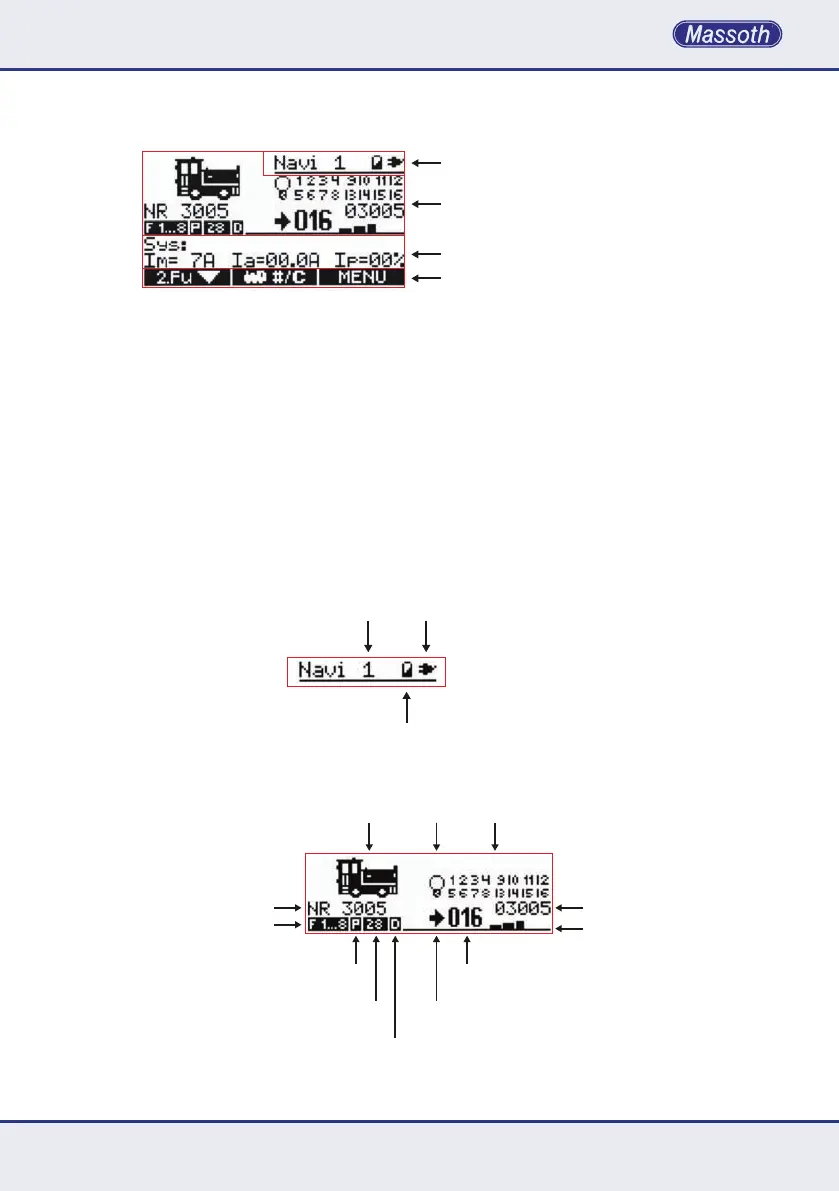
DasgroßeGrakdisplaygibtjederzeitdetaillierte
Auskunft über den Zustand der Lok und der
Anlage.UnteranderemzeigtdasDisplay
imBetriebdieKongurationsdatenwiez.B.
Lokbild, Lokname, Lokadresse, ansteuerbaren
Fahrstufen, paralleler oder serieller Ansteue-
rungderFunktionen,aktiveFunktionenvon
1 bis 28, Fahrtrichtung, aktuelle Geschwin-
digkeit in Fahrstufen, Aussteuerungsanzeige
für die gefahrene Geschwindigkeit, etc..
DieHintergrundbeleuchtungdesDisplays
wird im Menü ein- und ausgeschaltet.
Statuszeile / Status bar
Hauptfunktionsfeld / Main function array
Nebenfunktionsfeld / Auxiliary function array
Menübelegung / Menu assignment
Navigator ID Kabel-/ Funkbetrieb
Wired-/ RC mode
Akku Ladezustand
Accu charge state
Abbildung 1: Das Display ist in vier Bereiche aufgeteilt
Illustration #1: The has four functional sections
Abbildung 2: Die Statuszeile zeigt Geräte ID, Batteriestatus und Betriebsart
Illustration #2: The Status bar shows the Navigator ID, Battery state and operation mode
Loksymbol
Loco symbol
Funktionsanzeige
Function display
Lokname / Loco name
Funktionsebene / Function level
Betriebsart
Operation mode
Fahrstufen
Speed steps
DCC Protokoll
DCC Protocol
Richtung
Direction
Aktuelle Fahrstufen
Actual speed steps
Geschwindigkeitgraph
Actual speed graph
Lokadresse / Loco address
Licht
Light
Abbildung 3: Das Hauptfunktionsfeld informiert über die aktuell gewählte Lok und deren Zustand
Illustration #3: The main function array informs about the selected locomotive and its status
2.3 Display and basic operation
Thelargegraphicsdisplaygivesdetailed
informationaboutthelocomotiveandlayout.
Forexample,itshowsthelococonguration
details like picture, name, address, functions,
parallelorserial,activefunctions1to28,
actual speed in speed steps, a graphical bar
indicating the speed, etc. The backlight can be
activatedandadjustedintheNavigatorsmenu.


 To Next Page