OM-248 440 Page 17
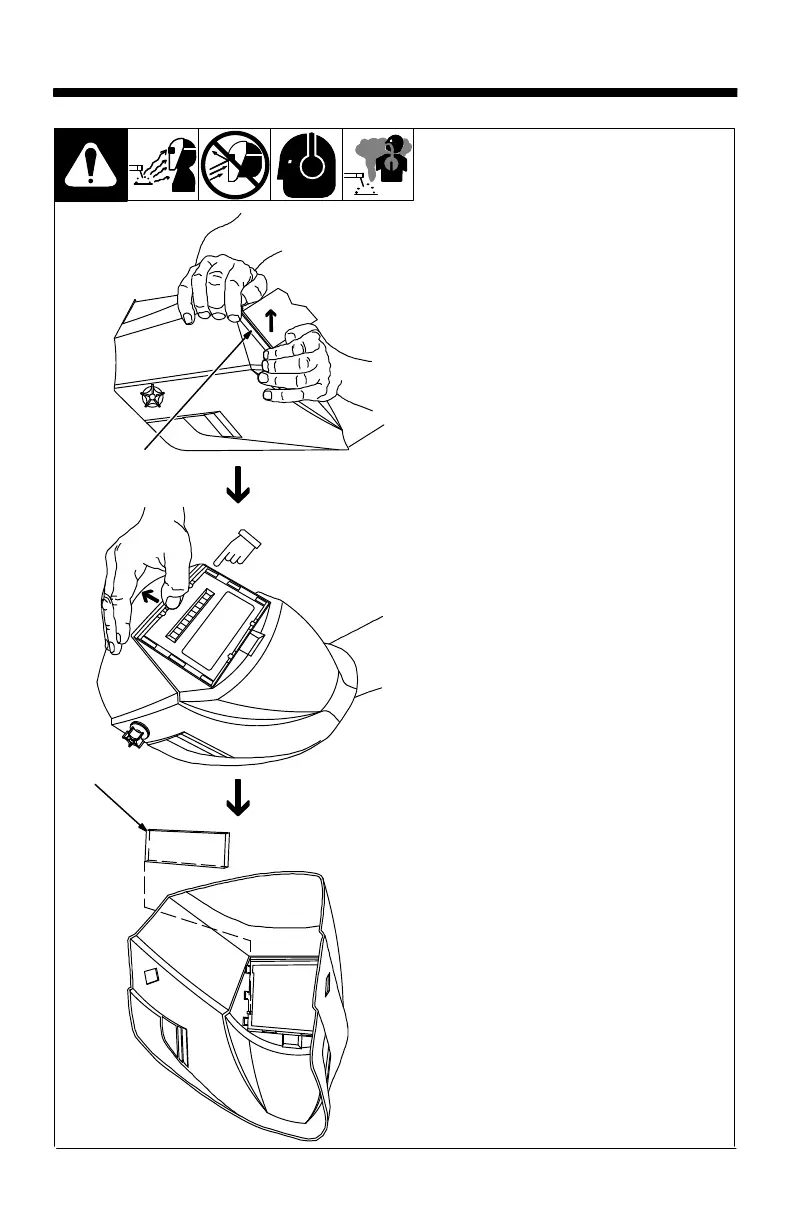
SECTION 7 − INSTALLING OPTIONAL MAGNIFYING LENS
1 Outside Lens Cover Frame
2 Optional Magnifying Lens
Remove lens cover frame by
grasping the outside corners and
pulling the frame away from the hel-
met.
Remove the auto-darkening lens
assembly by gently lifting the hel-
met lip above the assembly and
pushing assembly free of the re-
taining brackets.
Starting at the top, slide magnifying
lens into the helmet retaining brack-
ets. Position the lens tightly against
the bottom holding pins.
Reinstall auto-darkening lens as-
sembly and lens cover frame.
Lift helmet lip with thumb
and push lens out.
804 794 / 804 795
1
2



 To Next Page