31
30
FUNCTION & DEFAULTS DESCRIPTIONS MODIFIED
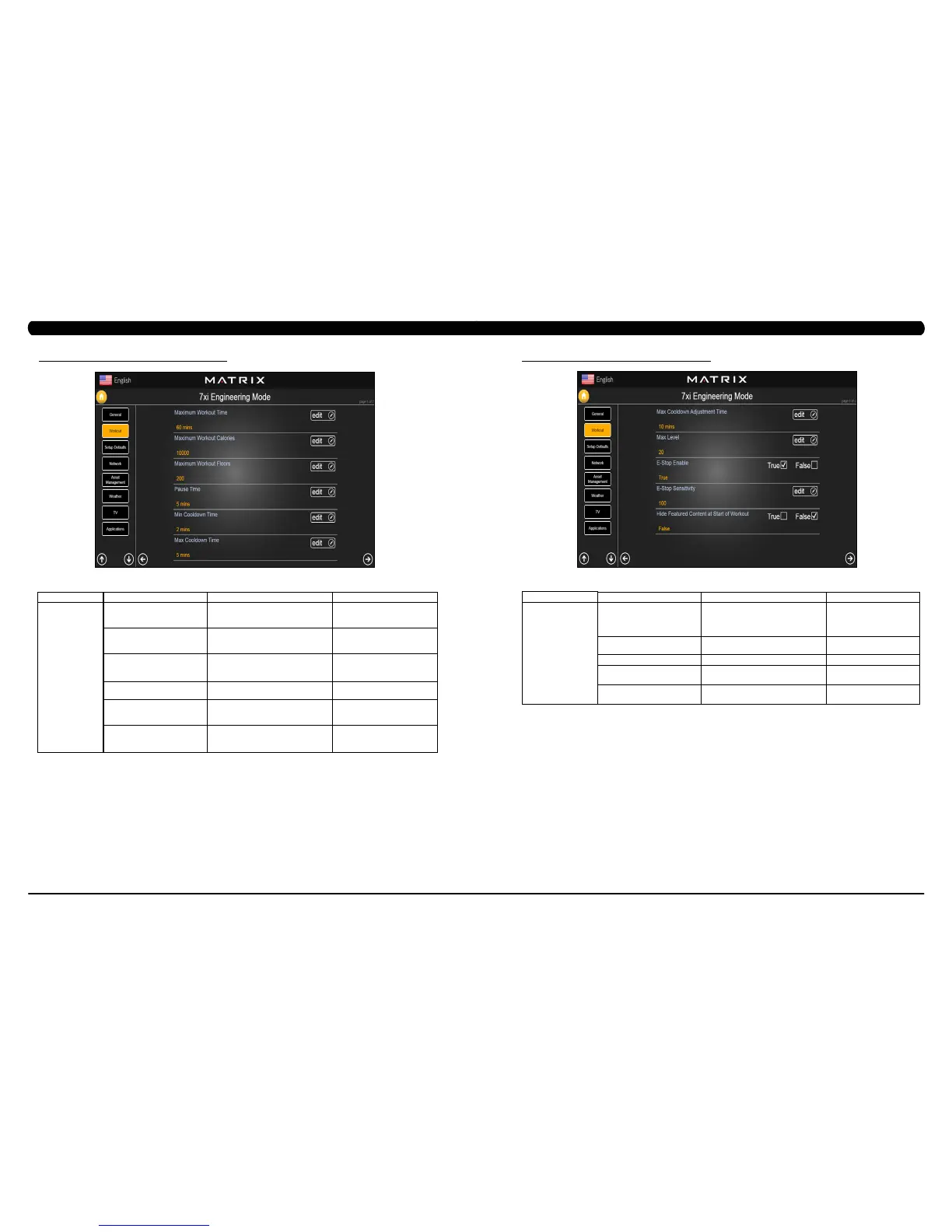
Maximum Workout Time This option allows the club to set the
maximum workout duration limits during
peak and non peak hours.
Maximum: 120 Minutes
Minimum: 10 Minutes
Maximum Workout Calories This option allows the club to set the
maximum workout duration limits during
peak and non peak hours.
Maximum: 10000
Minimum: 50
Maximum Workout Floors This option allows the club to set the
maximum workout duration limits during
peak and non peak hours.
Maximum: 10000
Minimum: 10
Pause Time This option controls the default pause time. Maximum: 10 Minutes
Minimum: 1 Minutes
Min Cooldown Time This option allows the club to set the
minimum cool down duration limits during
peak and non peak hours.
Maximum: 5 Minutes
Minimum: 1 Minutes
Max Cooldown Time This option allows the club to set the
maximum cool down duration limits during
peak and non peak hours.
Maximum: 10 Minutes
Minimum: 5 Minutes
MANAGER MODE
Workout
6.3 ENGINEERING MODE - WORKOUT – TAB 1
CHAPTER 6: ENGINEERING MODE
6.3 ENGINEERING MODE - WORKOUT – TAB 2
CHAPTER 6: ENGINEERING MODE
ENGINEERING MODE
Workout
FUNCTION & DEFAULTS DESCRIPTIONS MODIFIED
Max Cooldown Adjustment Time This option allows the club to set the
maximum cool down adjustment time
duration limits during peak and non peak
hours.
Maximum: 20 Minutes
Minimum: 5 Minutes
Max Level This option controls the default program
level.
Maximum: 20 Minutes
Minimum: 1 Minutes
E-Stop Enable This option controls the E-Stop function True or False
E-Stop Sensitivity This option controls the safety threshold
for the E-Stop function.
Maximum: 500
Minimum: 4
Hide Featured Content at Start of
Workout
This option sets whether
hide
the
Featured
Content at start of workout
.
True or False


 To Next Page