10 Chapter 1: Introduction
When grabbing video in SDI format, the data does not get converted. Standard
definition (SD) video input is in YCbCr601; high-definition (HD) video input
is in YCbCr709.
Display features
Matrox Orion HD can output video (the operating system’s desktop) to four
independent display devices simultaneously. These devices can be either digital
(DVI-D or SDI) or analog output devices, depending on the connector to which
they are connected. The video outputs are not only independent from each other,
but are also independent from the video inputs for maximum configuration
flexibility. The video outputs can be used to display an extended Windows desktop
or the Windows desktop and an exclusive display. However, to grab with the
Matrox Orion HD board, one of the board’s outputs must be used to display the
Windows desktop; otherwise, the Matrox GPU won’t be initialized properly and
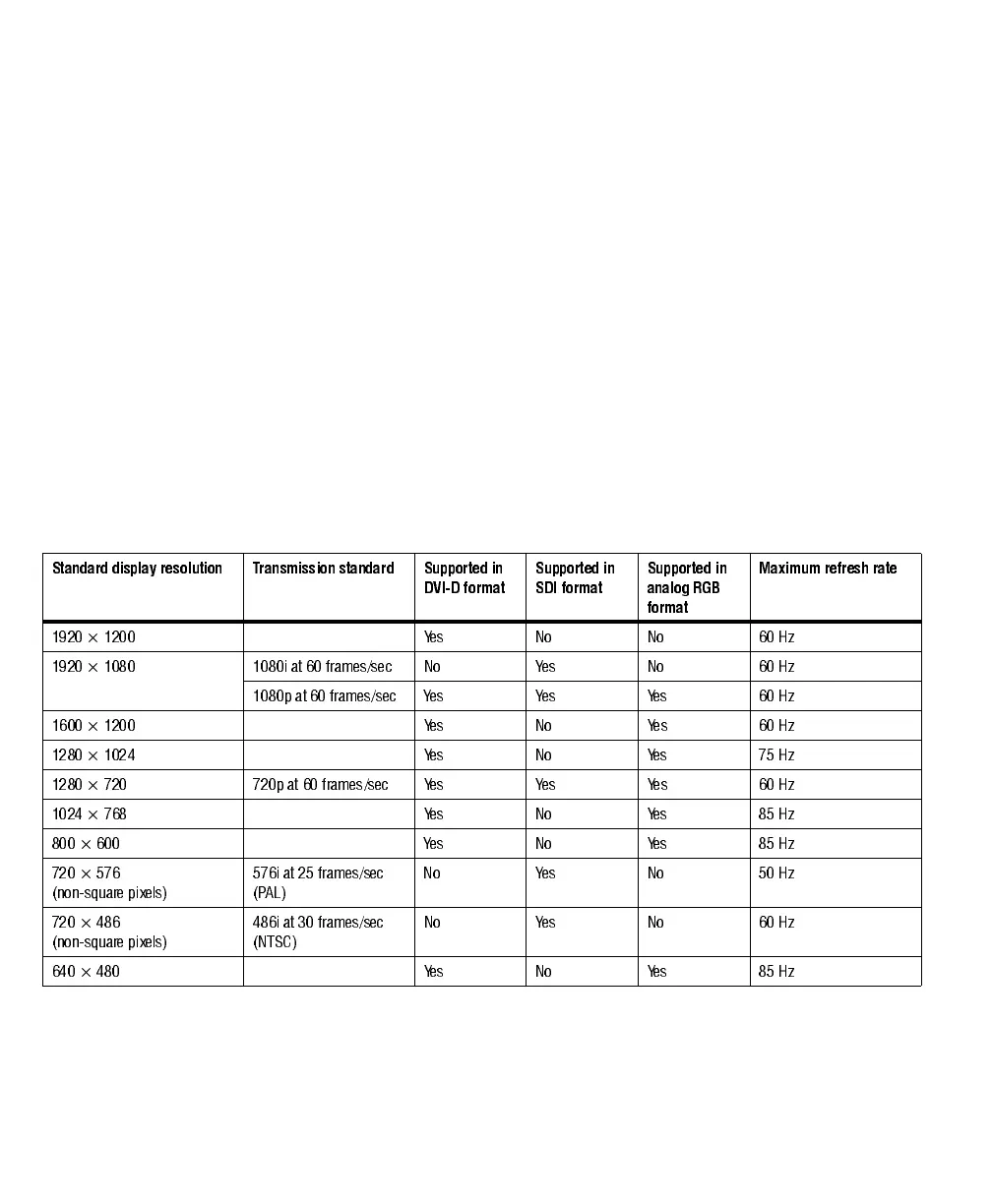
won’t be available to control the grab. The table below summarizes the supported
standard display resolutions:
Two of the video outputs can be output in SDI format using a multi-rate serializer.
The other two video outputs can be output in RGB analog format or in DVI-D
format using a multi-format transmitter.
Standard display resolution Transmission standard Supported in
DVI-D format
Supported in
SDI format
Supported in
analog RGB
format
Maximum refresh rate
1920 × 1200 Yes No No 60 Hz
1920 × 1080 1080i at 60 frames/sec No Yes No 60 Hz
1080p at 60 frames/sec Yes Yes Yes 60 Hz
1600 × 1200 Yes No Yes 60 Hz
1280 × 1024 Yes No Yes 75 Hz
1280 × 720 720p at 60 frames/sec Yes Yes Yes 60 Hz
1024 × 768 Yes No Yes 85 Hz
800 × 60 0 Yes No Yes 85 Hz
720 × 57 6
(non-square pixels)
576i at 25 frames/sec
(PAL)
No Yes No 50 Hz
720 × 48 6
(non-square pixels)
486i at 30 frames/sec
(NTSC)
No Yes No 60 Hz
640 × 48 0 Yes No Yes 85 Hz











 To Next Page