28 Chapter 2: Hardware installation
Connecting video sources of other supported formats
To connect DVI-D, RGB, YPbPr, Y/C, and/or CVBS video sources to the
multi-format input/output connector:
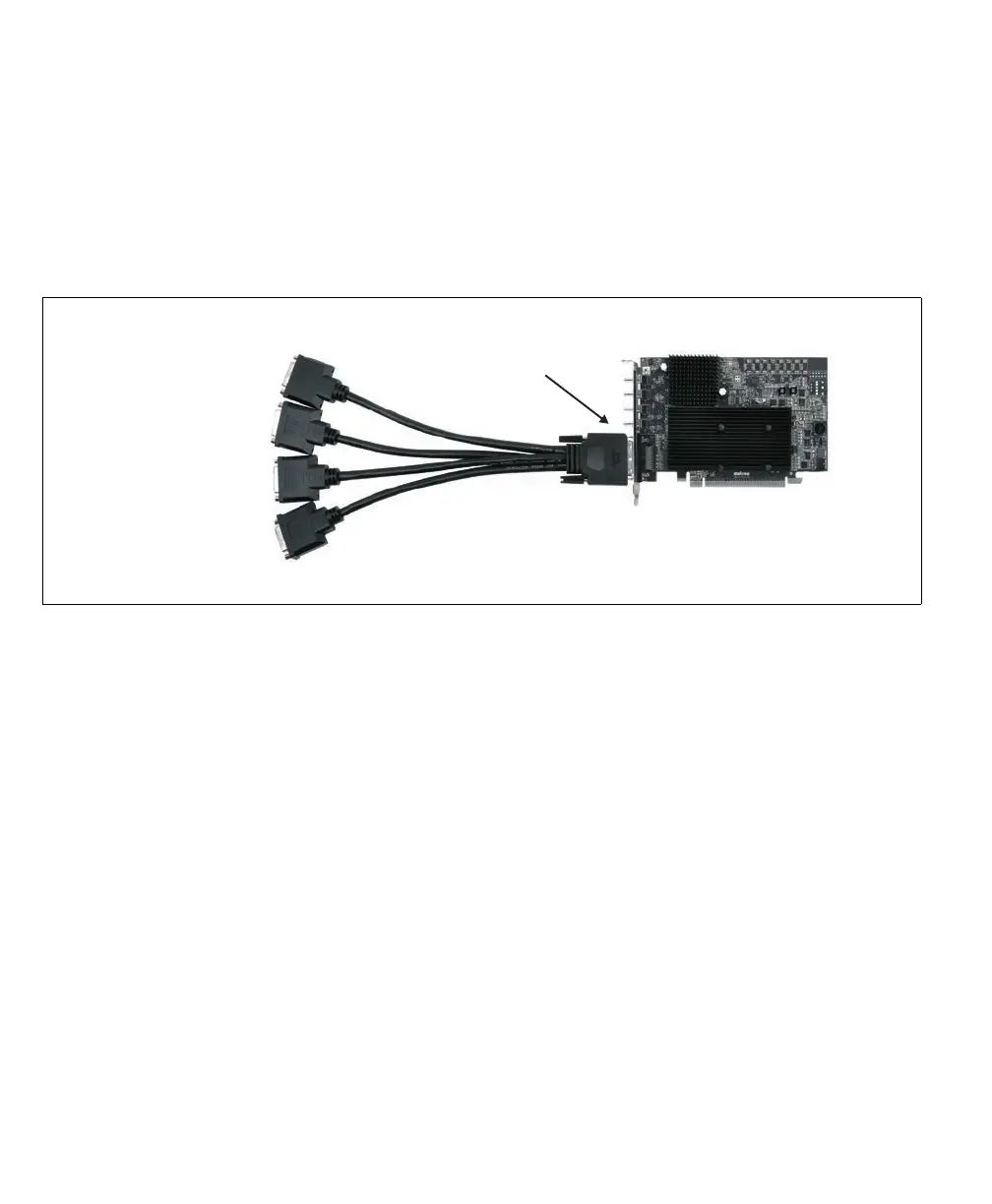
1. Connect the KX20 end of the supplied Matrox KX20 to 4 DVI-I cable adapter
to the multi-format input/output connector on the Matrox Orion HD board.
2. Tighten the screws on the sides of the adapter to secure the adapter to the
multi-format input/output connector on the Matrox Orion HD board.
3. Connect your video source(s) to DVI-I connector(s) 3/7 and/or 4/8 of the cable
adapter. To each of these DVI-I connectors, you can connect one of the following
combinations of video sources:
-DVI-D and/or RGB.
-DVI-D and/or YPbPr.
-DVI-D and/or Y/C.
- DVI-D and/or CVBS/CVBS/CVBS.
This means that to DVI-I connector(s) 3/7 and/or 4/8, you can attach a DVI-D
video source, as well as an RGB or YPbPr or Y/C video source, or three CVBS
video sources.
DVI-I connector 4/8
DVI-I connector 3/7
DVI-I connector 2/6
DVI-I connector 1/5
Multi-format
input/output
connector











 To Next Page