Group Head Cleaning
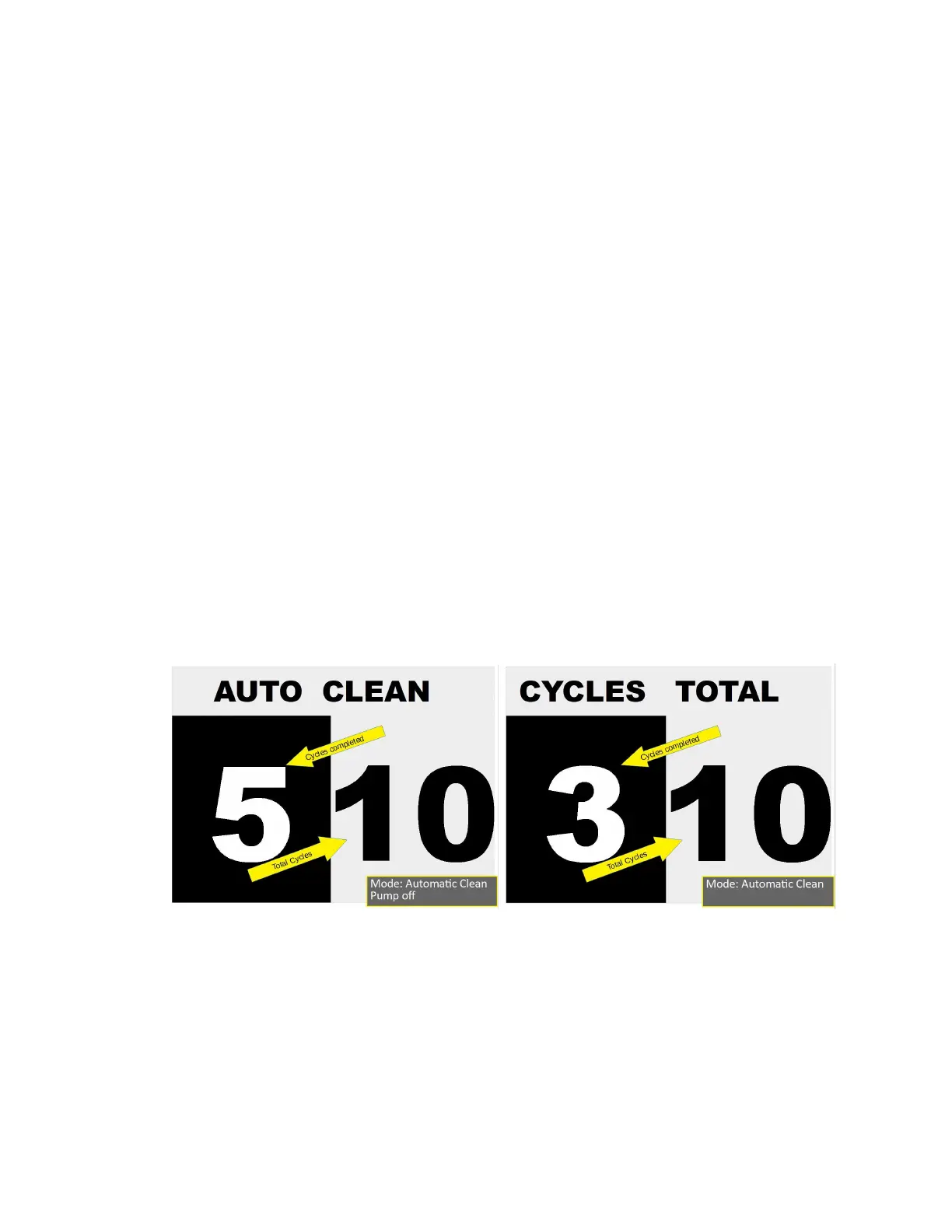
This is a special function usually performed at the end of the day. The clean cycle will run ten
cycles of five seconds Brew phase and five seconds off. The UI display will show “AUTO CYCLE”
in the top data window with the total cycles on the right of the bottom data window and cycles
completed in the left of the bottom data window. After each cycle the top data window will
display “CYCLES TOTAL” and a total of completed cycles. The following steps describe how to
access this function
1. Enter Menu Mode by pressing and releasing BOTH Pre-Infusion and Brew actuators at
the same time. “PSH FOR MENU” should show in the top data display. Press and release
BOTH Pre-Infusion and Brew actuators again, (this has to be done within two seconds of
the first part). If done within two seconds “CLEAN? NO” will show in the top data
window.
2. When “CLEAN? NO” is shown use the Brew actuator to change to “CLEAN? YES”. Press
the Steam or Water actuator to start the clean cycle. If you do not want to perform the
clean function leave at “NO” and press the Steam or Water actuator to move to the next
menu function. Pressing the Pre-infusion actuator will change “YES” to “NO”.
3. When running pressing either Pre-Infusion or Brew actuator at any time will cancel the
clean cycle.
4. When completed, or stopped, the UI will return to Idle mode.
Clean Cycle running Clean Cycle running, Display between cycles
2023 Mavam User Manual V4.53 UC/F Page 14 of 28


 To Next Page