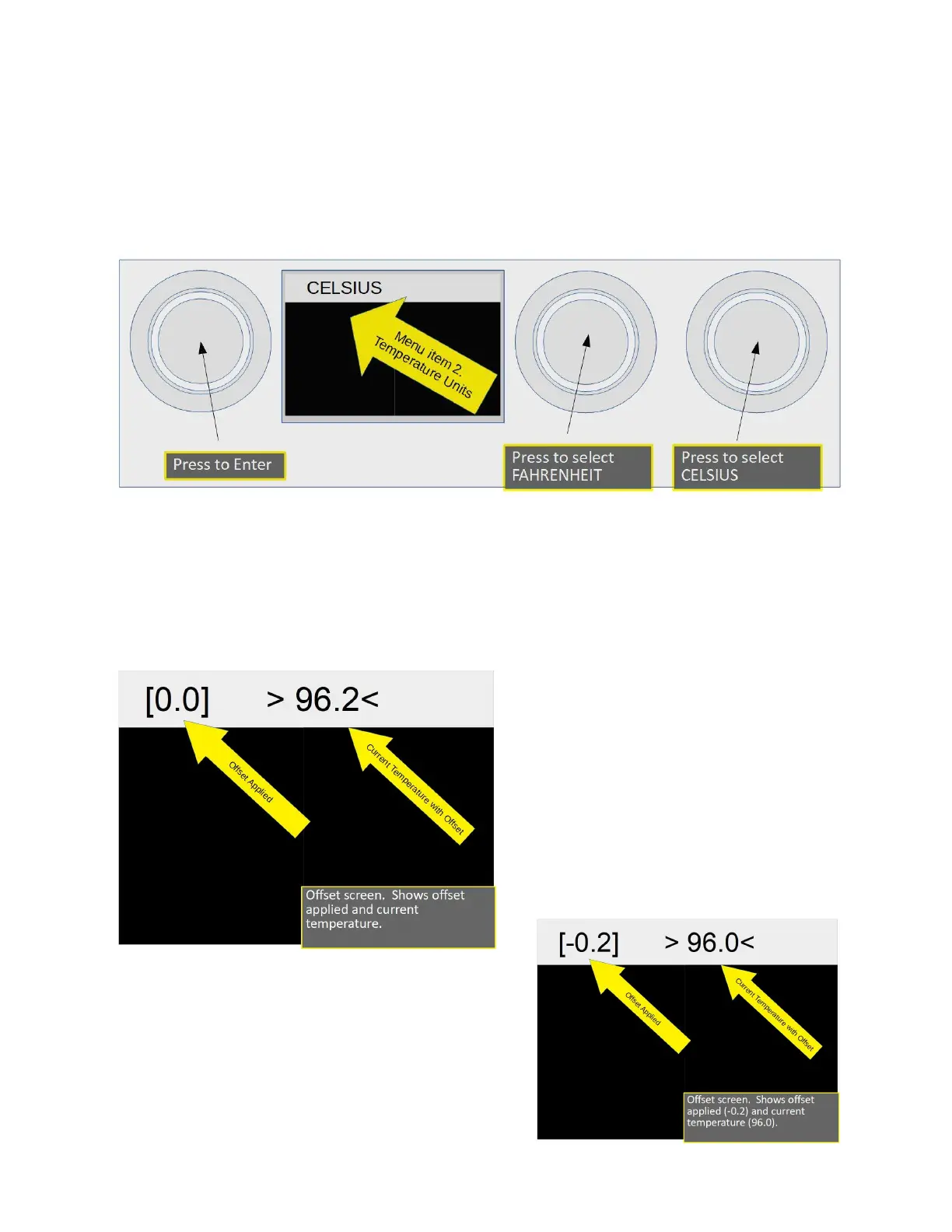
Menu Item 2, Selecting Temperature Units
You may select the temperature units to be either Celsius, or Fahrenheit. Press the Pre-Infusion
actuator for Fahrenheit or Brew for Celsius. Upper data window will display selection.
Menu Item 2, Selecting Temperature Units
Menu Item 3, Offset
This is used to calibrate the temperature sensor. Calibration is done at the factory using highly
accurate temperature measurement tools. You should only undertake this operation if you have
a full understanding of this function. Offset and current temperature are displayed in the upper
data window. Offset is in brackets “[0.0]”
(Zero offset applied). Current temperature
is between arrows “> 96.2<”. The offset is
added or subtracted from the temperature
sensor input. To set the offset you must
know the measured temperature coming
out of the brew head during a brew cycle.
Usually a test instrument such as a Scace
temperature and pressure monitor is used.
Using the screen example to the left offset
is [0.0]and temperature reads 96.2. Using a test
instrument temperature has been measured to be
96.0, Offset is changed to [-0.2]. This is subtracted
from the sensor input and displayed temperature is
now 96.0 (screen at right).
2023 Mavam User Manual V4.53 UC/F Page 23 of 28


 To Next Page