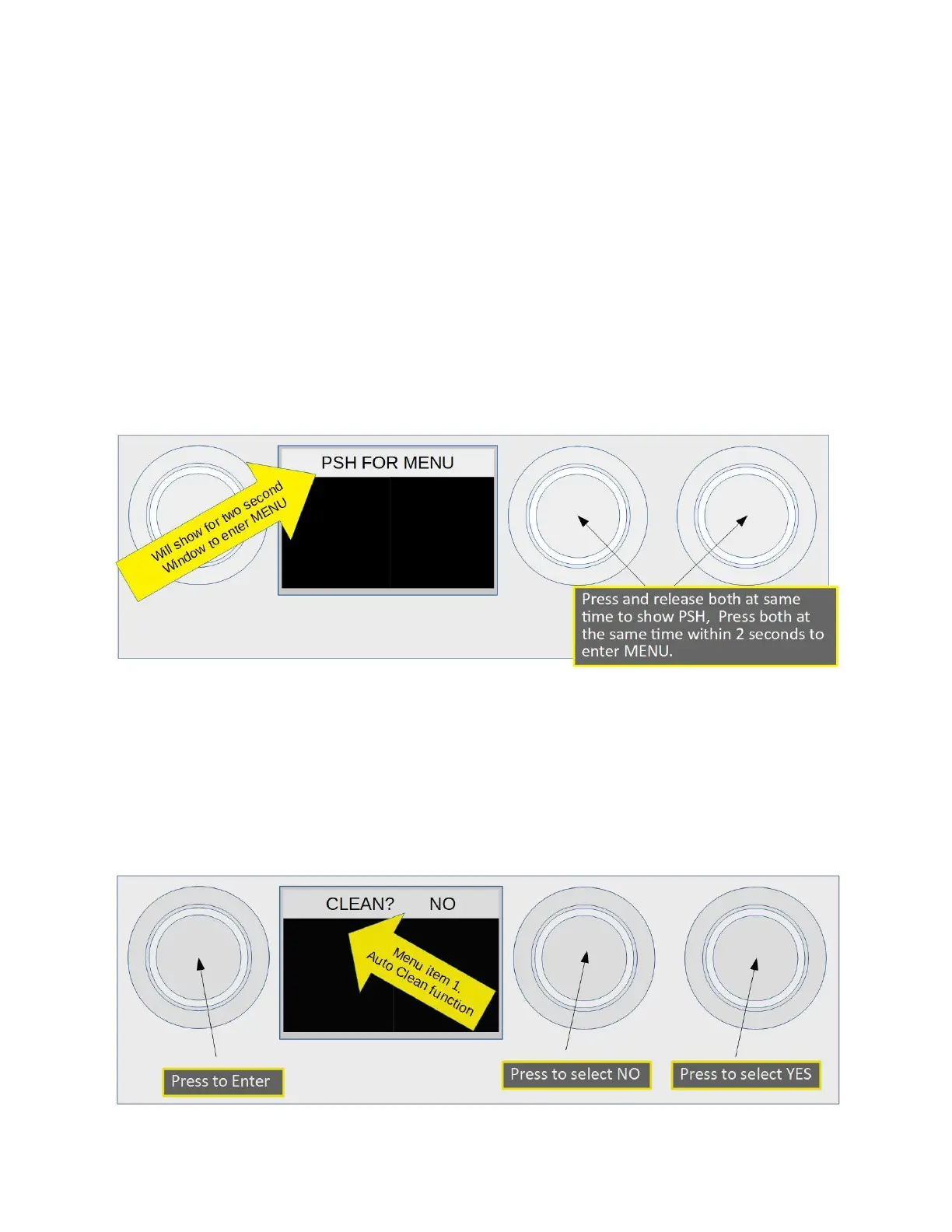
Entering the Menu
Using Piezo actuators or Mechanical actuators press and release BOTH Pre-Infusion and Brew
actuators at the same time. “PSH FOR MENU” will show in the top data display. Press and
release BOTH Pre-Infusion and Brew actuators again, (this has to be done within two seconds of
the first push). If done within two seconds “CLEAN? NO” will show in the top data window. If
“PSH FOR MENU” is not displayed and one of the brew phases are started, just press BOTH
again, the phase will be cancelled when the “PSH FOR MENU” is displayed.
NOTE: Timing is important for this operation, it may take a few tries to “get” it, no harm is done
to the machine if multiple tries are needed.
Entering the Menu by pushing both Pre-Infusion and Brew
Menu Item 1, Selecting Auto Clean Cycle
When “CLEAN? NO” is shown use the Pre-Infusion actuator to change to “CLEAN? YES”. Press
the Steam or Water actuator to start the clean cycle. If you do not want to perform the clean
function leave at “NO” and press the Steam or Water actuator to move to the next menu.
Menu item 1. Auto Clean Cycle.
2023 Mavam User Manual V4.53 UC/F Page 21 of 28


 To Next Page