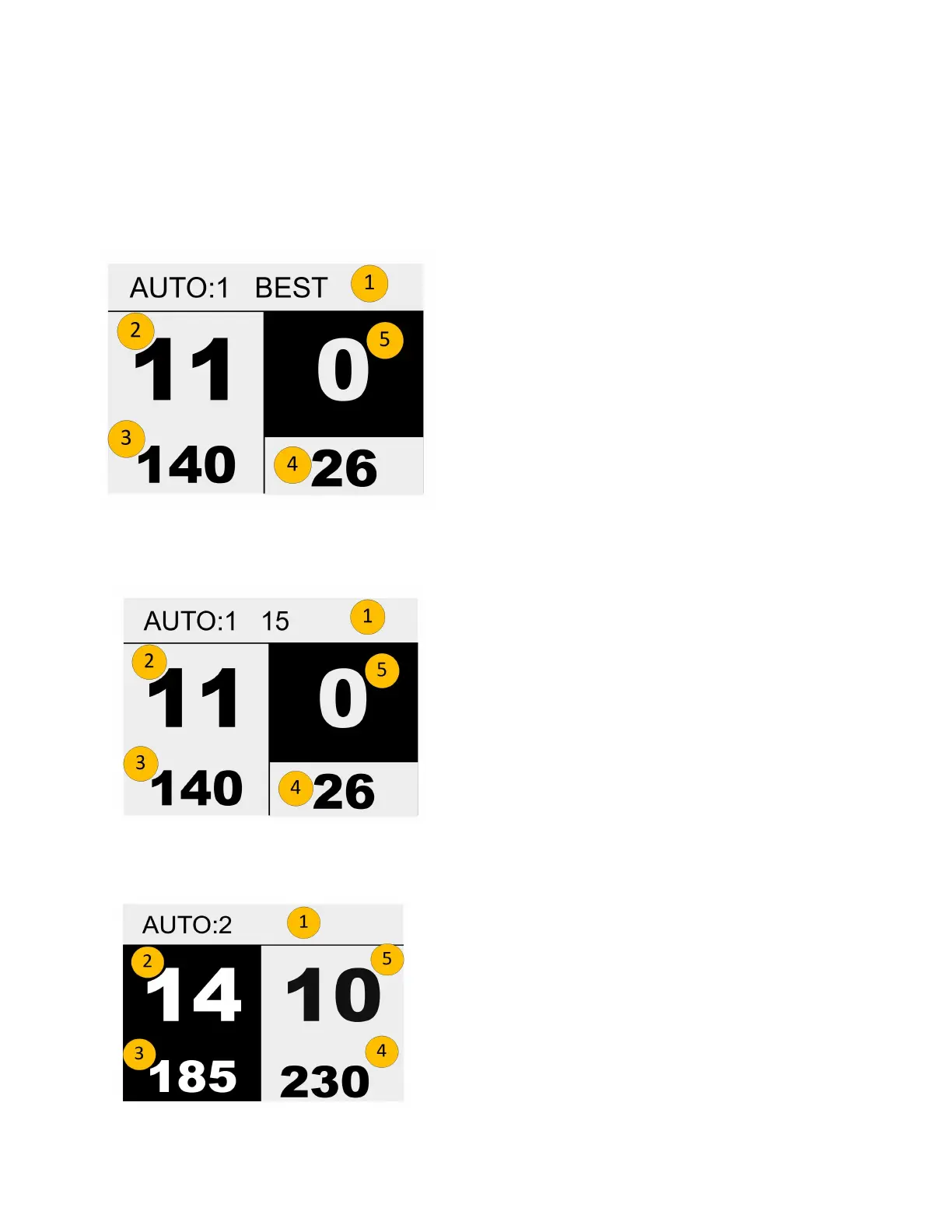
Pre-infusion and Brew Screens
There is a lot of information presented during a shot. See the examples below to help explain
what is shown on the screen during a shot.
Pre-infusion screen, Automatic, BEST setting:
1. Heading showing Auto 1 , Best.
2. Time Pre-infusion has run in seconds.
3. Volume of water into puck in Pulses.
4. Rate of flow (Volume/Time).
5. Time of Brew, zero since Brew is not started.
Pre-infusion screen, Automatic, TIME setting:
1. Heading showing Auto 1, Time.
2. Time Pre-infusion has run in seconds
3. Volume of water into puck in Pulses.
4. Rate of flow (Volume/Time).
5. Time of Brew, zero since Brew is not started.
Brew screen, Automatic:
1. Heading showing Auto 2
2. Time of Pre-infusion, White on Black means
completed
3. Volume used during Pre-infusion
4. Volume used so far in Brew
5. Time so far in Brew
The shot information will remain on screen for 30 seconds before going to Idle.
2023 Mavam User Manual V4.53 UC/F Page 19 of 28


 To Next Page