EasyManua.ls Logo

MAXDATA PLATINUM 100 I - Opening Load Plate; Removing Protective Covering from the Load Plate; Inserting the Processor

MAXDATA PLATINUM 100 I
29 pages
Print Icon
To Next Page IconTo Next Page
To Previous Page IconTo Previous Page
Loading...
14 15MAXDATA PLATINUM 100 I M9Hardware Installations and Upgrades
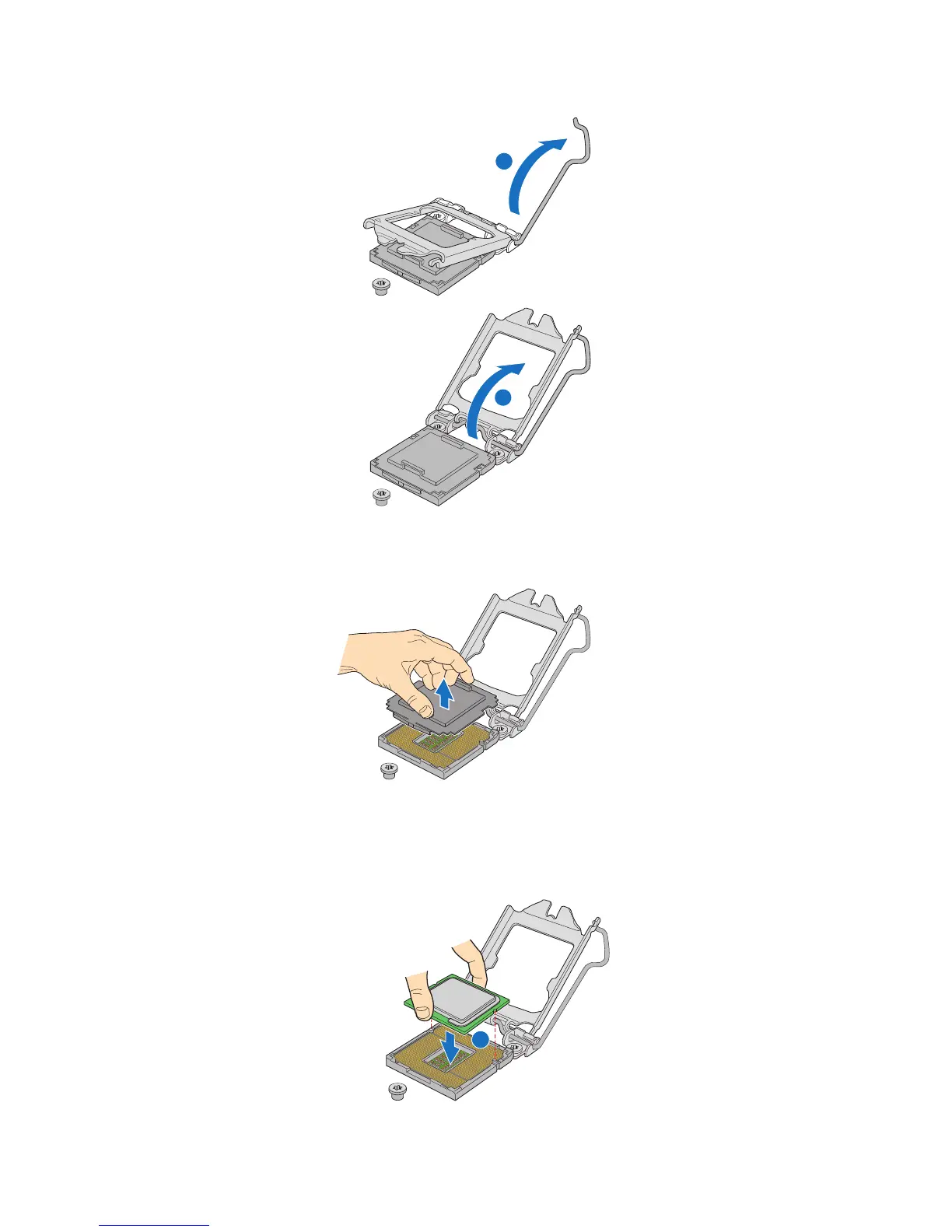
8. Push the rear tab with your fingertip to bring the front end of the load plate up slightly. Open
the load plate completely. See figure 7.
Figure 7. Opening Load Plate
9. If there is a protective covering on the load plate, remove it and store it for later use.
Figure 8. Removing Protective Covering from the Load Plate
10. Take the processor out of the box and remove the protective shipping covering.
11. Align the processor with the socket in such a way that both notches match up with the
processor socket pins. Gently insert the processor into the socket.
Figure 9. Inserting the Processor

REMOVE
AF003187
Grosse Point Server Board
AF003187.ai
11 May 2009
Heideman Assoc.
REMOVE
A
B
AF003190
Grosse Point Server Board
AF003190.ai
11 May 2009
Heideman Assoc.
A

Table of Contents

Related product manuals