38
The limit sensor activators MUST be
installed on BOTH ends of chain to
indicate the OPEN and CLOSE positions
of the gate or DAMAGE will occur. They
will activate the corresponding LIMIT
SENSOR (Gray or Black) when they
move within range, stopping the gate at
the desired positions.
The limit sensors have been FACTORY
INSTALLED for front mounting position.
If rear mounting position is being
installed, make sure the limit sensors
have been moved to the correct
positions (see below).
Limit Sensor
Activator
(Magnet)
Gate
Bracket
Limit Sensor
Activator installation
LED lights when
sensing a limit
sensor activator
(Magnet).
GRAY Limit Sensor
Gate
Bracket
Adjustments
open and close limits
IMPORTANT: Cycle the gate OPEN and CLOSED AFTER the
limit sensor activators have been installed. Operator will cycle
slowly to LEARN the open and closed gate positions. After
the operator learns the gate positions, it will cycle at the
GATE SPEED selected for normal operation, see page 28.
Rear Mounting Position
NOTE: Refer to
page 40 for Limit
Sensor wiring.
Reposition
limit sensors
to aligned
with chain.
Front Mounting Position
Back
View
Back
View
Factory Installed
GRAY Limit Sensor
Factory Installed
BLACK Limit Sensor
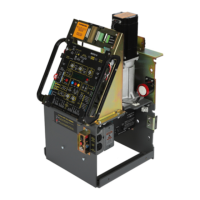
Push and HOLD the JOG LEFT or JOG RIGHT buttons
accordingly on the MAX MC-200 motor controller to
move the gate (release the button to stop gate). This
allows gate to be moved back and fourth without leaving
the operator to “fine tune” the open and close gate
positions if desired.
“Fine Tune” Limits Adjustment
WARNING: Avoid moving gate while “Fine Tune” adjusting.
IMPORTANT: LEDs MUST light up when gate
reaches OPEN and CLOSE positions or operator
WILL NOT learn gate positions. If gate positions
are not learned, gate cycling speed will remain
slow during normal operation.
IMPORTANT: Remove breather pin from
gear reducer BEFORE cycling operator.
Breather Pin
C
AUTION
REMOVE
BEFORE
OPER
ATION
Limit Sensor
Activator
GRAY
BLACK
Limit Sensor
Activator
Limit Sensor
Activator
Limit Sensor
Activator
BLACK Limit Sensor
Plu
g
Pl
u
g
Plu
g
PhotoCell
Edge
UL
Entrap
1
2
Limit SW
ON-LINE
MATRIX
JOG
JOG
LEFT
RIGHT
Jog LT
Jog RT
GND
Edge 1
Edge 2
Photo
Cell
ERD
Motor
OverLoad
POWER
MC-200
Motor Controller
16
15
14
13
12
3
4
5
MAX
LED ON
Sensitivity
Edge
ERD
IMPORTANT:
Gray Limit sensor
MUST be in the
OPEN position.






 To Next Page
