Antenna Setup
Instruction for the presetting “fixed antenna”
> Satellite: Satellite selection. Here, all satellites enabled in the submenu “Satellite list” are
listed. Select the satellite to be edited.
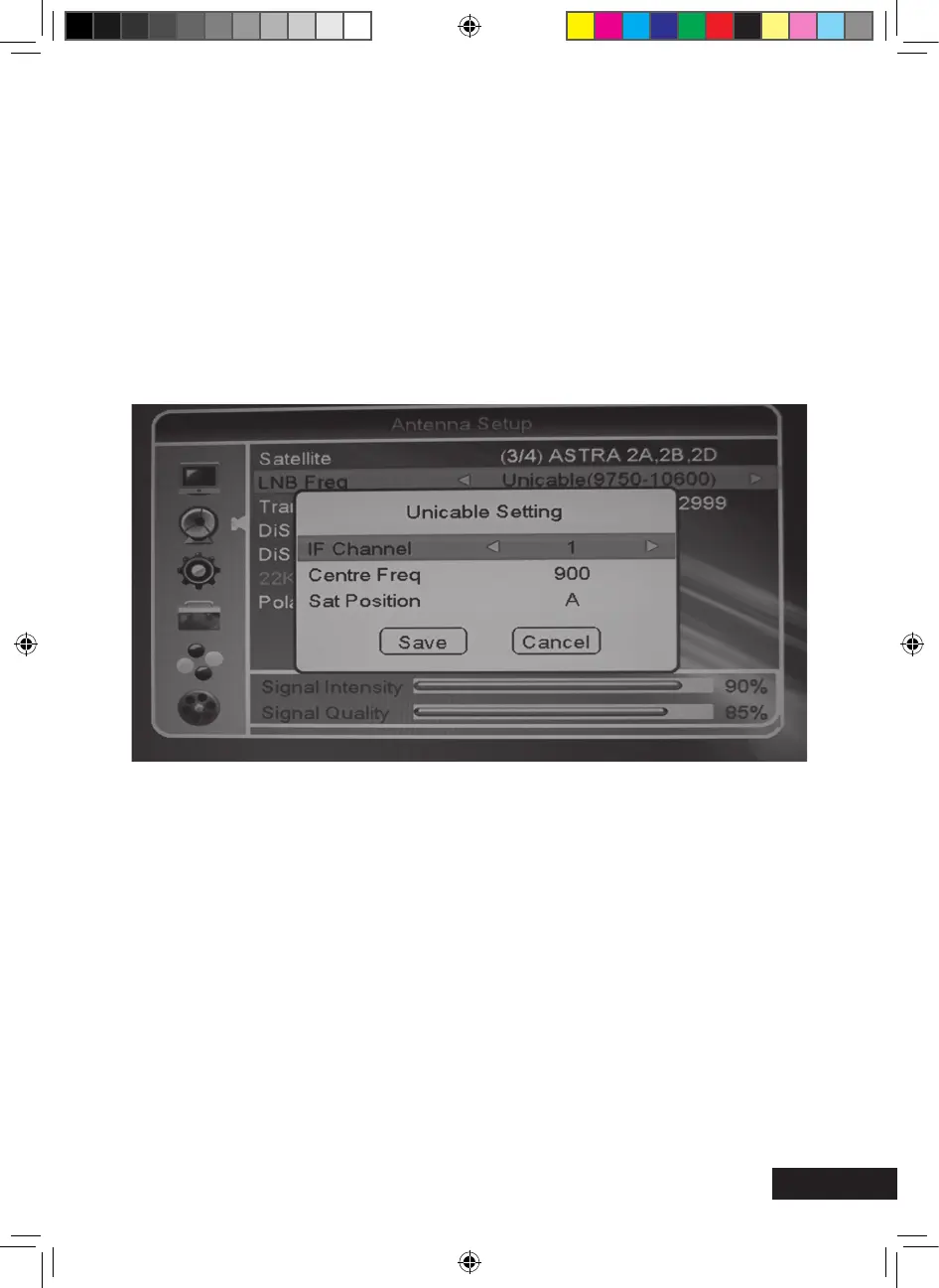
> LNB Frequency: Set the corresponding LNB frequency for the selected satellite. The
default setting is universal.
If you connect your receiver to a single cable system, you must set the selection one cable.
The detailed explanation for connection to a cable system can be found below.
Now you have to select the following points:
• IF-Channel • Centre Frequency • Satellite position
The values to be set mainly depend on the one cable system. Follow the indications in the
operating manual of the one cable system.
Please note: Assign the receiver number (= IF-Channel) and ZF-Frequency
(Centre Freq) only once and in pairs.
> Transponder: List of the programmed transponders.
> DiSEqC1.0: Setting for multi-satellite reception.
> DiSEqC1.1: Setting for multi-satellite reception.
> 22K: Will be set automatically by the receiver.
> Polarity: The default setting is “AUTO”. However, you can dene the horizontal or
vertical LNB supply voltage.
Page 23
MXL020HD INSTRUCTIONS REVISION.indd 23 15/05/2013 14:12


 To Next Page