Page 25
TP list
In this submenu, you can edit the transponders of the satellites enabled in the submenu
item satellite list.
> Edit (red function key): Editing of the parameters of the marked transponder.
Please note that this change will have an inuence on the channels of the edited
transponder!
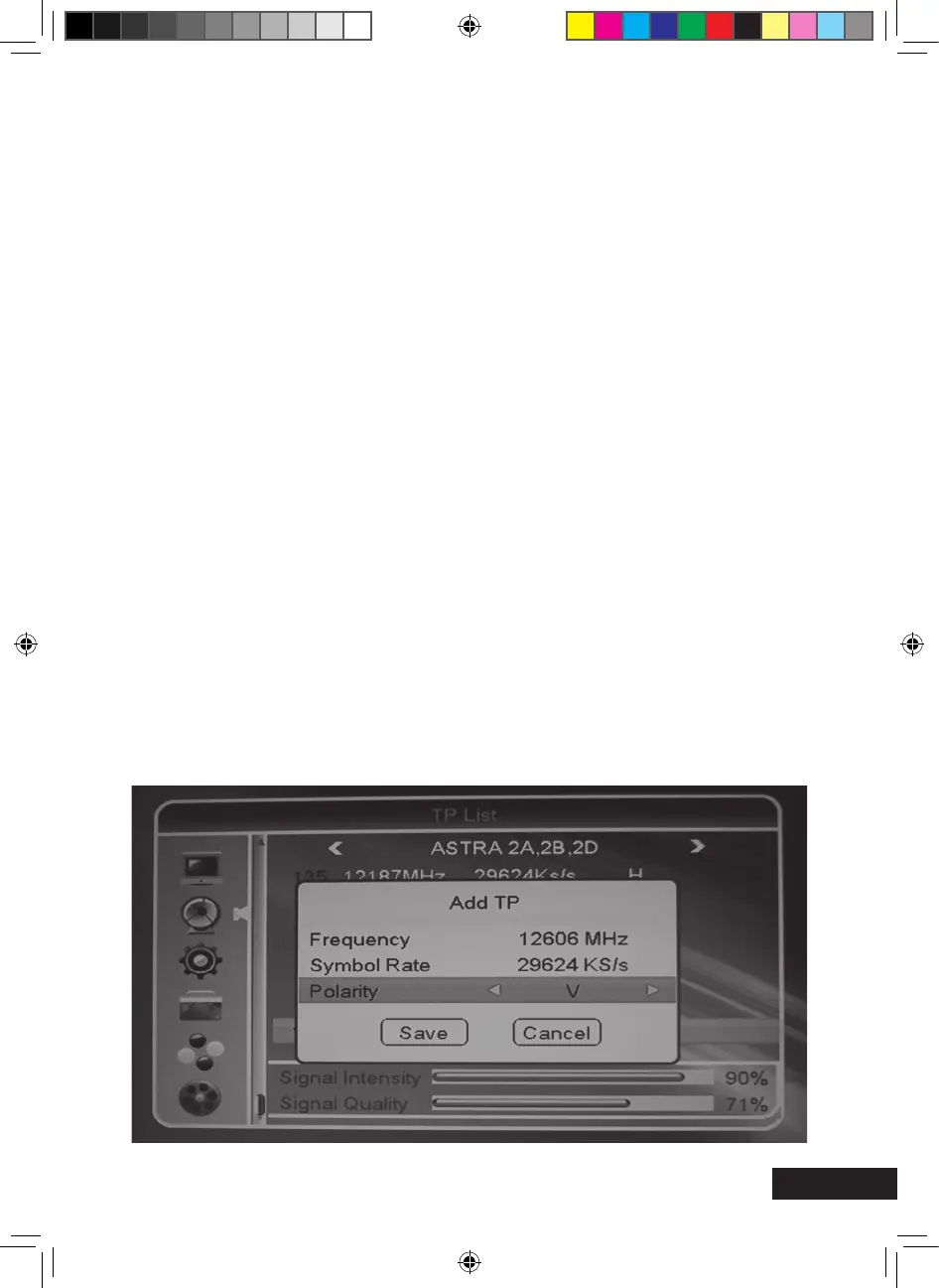
> Add (green function key): Here, a new transponder not being saved yet can be
created. Use this function to scan for a channel if you know the required details.
> Delete (yellow function key): Deleting of the marked transponder.
> Search (blue function key): Scanning of the marked transponder for new channels taking
into consideration the settable scanning filters.
Example for the channel add
You are aware that new channels are broadcasted on a determined frequency.
Satellite: ASTRA 28° East - Frequency: 12606 MHz
Symbol rate: 29624 Ks/s - Polarity: Vertical
Now, proceed as follows: Submenu item TP List.
Press the green function key of your remote control. The “Add TP” box appears.
Enter the frequency 10836 with the keys 0-9 of the remote control.
Then, enter the symbol rate 22000 with the keys 0-9 of the remote control.
Set the polarity H for horizontal with the or keys.
MXL020HD INSTRUCTIONS REVISION.indd 25 15/05/2013 14:12


 To Next Page