3-52
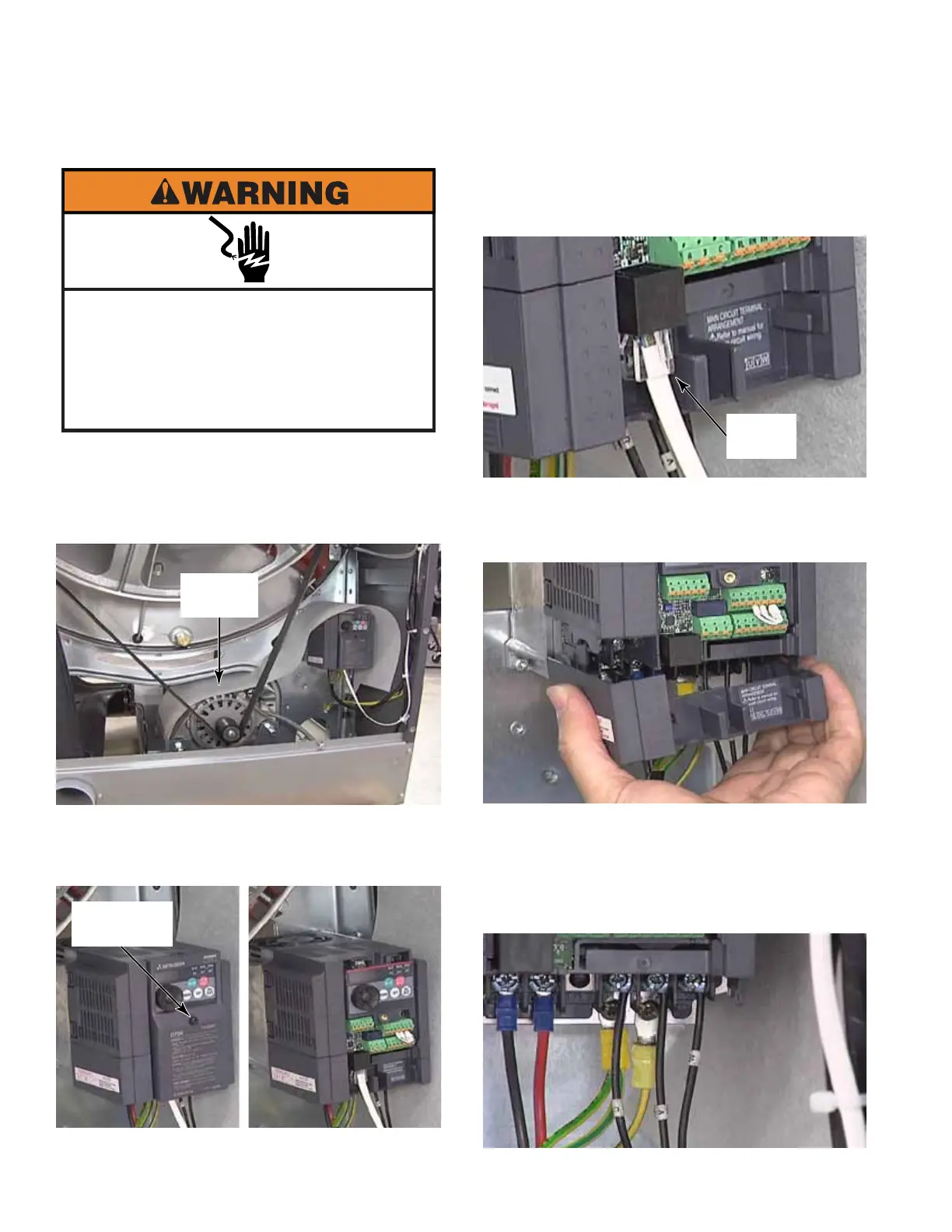
1. Remove the back panel. (See page 3-46)
2. The splash guard above the motor and
inverter must be reinstalled, if it is removed.
3. Unscrew the #2 Phillips screw securing the
inverter front cover. Remove the cover. The
screw does not come out of the cover.
4. Disconnect the RJ-45 inverter
communication wire by pressing the thumb
tab and pulling the connector out.
5. Remove the bottom inverter cover by
squeezing in on both sides of the cover to
release the locking clips.
6. Slide the cover down and out to remove it.
7. Mark wires from drive motor to inverter
for proper reinstallation. These wires are
connected to contacts U, V and W.
Electrical Shock Hazard
Disconnect power before servicing.
Failure to do so can result in death or
electrical shock.
Replace all parts and panels before
operating.
INVERTER
#2 Phillips
Screw
Splash
Guard
RJ-45
Wire



 To Next Page