PAGE 11
FOR SERVICE TECHNICIAN’S USE ONLY
DO NOT REMOVE OR DESTROY
3. Access the machine electronics without
disconnecting any wiring to the CCU (see
Dryer Disassembly Instructions, page 24).
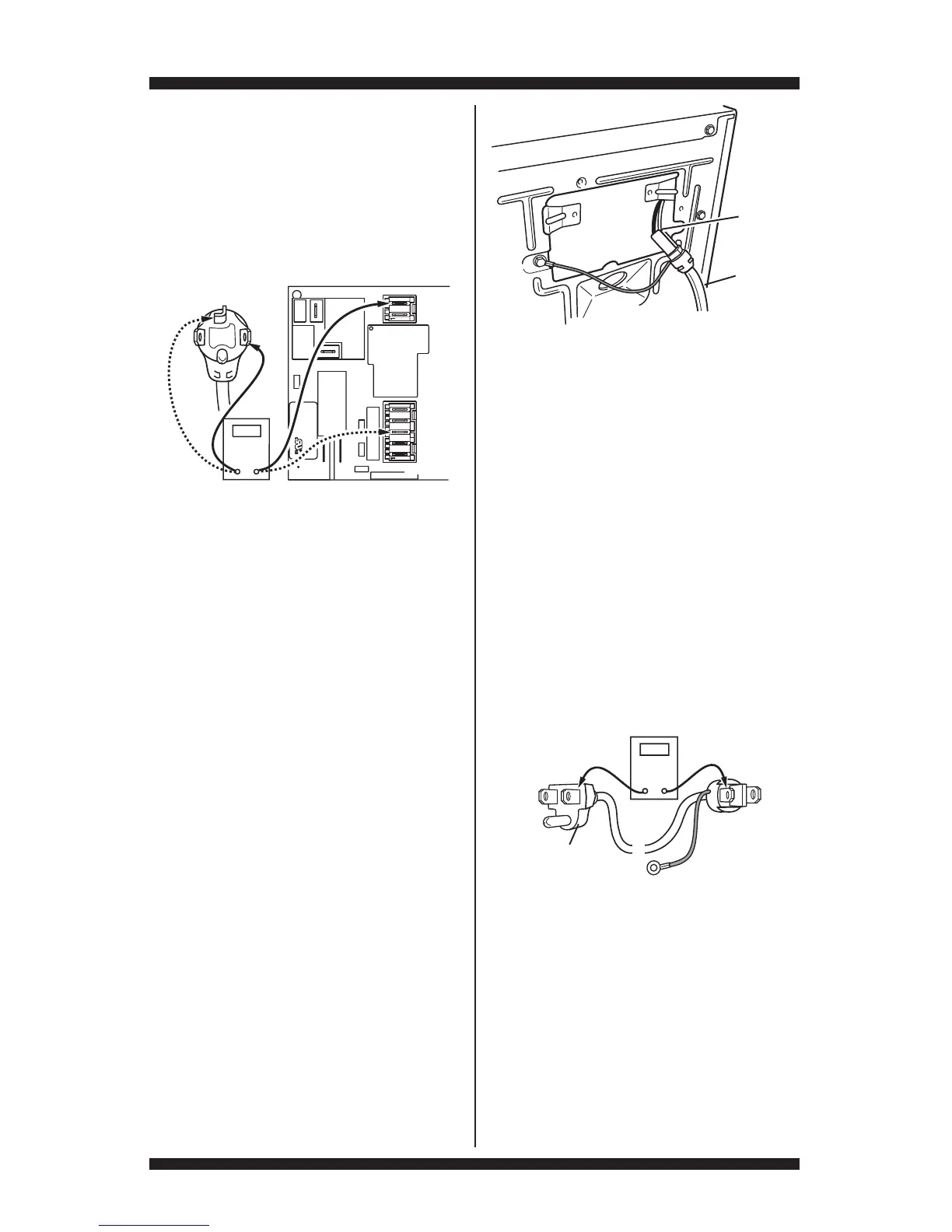
4. With an ohmmeter, check the continuity
from L1 and N plug terminals of the power
cord to the terminals for L1 and N on the
CCU. See figure 13b.
If continuity exists for both connections,
go to step 6.
If an open circuit is found, check the integrity
of the connections of the power cord to the
harness in the dryer; harness to the CCU;
and the integrity of the power cord itself.
5. If it is necessary to replace the power
cord, remove the retaining clip that secures
the cord to the back panel. Disconnect the
cord from the main harness and the ground
wire from the rear panel, then pull out the
power cord.
6. Visually check that ALL connectors are
fully inserted into the CCU.
7. Visually check that ALL connectors are
fully inserted into the UI.
8. Reassemble all parts and panels.
9. Plug in dryer or reconnect power.
10. Perform the “Quick Diagnostic Test”
through Service Diagnostics to verify repair.
GAS DRYER (U.S. and Canadian Installations):
1. Unplug dryer or disconnect power.
2. Remove the cover plate from the top right
corner of the back of the dryer. See figure 12.
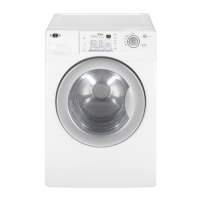
3. Check that the power cord is firmly
connected to the dryer’s wire harness.
See figure 14.
P9
1
5
1
P/N XXXXXX Rev X
Date Code YDDD-xx
XXXX-XXX
MADE IN COO
L1
COM
P8
L1
N
Neu
N
Neu
Power Cord
Plug
CCU
Figure 13b - Plug-to-terminal connections
for electric dryer.
4. Access the machine electronics without
disconnecting any wiring to the CCU (See Dryer
Disassembly Instructions, page 24).
5. With an ohmmeter, check for continuity
between the neutral (N) terminal of the plug and
P8-3 (white wire) on the CCU. The left-hand
side of figure 15 shows the position of the
neutral terminal (N) on the power cord plug.
Also see figure 11, page 9.
If there is continuity, go to step 6.
If there is no continuity, disconnect the
white wire of the main harness from the
power cord at the location illustrated in
figure 14. Test the continuity of the power
cord neutral wire as illustrated in figure 15.
If an open circuit is found, replace the
power cord. Otherwise, go to step 6.
6. In a similar way, check for continuity
between the L1 terminal of the plug and P9-2
(black wire) on the CCU.
If there is continuity, go to step 7.
If there is no continuity, check the continuity
of the power cord in a similar way to that
illustrated in figure 15, but for power cord’s
L1 wire.
If an open circuit is found, replace the power
cord. Otherwise, replace the main harness.
COM
Neu
G
L1
L1
Masse
N
Neu
N
G
Masse
Figure 14 - Power cord-to-wire harness
connection for gas dryer.
Figure 15 - Power cord terminals, gas dryer.
Power Cord
Plug
Power
Cord
Wire
Harness



 To Next Page