PAGE 5
FOR SERVICE TECHNICIAN’S USE ONLY
DO NOT REMOVE OR DESTROY
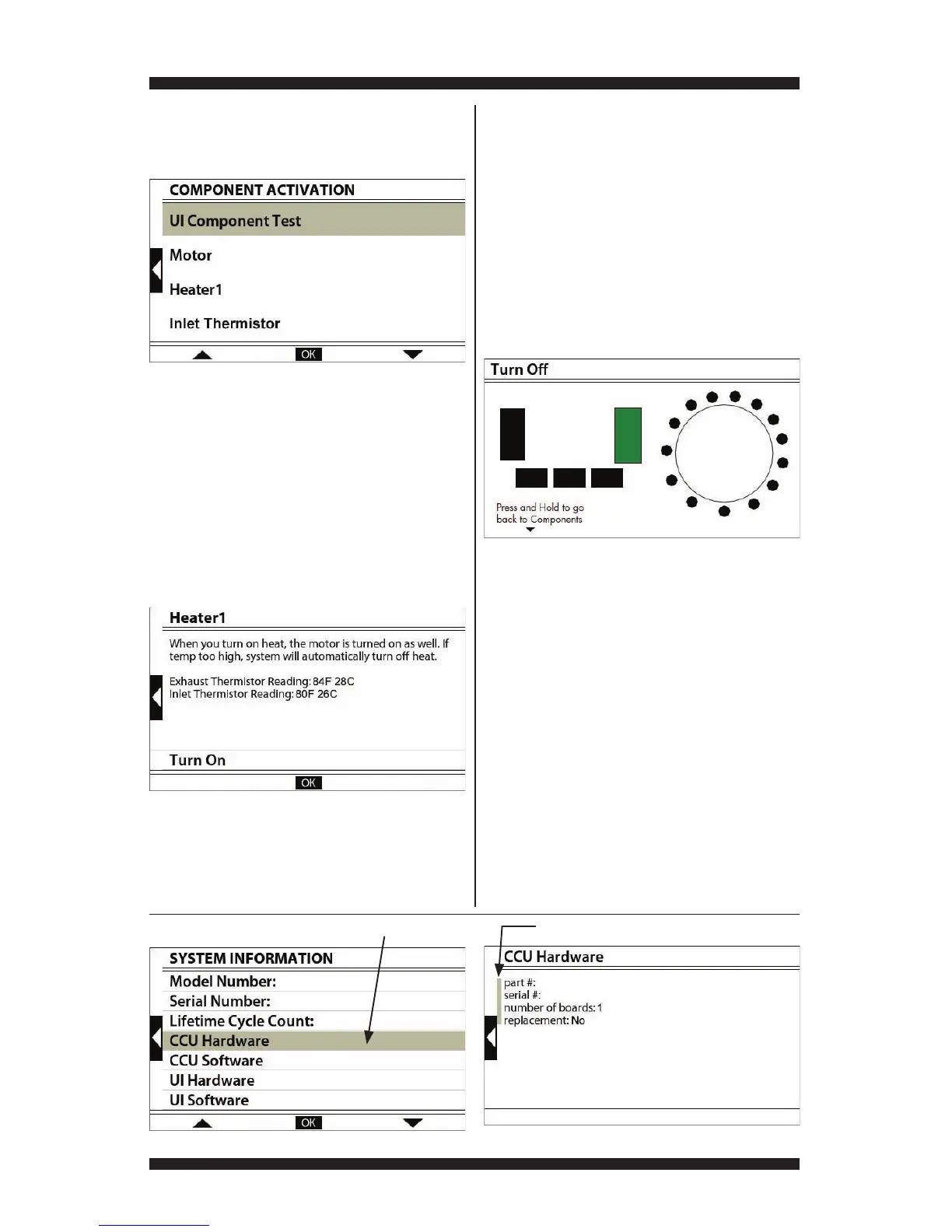
COMPONENT ACTIVATION
Activation and functional testing of system
components and sensors (see figure 6).
• Component Activation – When a
component is selected from the
Component Activation menu (see figure
6), a screen appears providing component
information, and if available, attributes
related to the component (see figure
7). Many of the components listed can
be turned on and off. By default, the
component is off. (See Component
Activation chart on page 6.)
Figure 6 - Component Activation Menu
Figure 7 - Component Screen
UI Component Test – Upon activation, all LEDs
are turned on. Pressing each button turns off its
LED. Pressing the ATM buttons and rotating the
cycle selector knob changes their on-screen
representations from black to green (see figure
8). Press and hold the lower-left ATM button
to return to previous screen.
If button indicators do not turn off, or their
on-screen representations do not change
after pressing buttons or rotating the
cycle selector knob, go to TEST #6:
User Interface, page 19.
SYSTEM INFO
Displays model and serial number, hardware
information, and other system variables.
NOTE: Missing system information does not
indicate a problem. The system information
screens are common across various washer
and dryer platforms; therefore, information
provided on one dryer may not be available
on another. If uncertain about the information,
check with technical support.
NOTE: All non-selectable items will display a
short gray highlight preceding the selection;
however, as the highlight of the screen moves
over items with more information, it displays
regular background length (see figures 9 & 10).
Non-selectable itemsItems with more information
Figure 9 - System Information Screen Figure 10 - Hardware Information Details
Figure 8 - UI Component Test



 To Next Page