PAGE 7
FOR SERVICE TECHNICIAN’S USE ONLY
DO NOT REMOVE OR DESTROY
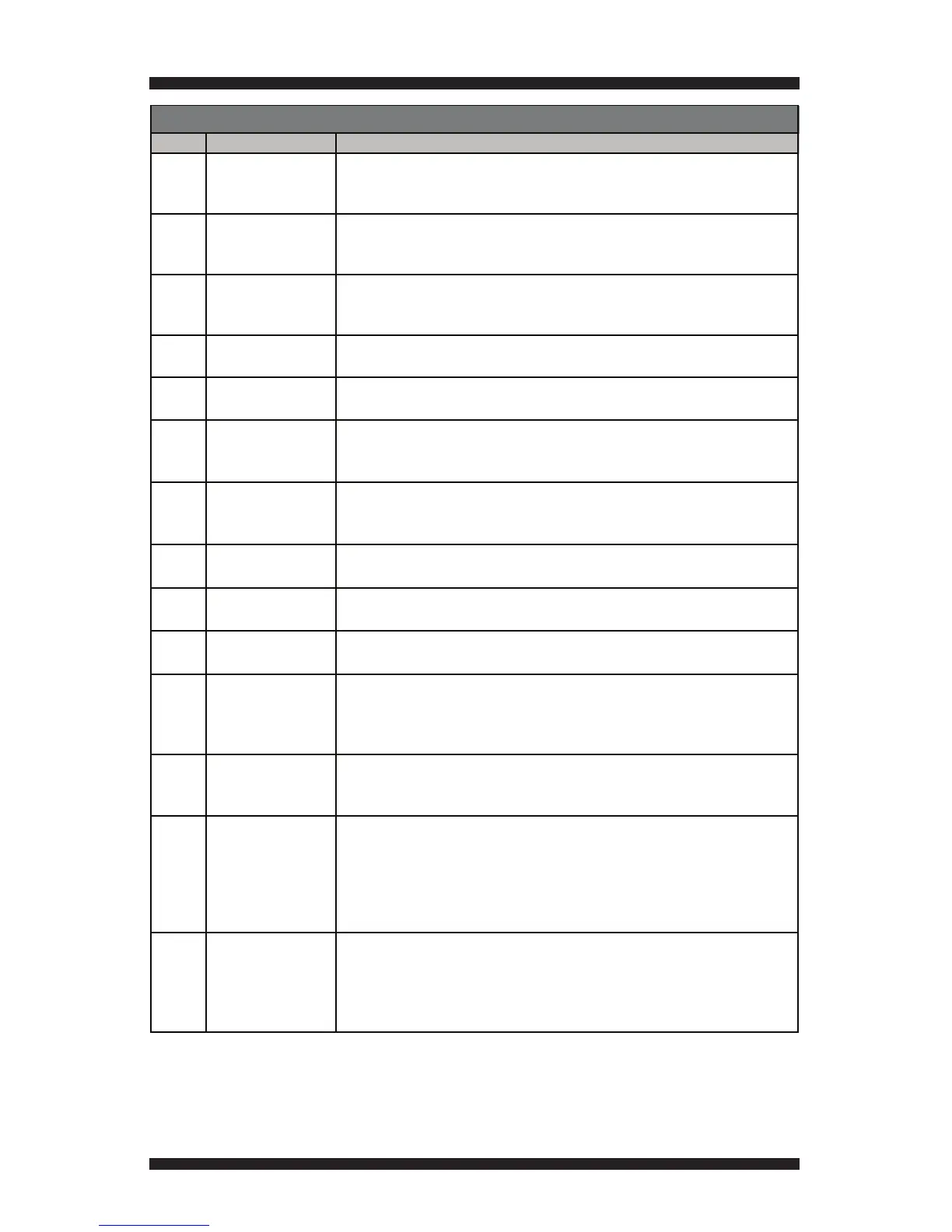
Code Description Explanation and Recommended Procedure
F1E1 Cycle Control Unit
(CCU) Problem
Indicates a CCU problem.
• Verify all connections to and from the CCU.
• See TEST #1: CCU Power Check, page 9.
F2E1 User Interface (UI)
Problem (stuck button)
Indicates a stuck button (depressed for over 20 seconds) or UI mismatch. This fault code
will ONLY appear when in the service diagnostic mode. See TEST #6: User Interface,
page 19.
F2E2 User Interface
Software Error
Appears if UI cannot read EEPROM software from UI.
• Verify all connections between CCU and UI.
• Replace the UI.
F3E1 Exhaust Thermistor
Open
Indicates that the exhaust thermistor is open. Temperature drops below 18 °F
(> 50k ohms). See TEST #4a: Thermistors, page 15.
F3E2 Exhaust Thermistor
Shorted
Indicates that the exhaust thermistor has shorted. Temperature above 250 °F
(< 500 ohms). See TEST #4a: Thermistors, page 15.
F3E3 Inlet Thermistor Open Indicates that the Inlet Thermistor is open. Temperature drops below 18 °F
(> 245k ohms). This fault code will ONLY appear when in the service diagnostic mode.
See TEST #4a: Thermistors, page 15.
F3E4 Inlet Thermistor
Shorted
Indicates that the Inlet Thermistor is shorted. Temperature above 760 °F (< 20 ohms).
This fault code will ONLY appear when in the service diagnostic mode. See TEST #4a:
Thermistors, page 15.
F3E5 Inlet and Exhaust
Thermistor Open
Indicates that the Inlet and Exhaust Thermistor are open. Will occur if the P14 connector
is not plugged into the CCU.
F3E6 Moisture Sensor Open Indicates the moisture sensor strip is open. This fault code will ONLY appear when
in the service diagnostic mode. See TEST #5: Moisture Sensor, page 18.
F3E7 Moisture Sensor
Shorted
Indicates that the moisture sensor strip has shorted. This fault code will ONLY appear
when in the service diagnostic mode. See TEST #5: Moisture Sensor, page 18.
F4E1 Heater Relay or
Connector Problem
Indicates no voltage detected at the heater relay. This fault code will ONLY appear
when in the service diagnostic mode.
• Unplug dryer or disconnect power and check that the wires are plugged into the
heater element and the relay on the CCU.
F4E3 Restricted Air Flow Indicates low air flow that may affect dryer performance.
• Confirm airflow system is not blocked, check lint screen, exhaust duct, exhaust fan.
• See TEST #4a: Thermistors, page 15.
F4E4 L2 Line Voltage Error L2 indicates low L2 voltage (less than 30 V) is detected at the CCU.
• Check to see if a household fuse has blown or a circuit breaker has tripped.
• Confirm the power cord is properly installed and plugged into the power outlet.
• Check the relay connections on the CCU.
• Gas Models Only: Check the P14 connection on the CCU. (Harness loopback
F6E1
F6E2
Communication Error
UI to CCU
Communication Error
CCU to UI
Communication between the CCU and UI has not been detected.
• Check the harness continuity and connections between the CCU and UI.
• Check AC and DC supplies. See TEST #1: CCU Power Check, page 9.
• Replace the User Interface.
• Replace the CCU.
SERVICE FAULT/ERROR CODES
on pins 4 & 5)



 To Next Page