1
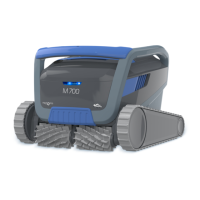
M700
Robotic Pool Cleaner
User Instructions
EN
Contents
1. INTRODUCTION ......................................................................................................................................................2
2. SPECIFICATIONS .....................................................................................................................................................2
3. WARNINGS AND CAUTIONS ..............................................................................................................................2
3.1 Water conditions ...........................................................................................................................................3
4. ROBOTIC POOL CLEANER PARTS
...................................................................................................................
4
5. USING THE ROBOTIC POOL CLEANER ............................................................................................................5
5.1 Setup ..................................................................................................................................................................5
5.2 Placing the Robotic Pool Cleaner into the pool
............................................................................
6
5.3 Plug in the power supply
.......................................................................................................................
6
5.4 Operating the Robotic Pool Cleaner without using your smart device ...............................7
5.5 Using the power supply ............................................................................................................................7
5.6 Robotic Pool Cleaner indicator lights ..................................................................................................7
5.7
Removing the Robotic Pool Cleaner from the pool
......................................................................
8
6. CARE AND MAINTENANCE
..............................................................................................................................
9
6.1
Cleaning after use - Removing and cleaning the dual filter baske
t ............................................9
6.2
Periodic filter cleaning
.............................................................................................................................10
6.3
Cleaning the impeller
............................................................................................................................................
11
6.4
Periodic general maintenance - Recommended at least once a week
....................................
12
7. OFFSEASON STORAGE
..............................................................................................................................................
12
8. HOW TO USE THE REMOTE CONTROL
................................................................................................................
13
8.1
Getting Started with the Remote Control ................................................................................................
13
8.2
Automatic Mode
...................................................................................................................................................
14
8.3
Manual Drive Mode
.............................................................................................................................................
14
9. USE THE
MyDolphin™ Plus
IOT MOBILE APP
.................................................................................................
15
9.1
Getting Started with the MyDolphin™ Plus App ...................................................................................
15
9.2
Prepare the Robotic
Pool Cleaner for Connection ............................................................................
15
9.3
Activate the Robotic Pool Cleaner Using your Mobile Smart Device
........................................
15
9.4
LED Lights
.................................................................................................................................................................
16
10. ADVANCED FEATURES
.............................................................................................................................................
17
11. TROUBLESHOOTING
.....................................................................................................................................................
18
12.
MyDolphin™ Plus
App - TROUBLESHOOTING
................................................................................................
20






 To Next Page