14
Skimmi Robotic Pool Skimmer | User Instructions
Dolphin Skimmi User Manual
TROUBLESHOOTING
Symptom Possible reason Corrective action
Robot is placed in
a sunny location,
but the charging
power is zero or
very low.
• Battery is fully charged.
• Processor is testing the battery.
• Surface of the solar panel is dirty.
• High battery temperature.
• Faulty battery or faulty solar panel.
• This is normal when the battery is full – so that the robot
runs on solar power instead of battery. When the sunlight
becomes weaker, the battery will start to power the robot
again and will continue charging.
• Normal operating condition, charging resumes within a few
seconds.
• Clean the panel with a damp cloth or wash the surface with
a stream of water.
• Move the robot to a cooler place or leave it in the pool. Once
the battery temperature drops the recharge will resume
immediately.
• If none of the above solutions helped, contact Customer
Care to locate your nearest Maytronics certified service
station: wecare@maytronics.com
Solar panel
is covered
by plaque
(limescale).
• Your local water has a high level of
calcium (hardwater). Calcium is deposited
on surfaces and accumulates into plaque.
• Clean gently with lemon juice or diluted citric acid or vinegar.
• Prevent future buildup by rinsing less frequently or towel
drying. Also, you can balance your pool’s pH with a water
test strip and adding pool-grade acid accordingly.
Robot pushes
against the edge
of an infinity
pool.
• In the “Smart Detect” setting, the
underwater sensor sensitivity is set to
“Cloudy” or “Murky” causing it to get too
close to the edge.
• If the pool water is clear, change the "Water Clarity" setting
to “Clear” or “Crystal Clear”.
• If the pool is “Natural” and has cloudy water due to algae or
silt, set the “Pool Type” setting to “Natural”. Then the robot
will reverse when approaching a wall, instead of turning.
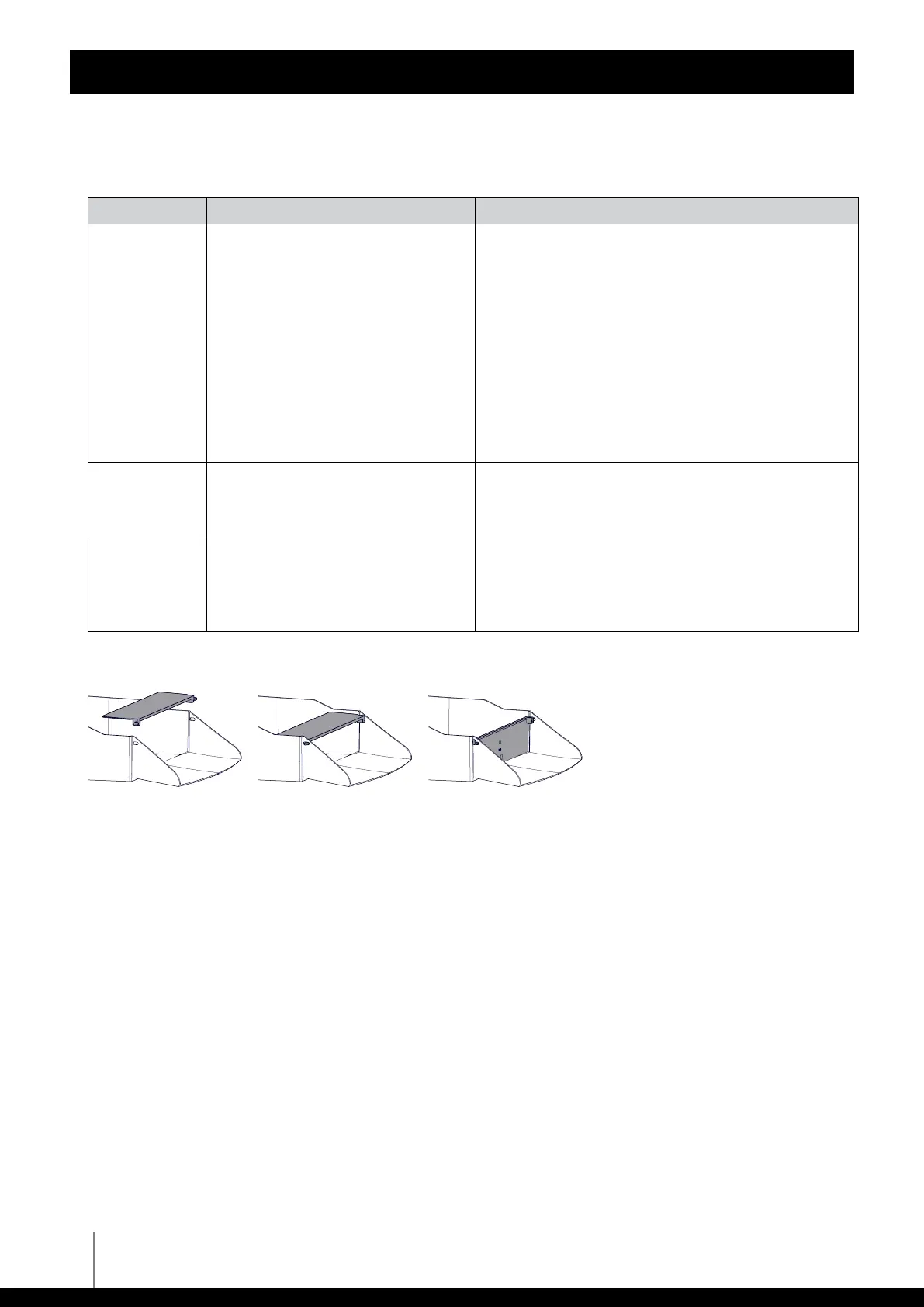
Replacing the non-return flap if it comes o the filter tray.
If none of these solutions solve your problem, contact Maytronics Customer Care:
North America
1-888-365-7446 ext. 1002
customersupport@maytronicsus.com
Rest of the world / Maytronics HQ
00 800 69694141 (toll free number)
00 972 77 96 14 204 (international call)
wecare@maytronics.com
For full information and additional troubleshooting please visit us at:
www.maytronics.com
8159220-WEB










 To Previous Page