NOTE
The system cannot be activated
when any door or the liftgate is
open.
How to Deactivate the System
Unlock the driver's door or start the
engine.
NOTE
If the power supply is interrupted (fuse
blows or the battery is disconnected),
the system can only be deactivated by
unlocking a door with the auxiliary key.
▼
Locking, Unlocking with Touch
Sensor, Door Handle (With the
advanced keyless function)
By touching the sensing area of the
touch sensor, various locking/
unlocking operations can be done
without taking the key out of a bag or
pocket.
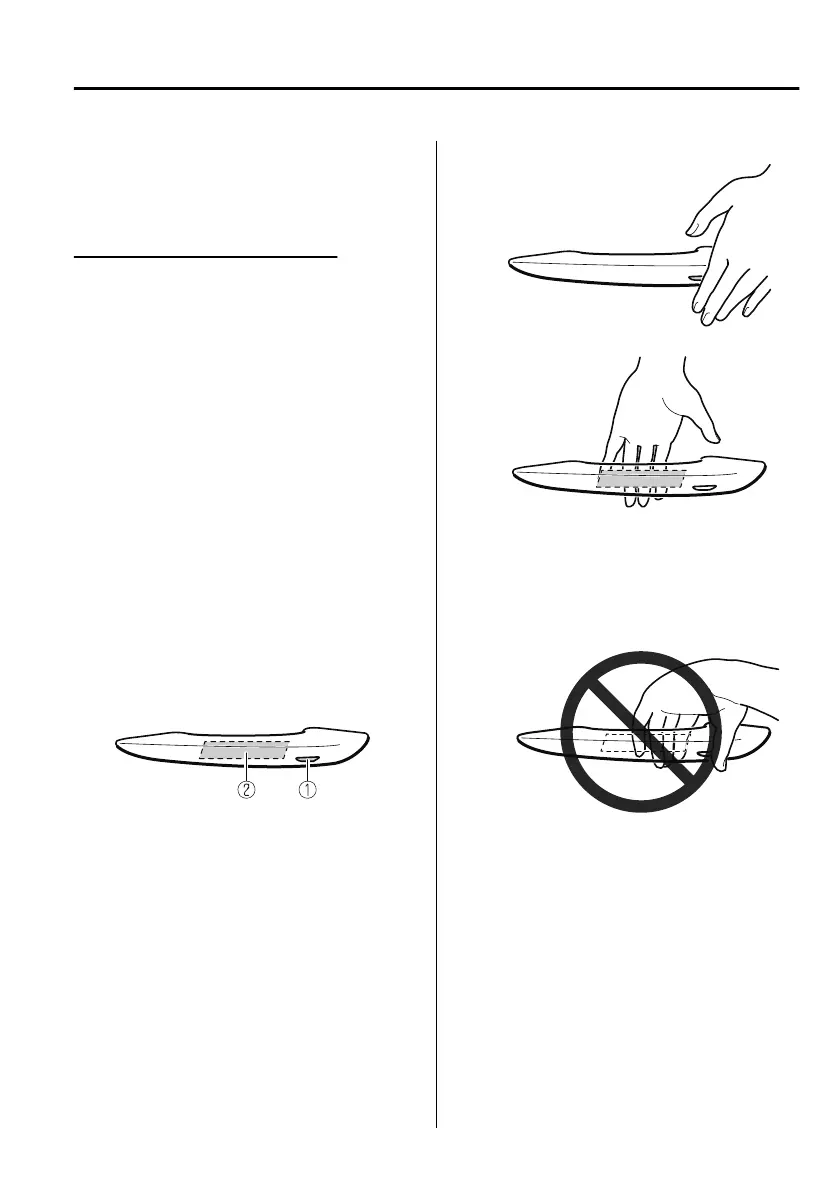
There are two types of touch sensors
used for locking and unlocking, and
each sensor is built into the outer door
handle on the driver and front
passenger's doors.
1. Sensing area of door lock touch
sensor (Depression on outer side of
door handle)
2. Sensing area of door release touch
sensor (Inner side of door handle)
NOTE
When locking/unlocking with the
transmitter carried, securely touch
the sensing area of the touch sensor
as follows.
Locking
Unlocking
The system may not operate normally
under the following conditions.
You touch the sensing area of the
door lock touch sensor and the
sensing area of the door release
touch sensor at the same time.
You touch the sensing area of the
touch sensor while wearing gloves.
Foreign matter such as snow or dirt
is stuck on the sensing area of the
touch sensor.
You pull the door handle just after
touching the sensing area of the
touch sensor.
The system may operate if the outer
side door handle of a front door is
splashed with water by a car wash or
rain while the transmitter is in the
operation range.
Before Driving
Doors and Locks
3-15
Mazda3_8HS5-EE19I_Edition1_new 2019-7-1 10:56:36



 To Next Page