▼
Driving Position Memory (Power
Seat)
*
The desired driving position can be
called up after programming the
position.
The following driving positions can be
programmed.
Driver’s seat position (seat slide,
height adjustment, front edge of seat
bottom, seat recline)
Refer to Adjusting the Driver's Seat
on page 2-5.
Active driving display (display
position, brightness level, display
information)
Refer to Active Driving Display on
page 4-42.
Outside mirror angle
Refer to Outside Mirrors on page
3-36.
A driving position can be programmed
to the following parts.
Position memory button
Transmitter used for vehicle
NOTE
Lumbar support adjustment cannot
be programmed.
Programming
1. Make sure the parking brake is on.
2. (Automatic transmission)
Make sure the selector lever is in
the P position.
3. Switch the ignition ON.
4. Adjust the following parts to the
desired conditions.
Driver's seat
Active driving display
Outside mirrors
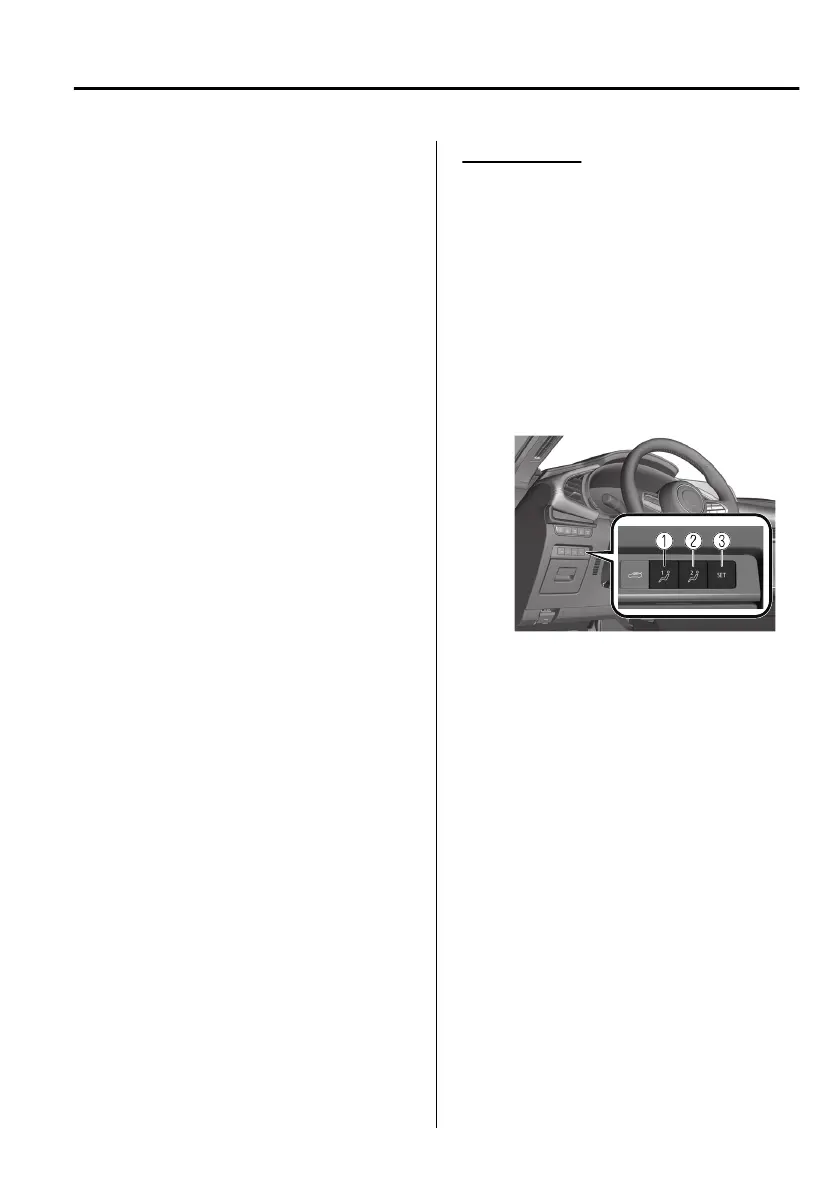
5. Press the SET button continuously
until a sound is activated.
1. 1 button
2. 2 button
3. SET button
6. Do the following operation within 5
seconds after the sound is activated
to programme the driving position.
Programming to a position
memory button
Press the button you want to
programme, either 1 or 2 button.
Programming to the transmitter
Press the unlock button on the
transmitter.
A sound is activated when the
operation is completed correctly.
NOTE
If you do not perform the operation
correctly, a sound indicating that the
programming has failed is activated.
Essential Safety Equipment
Seats
*Some models.
2-11
Mazda3_8HS5-EE19I_Edition1_new 2019-7-1 10:56:36



 To Next Page