Display/Icon Content
(3) Vehicle front end guide lines (blue) Indicates the point about 0.25 m (9.84 in) from the front
edge of the vehicle (front edge of the bumper).
NOTE
The setting can be changed so that the projected vehicle path lines are not
displayed.
Refer to the Settings section in the Mazda Connect Owner's Manual.
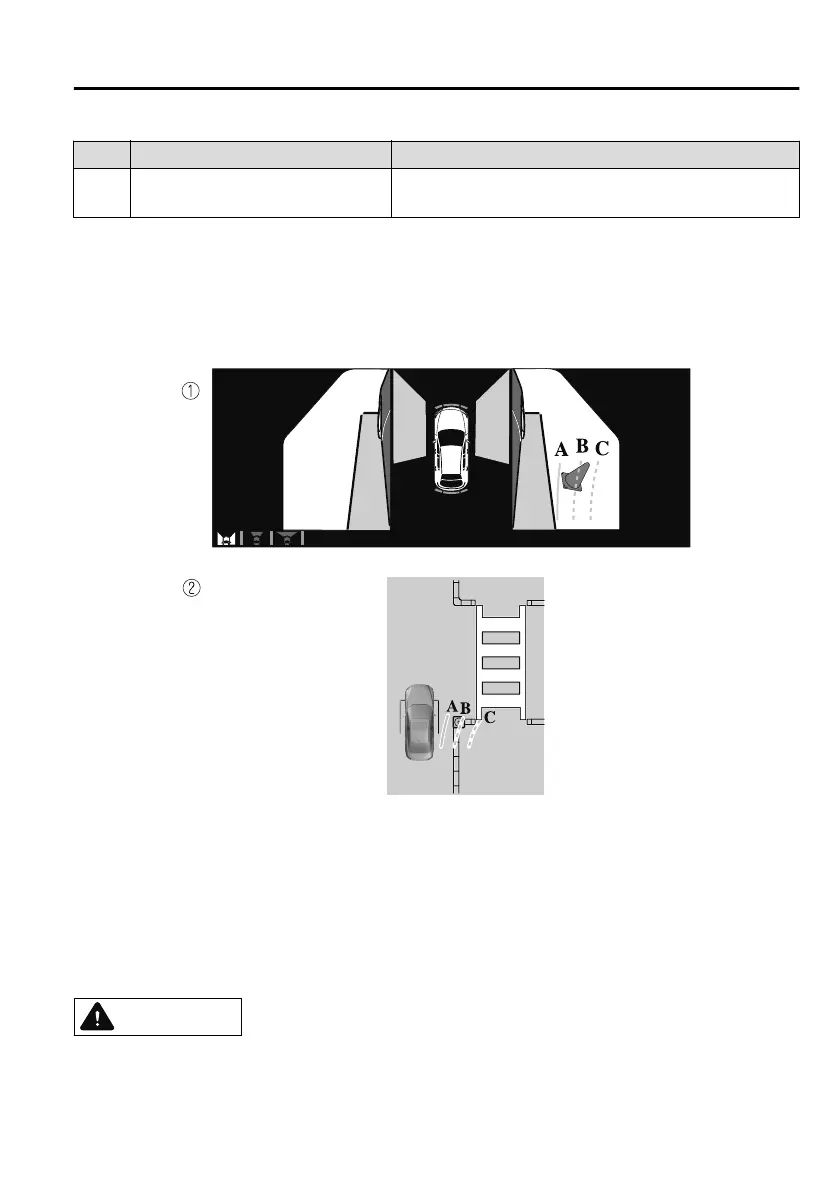
How to use the projected vehicle path line function
1. (Screen display)
2. (Actual condition)
Make sure that there are no obstructions within the projected vehicle path lines.
Turn the steering wheel so that the projected vehicle path lines travel inside of the
obstruction (A), and drive the vehicle forward until it passes the obstruction.
If the projected vehicle path lines are on an obstruction (B) or outside of the
obstruction (C), the vehicle may contact the obstruction when turning the vehicle
sharply.
CAUTION
The parking sensor detection range has limitations. For example, obstructions
closing in from the side and objects short in height may not be detected. Always
confirm the safety around the vehicle visually when driving.
When Driving
i-ACTIVSENSE
4-215
Mazda3_8HS5-EE19I_Edition1_new 2019-7-1 10:56:36



 To Next Page