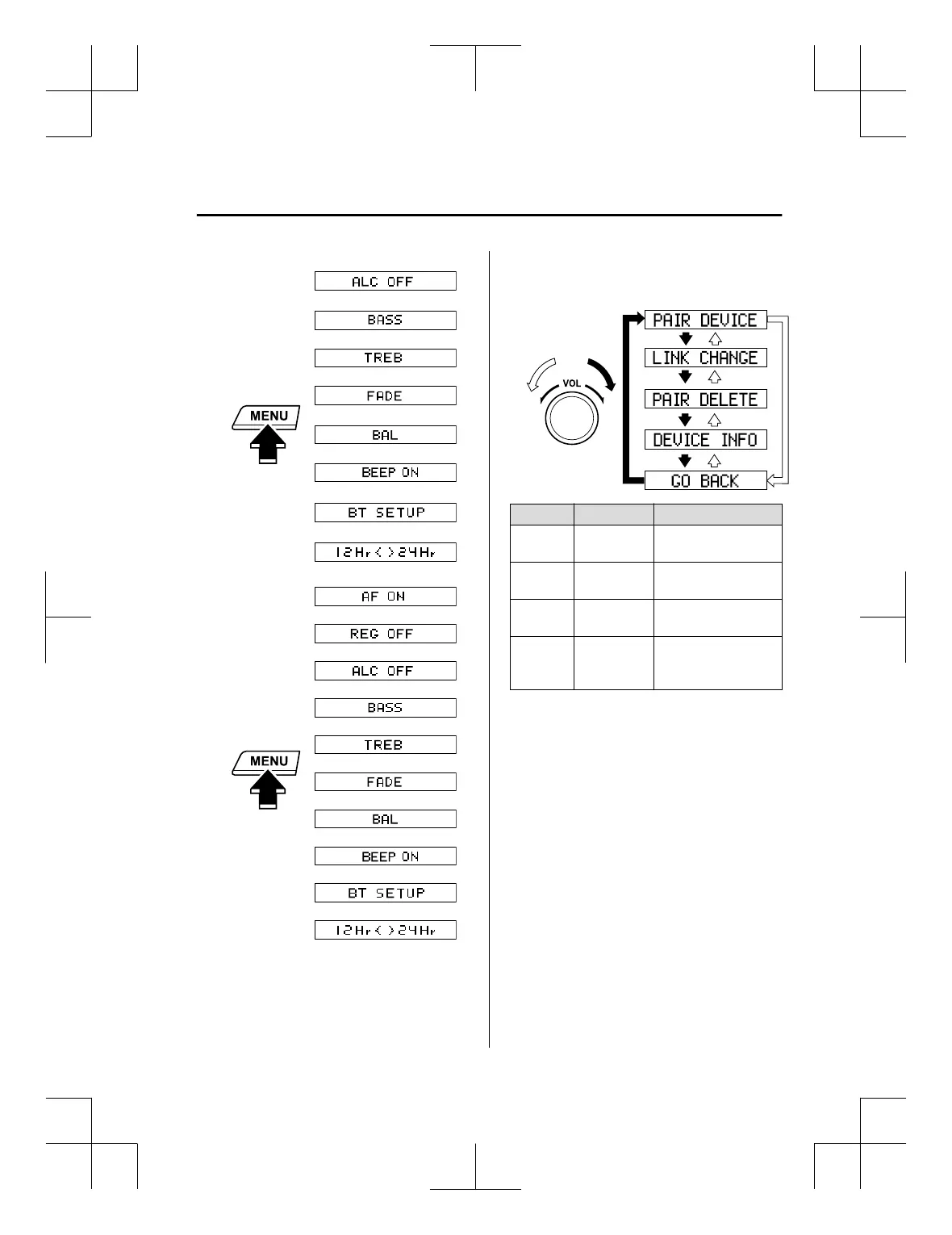
Without Radio Data System (RDS)
*
*
With Radio Data System (RDS)
*
*
*
*
* Depending on the mode selected, the
indication changes.
2. Turn the audio control dial and select a
desired mode.
Display Mode Function
PAIR DE‐
VICE
Pairing mode
Bluetooth
®
audio de‐
vice pairing
LINK
CHANGE
Link change
mode
Changing link to Blue‐
tooth
®
audio device
PAIR DE‐
LETE
Pairing dele‐
tion mode
Deleting link to Blue‐
tooth
®
audio device
DEVICE
INFO
Device infor‐
mation dis‐
play mode
Displaying vehicle's
Bluetooth
®
unit infor‐
mation
3. Press the audio control dial to
determine the mode.
▼
Bluetooth
®
audio device pairing
(Bluetooth
®
Audio)
Any Bluetooth
®
audio device must be
paired to the vehicle's Bluetooth
®
unit
before it can be listened to over the
vehicle's speakers.
A maximum of seven devices including
Bluetooth
®
audio devices and hands-free
mobile phones can be paired to one
vehicle.
Interior Features
Audio Set [Type A (non-touchscreen)]
5-47
CX-3_8GT4-EE-18D_Edition8_old 2019-11-14 12:53:52



 To Next Page