130
Before
Use
Getting
started
Routing
Address
Book
Voice
Recognition
Navigation
Set Up
RDM-TMC
Bluetooth Hands-Free
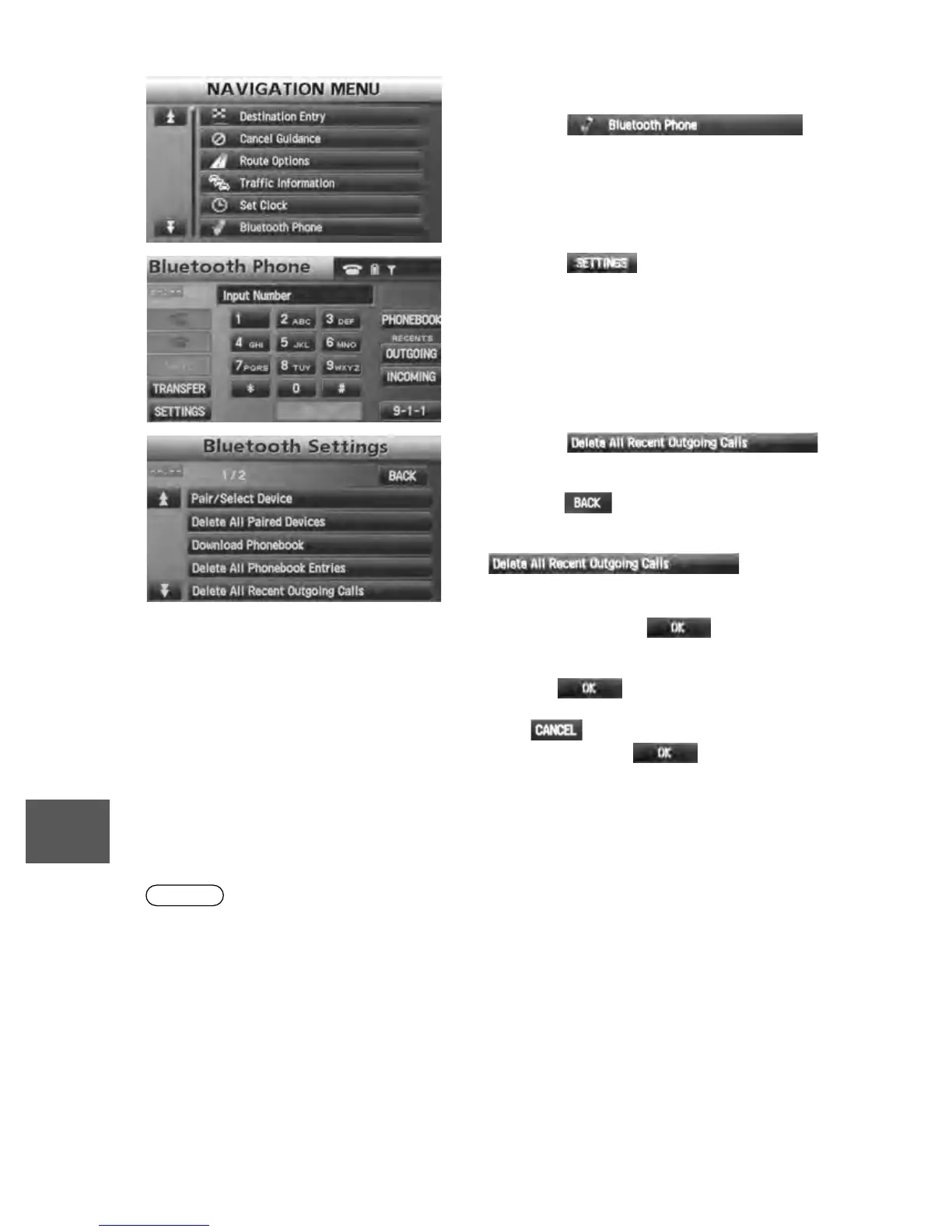
n Deleting all outgoing call records
Note
lPark your vehicle before attempting to delete the outgoing call records.
1. Press the MENU button.
2. The NAVIGATION MENU screen is displayed.
Press the on-
screen button to switch to the Bluetooth
Phone screen.
3. Press the on-screen button to
switch to the Bluetooth Setting screen.
4. Press the
on-screen button to switch to the delete
confirmation screen.
• Press the on-screen button to return to
the Bluetooth Phone screen.
• If there is no outgoing call record, the
on-screen
button cannot be pressed.
5. “Delete all recent outgoing calls?” is
displayed. Press the on-screen
button to start deleting.
• The deleting operation cannot be canceled
once the on-screen button is
pressed.
• If the on-screen button is pressed
before pressing the on-screen button,
the message is cleared and the system
returns to the Bluetooth Setting screen.
6. “Deleting all recent outgoing calls.” is
displayed. The message disappears when the
deletion ends.


 To Next Page
 Loading...





