SimStep Manual - 3400 Iss. D 7
th
June 2004 page 19
7 Manual Operation Using the Jog Box or Joystick
The SimStep controller can be operated in manual mode by means of either a jog box or
joystick. These devices should be connected to the
Jog
connectors on the rear of the unit.
7.1 Jog Boxes - JC Series
JC Series Jog boxes provide a convenient way to manually control motor control systems.
Three models, the JC100 single-axis, the JC200 dual axis and the JC809 multi-axis are
available and provide the following manual control functions:
• Bi-directional single step (jog) function by momentary depression of ‘+’ or ‘-’ buttons.
• Slow speed continuous operation in desired direction by the depression and holding of
the ‘+’ or ‘-’ buttons. The speed of movement can be programmed using SJ command
into the SimStep during commissioning.
• Fast speed, continuous operation in desired direction by depressing & holding the ‘F’
button together with either the ‘+ or ‘- button. The fast positioning rates are can also be
programmed using SF command into the SimStep during commissioning.
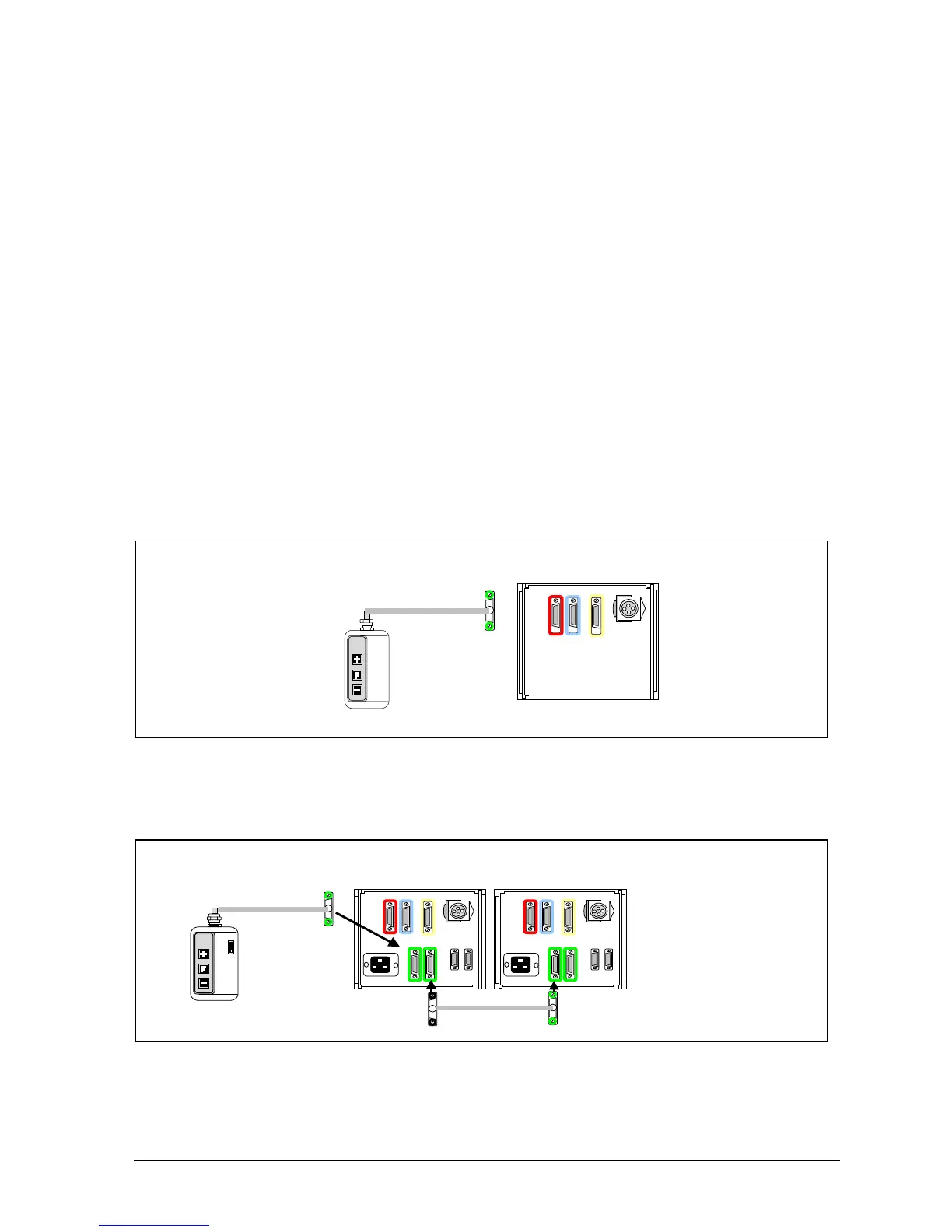
Figures 7.1 to 7.3 show the connections of the JC series Jog Boxes to the SimStep.
For single axis drives specify JC100 Jog box and connect it to the green ‘D’ connector on
the SimStep as shown in fig 7.1.
Fig. 7.1 Single axis installations
For dual axis drives specify JC200 Jog box and connect it to the green ‘D’ connector on
the SimStep as shown in fig 7.2.
Fig. 7.2 Dual axis installations
Sim-Step
SINGLE
AXIS
JOG BOX
JC100
JC200
Use jog link cable 507JDC05916
AXIS
DUAL
AXIS
JOG
JC200
Note: Jog link cable is handed, identified by
the colour of the screw heads as shown
1
2


 To Next Page