SimStep Manual - 3400 Iss. D 7
th
June 2004 page 20
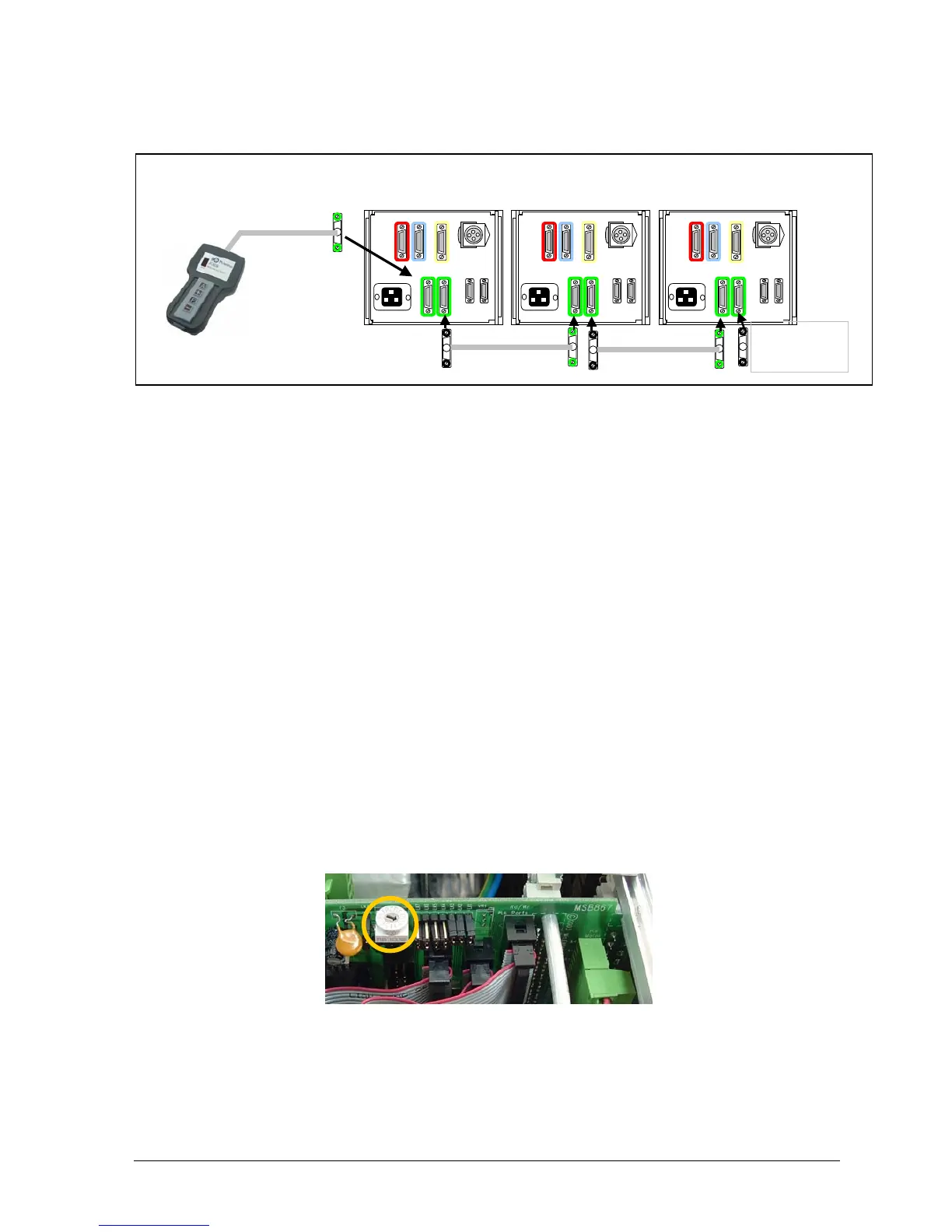
For 3-15 axes drives specify JC809 Jog Box and connect it to the green ‘D’ connector on
the SimStep as shown in fig. 7.3.
Fig. 7.3 3-15 axis installations
7.2 Single and Dual Axis Jog Box Operation
Jog box operation is very straightforward. Once connected, the jog box will control the
motor as follows. Pressing either the + or – button causes the motor to move in the
positive or negative rotation direction. The speed of rotation is determined by the
Slow Jog (SJ command) speed that has been set in the PM600. Momentarily
pressing the + or – buttons causes the motor to move in single steps.
Pressing the F button together with either the + or – buttons causes the motor to move
at the Fast Jog (SF command) speed that has been programmed into the PM600 (see
pages 7-48 and 7-49 of the PM600 manual)
7.3 Multi-axis Jog Box Operation
The MSB867 interfaces between the JC809 Multi-axis Jog Box and the PM600.
It communicates to the JC809 via signals transferred over a RS485 link. The outputs
from the MSB867 connect to the PM600’s Jog inputs. Connecting the ‘Jog Daisy-
Chain’ lead between the JOG B connector on one system to the JOG A connector on
the next system allows further systems to be connected to the JC809.
A rotary switch on the MSB867 sets the axis address that is shown on the JC809. This
switch is accessible by removing the rear top cover of the unit. A setting of 0 will mean
that the axis cannot be controlled by the JC809. The default axis is 1 but any axis
between 1 and 15 can be selected. Note that axes 10, 11, 12, 13, 14 and 15 are
represented by the letters A, B, C, D, E and F respectively.
Fig. 7.4 Jog Axis Selector
JC809
Use jog link cables 507JDC05916
Fit terminator
Supplied with
JC809


 To Next Page