MEA INC
2600 American Lane | Elk Grove Village, IL 60007 | USA
T +1 847 766 9040 | F +1 847 350 1951
COMPLETE CONTROL
www.meaincorporated.com
MEA Incorporated | Hawk Actuator Instruction and Operation Manual
02/2018
25
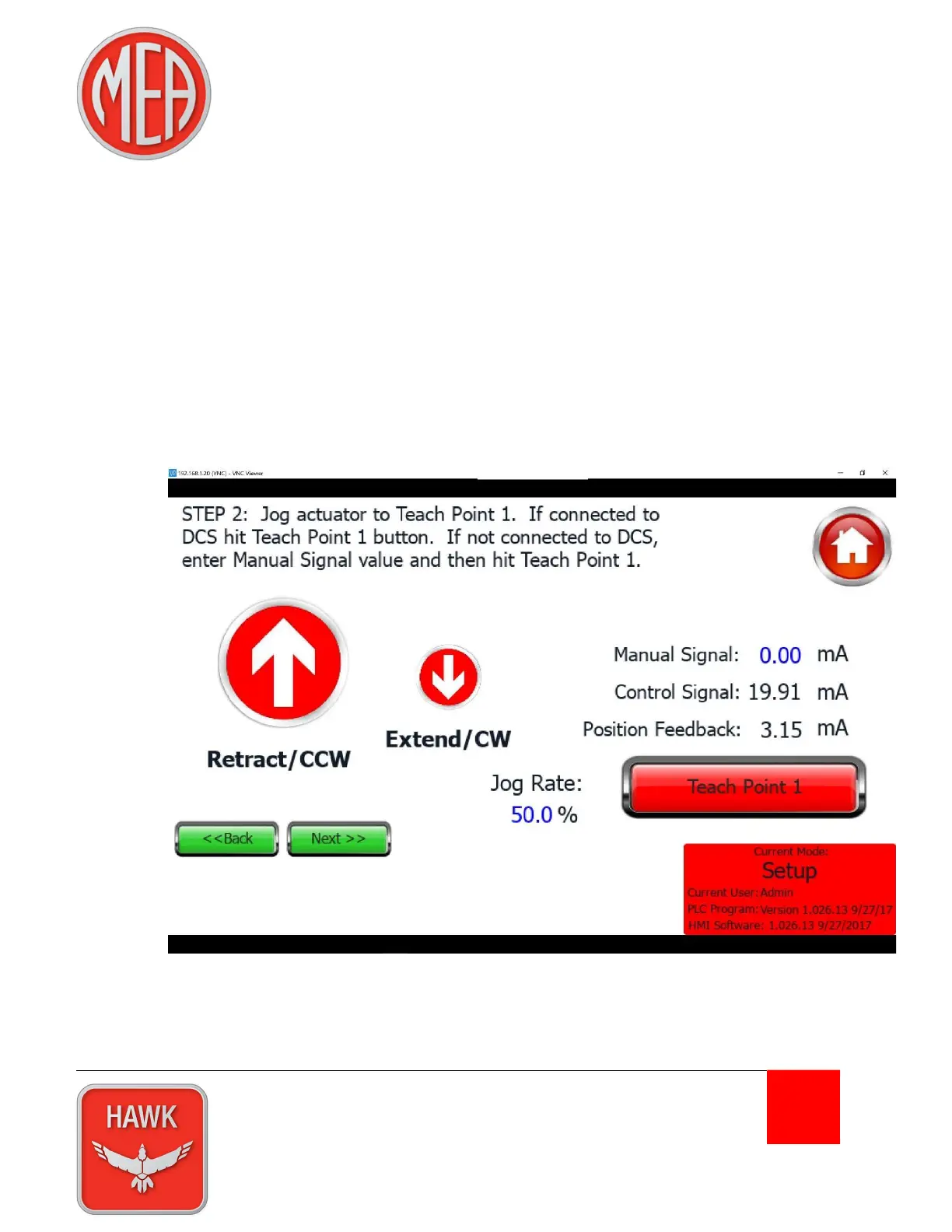
Alternatively, if a command signal is unavailable, the user can manually enter the appropriate
signal for this actuator position by pressing the blue 0.00 digits in the “Manual Signal” field on the
right of the screen.
Press the “Teach Point 1” button to calibrate the Retracted (or Counter-Clockwise) actuator
position. If successful a yellow “Teach Complete” box will appear in the upper right of the screen.
Press the “Next” button.
Note: It is possible that the Position Feedback display will not match the Control Signal (or
Manual Signal) display. That is normal. The Hawk controls will scale the input accordingly after
both calibration teach points are set.
7) Use the arrow buttons to move the actuator to the Extended (or Clockwise) endpoint. Change the
control signal to match the desired signal for this actuator position. (For example, if the actuator
was Retract on Increasing signal, set the control signal to 4 mA)


 To Next Page