EN
5
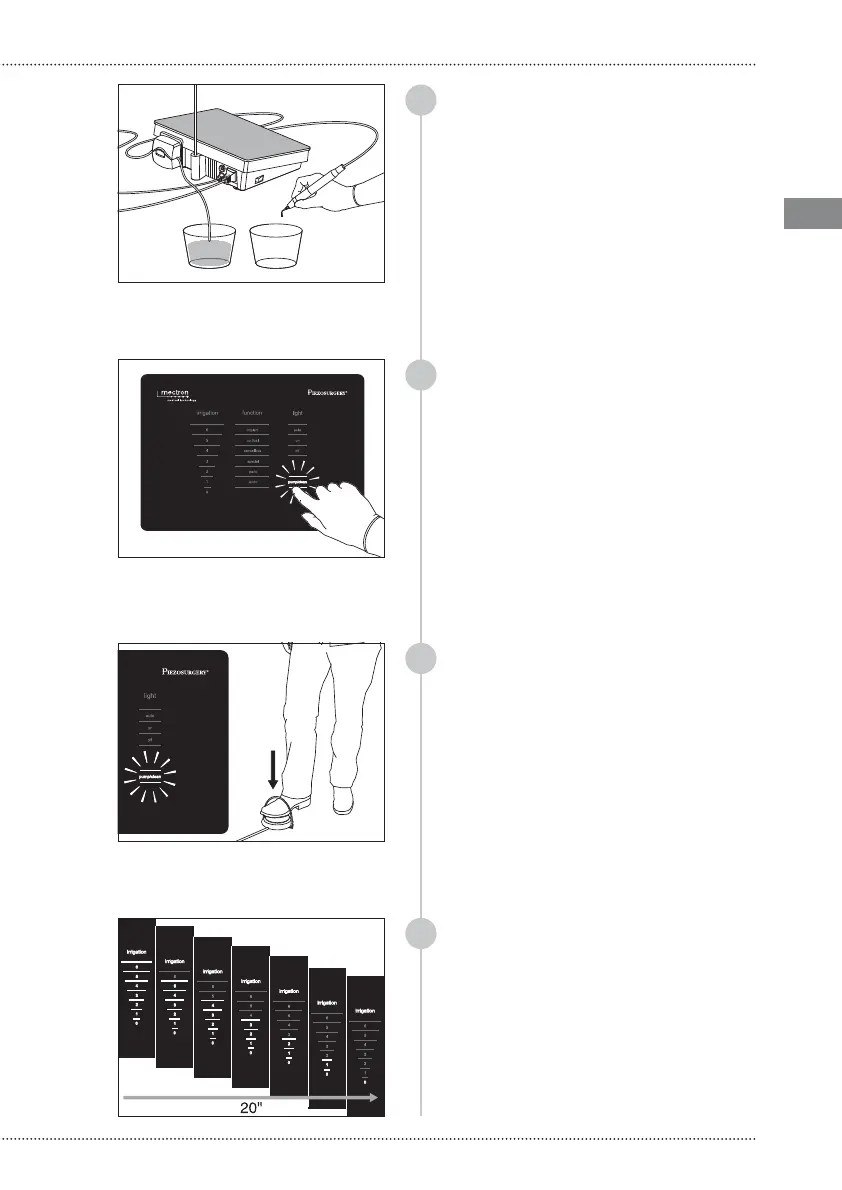
Position the handpiece, with or without
insert, above a container to contain the
liquid that will outflow during the cleaning
cycle;
To enter the cleaning mode, select PUMP/
CLEAN on the keyboard: all the other
selection options present on the display
are disabled, and the PUMP/CLEAN writing
flashes;
PLEASE NOTE You can exit the cleaning
mode by pressing on PUMP/CLEAN again
or, alternatively, by waiting for at least 15
seconds. The CLEAN function is disabled and
the keyboard is enabled again, and displays
the last setting used;
02
Û
CLEAN FUNCTION
As soon as the peristaltic pump starts, the
entire scale of values of the “irrigation”
section lights up and during the liquid
passage, the value of the irrigation shifts
from 6 a 0 . The cycle lasts 20 seconds. Once
it has ended, the keyboard is enabled again,
and displays the last setting used;
To make the CLEAN function start while the
PUMP/CLEAN writing is flashing, press the
foot pedal once and release it: PUMP/CLEAN
stops flashing and the cleaning cycle starts;
PLEASE NOTE The Clean function can be
interrupted at any time by pressing the
PUMP/CLEAN writing again or, alternatively,
by pressing on foot pedal. The keyboard is
enabled again, and displays the last setting
used;
6
5
7
8


 To Next Page