Song Playing Back
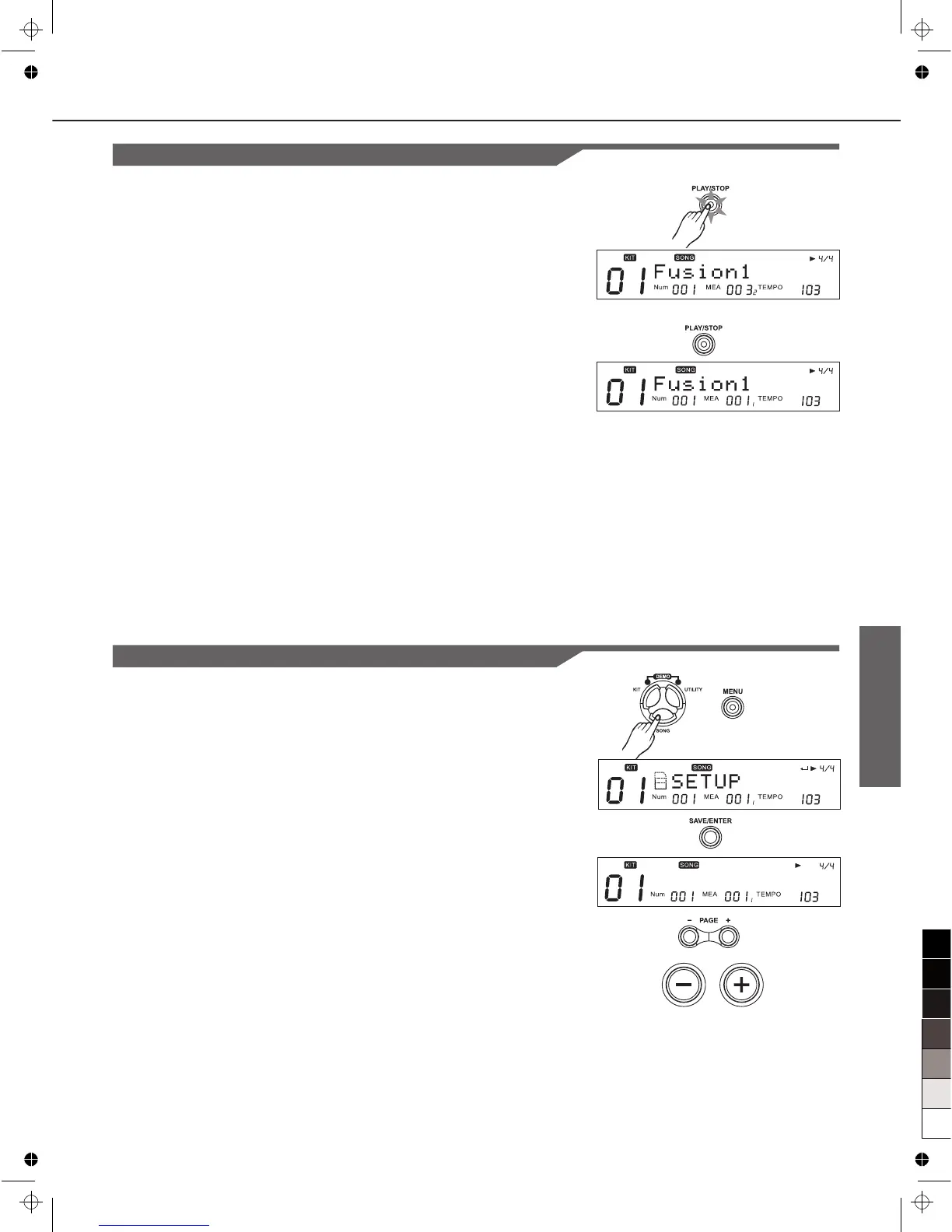
1. Press [PLAY/STOP], then [PLAY/STOP] lights.
(During playback of a song, you'll see the pads’ buttons
corresponding to the drums being played in the drum part
light up.)
2. Press [PLAY/STOP] again to stop playback of the song,
[PLAY/STOP] light goes out. And the song returns to the
beginning of the measure that was being played back.
Adjusting Song Acmp Volume
Adjust background volume of the song to balance the Kit
volume. (Refer to MIXER).
Temporarily Changing the Tempo
You can temporarily change the tempo of a song while playback
is in progress. The song returns to its preset tempo when a
different song is selected. (refer to Song Editing)
Song Selection
Song Editing
Song Setting
1. Press [SONG], then [MENU], "SETUP" will appear.
2. Press [SAVE/ENTER].
3. Press [PAGE+] / [PAGE-] to select the parameter.
4. Press [+]/[-] or use the DIAL to make the setting.
Note:
The parameters of Pre Count, Kit Link, Tap Sync are global
settings, which can not be saved to a user song.
19
T e m p o : 1 0 3



 To Next Page