1. Enter the function menu.
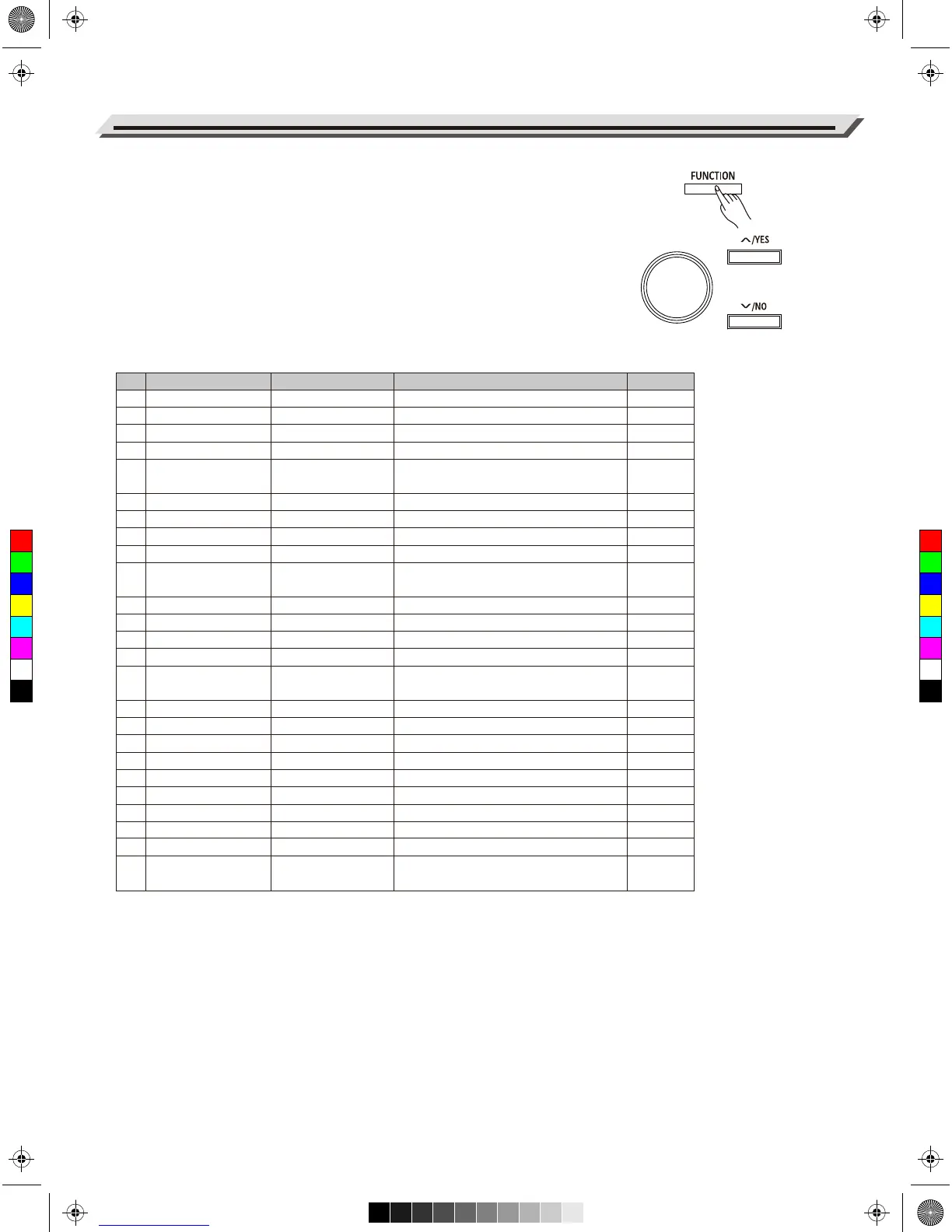
Press the [FUNCTION] button to enter the function menu. The LCD
shows the current parameter.
2. Adjust the settings.
Use the data dial to select a parameter. Use the [+/YES]/[-/NO]
buttons to change the setting of the selected item. Press [+/YES] and
[-/NO] at the same time to restore the default setting.
Note:
It will exit the function menu if there is no operation in 10 seconds.
Detailed parameters and their ranges:
Function Menu
22
No.
1
2
3
4
5
6
7
8
9
10
11
12
13
14
15
16
17
18
19
20
21
22
23
24
25
Parameter
Tune
Voice R1 Octave
Voice R2 Octave
Voice L Octave
Touch Response
Chord Type
Lower Split Point
Twinova Split Point
Twinova Octave
Harmony Type
EQ
String Resonance
Soft Pedal
Freeze
Metronome Time
Signature
Fade In/Out Time
MIDI Out Channel
Song Looping
Auto Power Off
System Time-Year
System Time-Month
System Time-Day
System Time-Hour
System Time-Minute
Restore Factory
Setting
LCD Display
TUNE
OCTAVE R1
OCTAVE R2
OCTAVE L
TOUCH
CHORD
LOWER SPLIT
TWINOVA SPLIT
TWINOVA OCTAVE
HARMONY
EQ
STRING RES.
SOFT PEDAL
FREEZE
METRO
FADE TIME
MIDI OUT CH
SONG LOOP
POWER OFF
YEAR
MONTH
DAY
HOUR
MINUTE
SYSTEM RESET
Default
0
0
0
0
Medium1
Fingered
F#3
E3
0
Duet
Piano
8
Soft
Style
4/4
10
1
All
30 min
2016
-
-
-
-
-
Range
-50 ~ +50
-2 ~ +2
-2 ~ +2
-2 ~ +2
Off, Soft2, Soft1, Medium1, Medium2,
Hard1, Hard2
Fingered, Multi, Bass Invert
A0 ~ C8
A0 ~ C8
-2 ~ 2
Duet, Trio, Octave, 1+5, Country Duet,
Block, 4 Close 1, 4 Close 2, 4 Open
Piano, Pop, Classical, Rock, Jazz,R&B
0 ~ 32
Soft, Play, Memory
Style, Voice, Song
2/2~12/8
1 ~ 20
1 ~ 16
Single, All, Off
Never, 30 min, 60 min
2016~2100
Jan.~ Dec.
1 ~ 31
0 ~ 23
0 ~ 59
-
C
M
Y
CM
MY
CY
CMY
K
aw_DP720_Manual_G03_170523.pdf 22 17/5/24 09:15


 To Next Page