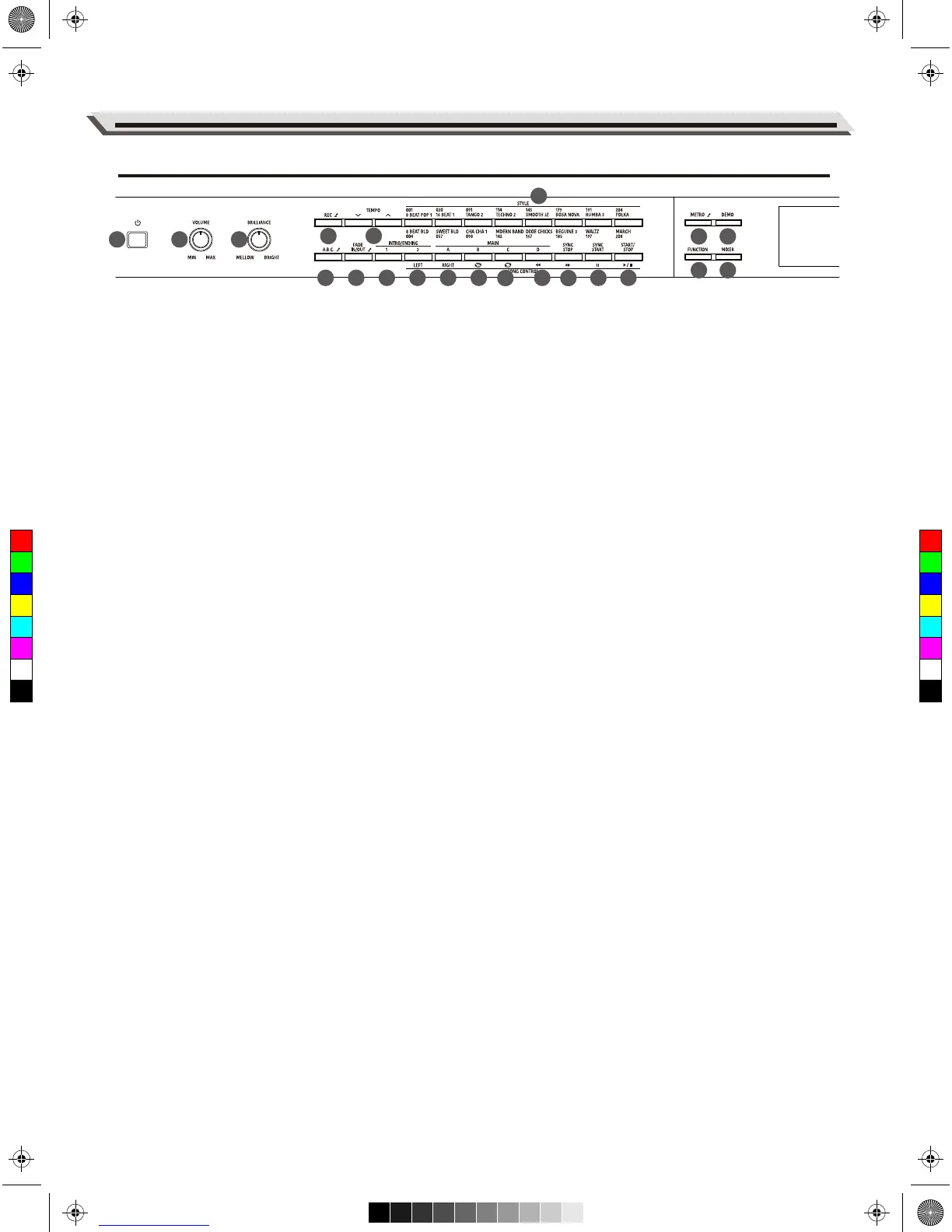
Panel & Display Description
07
1 2 3
4
1. [POWER] Switch
Turn the power on or off.
2. [VOLUME] Knob
Adjust the master volume.
3. [BRILLIANCE] Knob
Adjust the brilliance.
4. [REC] Button
USB flash drive inserted: press the button to enter
Audio Recording.
USB flash drive not inserted: press the button to enter
MIDI Recording.
Press and hold the button to enter the recording
setting menu.
5. [TEMPO +/-] Buttons
Press to edit the tempo value.
6. STYLE Select Buttons
Directly set a preset style. Press a button once to
select the first preset style, press it again to select
the second preset style.
7. [A.B.C.] Button
Press it to turn the A.B.C. function on or off.
Press and hold it to enter the Chord setting menu.
8. [FADE IN/OUT] Button
Press it to turn the Fade In or Fade Out on or off.
Press and hold it to enter the Fade Time setting menu.
9. [INTRO/ENDING 1] Button
Play the Intro or Ending pattern 1.
10. [INTRO/ENDING 2] Button
In style mode: play the Intro or Ending pattern 2.
In song mode: mute/activate the left hand part.
11. [MAIN A] Button
In style mode: play the Main pattern A.
In song mode: mute/activate the right hand part.
12. [MAIN B] Button
In style mode: play the Main pattern B.
In song mode: play the current song in a loop.
13. [MAIN C] Button
In style mode: play the Main pattern C.
In song mode: play all songs in a loop.
14. [MAIN D] Button
In style mode: play the Main pattern D.
In song mode: rewind the song playback.
15. [SYNC STOP] Button
In style mode: turn the Sync Stop function on or off.
In song mode: fast forward the song playback.
16. [SYNC START] Button
In style mode: turn the Sync Start function on or off.
In song mode: pause the song playback.
17. [START/STOP] Button
Start or stop playing a song or a style.
18. [METRO] Button
Press it to turn the Metronome on or off.
Press and hold it to enter the Metronome setting menu.
19. [FUNCTION] Button
Press it to enter the Function menu.
20. [DEMO] Button
Press it to enter Demo mode.
21. [MIXER] Button
Press it to enter the Mixer menu.
22. [STYLE] Button
Press it to enter Style mode.
23. [USB] Button
Press it to enter the USB Play menu.
Press and hold it to enter the USB menu.
24. [VOICE] Button
Press it to enter Voice mode.
25. [SONG] Button
Press it to enter Song mode.
13
5
6
20
18
19
21
Front Panel
7 8 9 10 11 12 1514 16 17
C
M
Y
CM
MY
CY
CMY
K
aw_DP720_Manual_G03_170523.pdf 7 17/5/24 09:15



 To Next Page