Note! In this window le location path are dened on local
PC computer, in this window you can manually start/stop re-
cording or make snapshot. For automatic surveillance func-
tion like motion detection go to “Settings” and dene SD card
or FTP server as le storage.
2. Choose video stream
You can choose primary stream or second stream, third
stream to view the video� Recommend to view by prima-
ry stream in LAN, by second stream in WAN and by third
stream in mobile phone� This option is good for preview
previously dened quality stream in “Settings”�
You can view the video by four-in-one on the same screen,
but need to set the camera in multiple setting�
3. Playback
In order to playback recorded les store onto local disk
go to “Playback Video” tab�
View video by WiFi connection in LAN
After nishing the wired connection you can connect the
camera by WiFi�
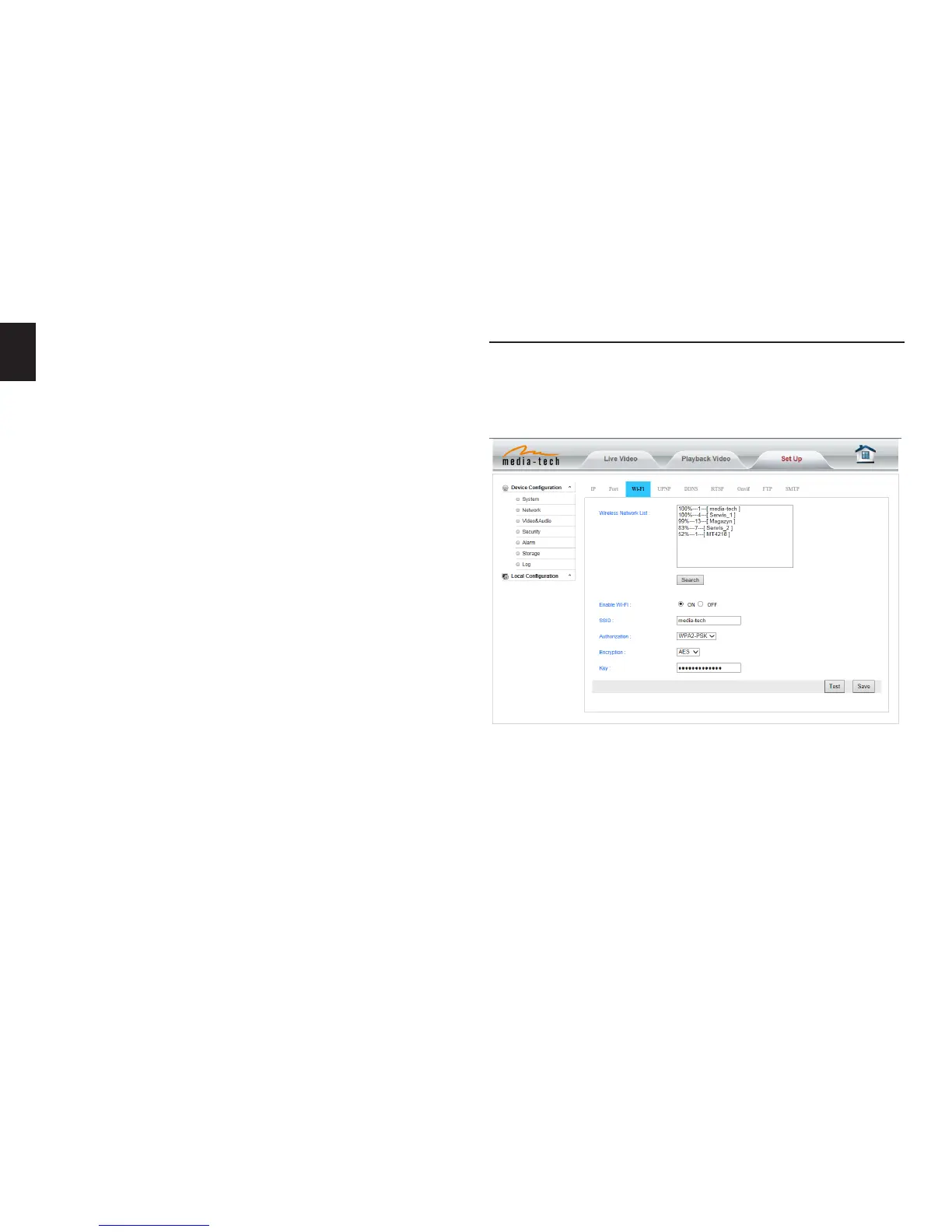
Login camera in wired connection and enter wi setting,
and then operate as the following step�
Select ‘On’ and click ‘Search’, and then select wireless router
in pop-up menu, click ‘OK’ and enter password if needed,
click ‘save’ to save the wireless settings� And you can click
‘Test’ to check if the wireless setting is successful� After set-
ting successfully, please pull out network cable and reboot
the camera to use the wireless connection to view video�


 To Next Page