Genio 350 EVK
Genio 350 Evaluation Kit Hardware User Guide
Unclassified
MediaTek Proprietary and
Confidential
© 2022 MediaTek Inc. All rights reserved.
Unauthorized reproduction or disclosure of this document, in whole or in
part, is strictly prohibited.
Page 17 of
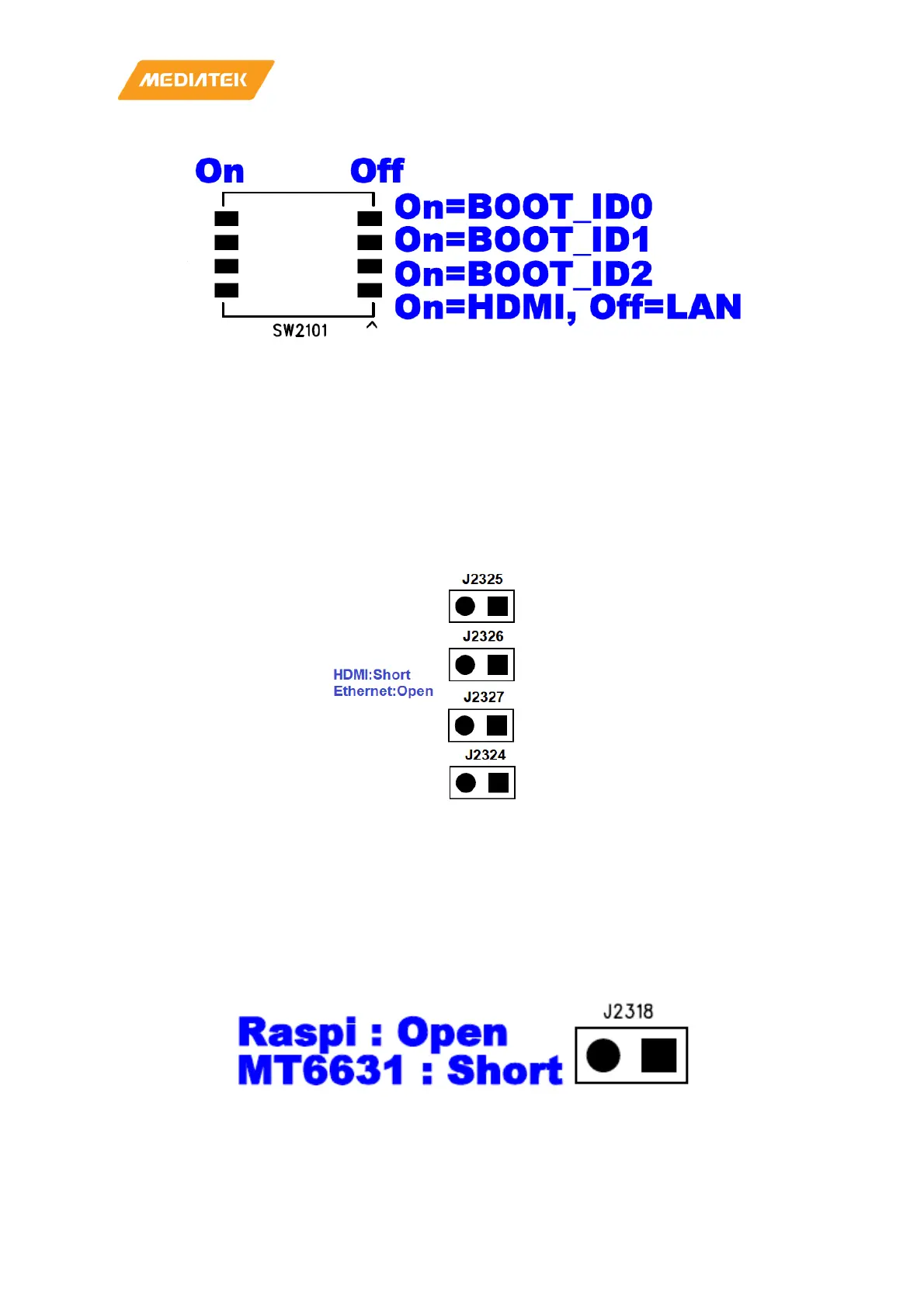
Figure 3-4 SW2102 DIP Switch
3.14 HDMI Port
Genio 350 EVK provides an HDMI port, users can connect external displays. Since HDMI signals come from the
DPI interfaces of the processors (MT8365) through a bridge IC. The maximum resolution is constrained by DPI
bandwidth. 1080p30 is the limitation.
Unfortunately, most PC displays support 1080p60 only, but TVs support this resolution usually. So 720p60 is the
recommendation, if you connect with a PC display.
Figure 3-5 When using HDMI or Ethernet, pay attention to the following jumps
3.15 Pin Mux for Other Interfaces
There are some GPIOs shared with HDMI, M.2 slot (MT7663), on-board WiFi chip (MT6631), JTAG, IrDA
Receiver and Raspberry Pi like I/O. You should pay attention on them when you use these functions.
Figure 3-6 Jumper J2318



 To Next Page