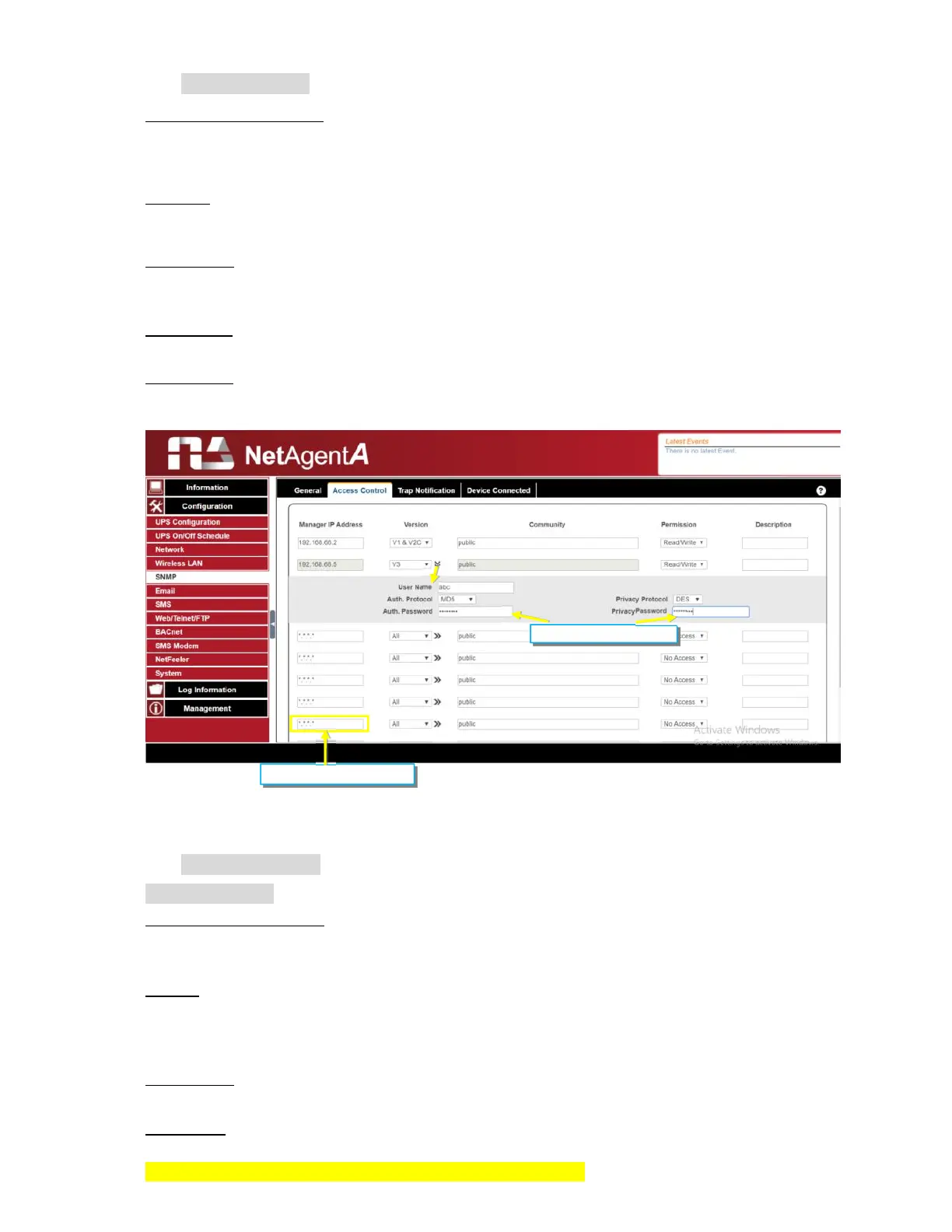
Access Control
Manager IP Address
:
This is to set the IP address that the administrator can manage NetAgentA from. It is valid
for up to 8 IP addresses. To manage NetAgentA from any IP address, enter *.*.*.* into
Manager IP address.
Version:
This is to select between SNMPv1& SNMPv2 or When select All and V3, user name,
password, authentication and privacy are required
Community:
This section is to set a Community name for NMS. The community name has to be as the
same as the setting in NMS. (Default is public)
Permission:
This is to set authorities of administrators. Options are Read, Read/Write, and No Access.
Description:
This is to make note for administrator’s reference
Trap Notification
Trap Notification
Destination IP Address:
To set receivers IP address for receiving traps sent by NetAgentA. It is valid for up to 8 IP
Addresses.
Accept:
Select the trap type of its SNMP version or Inform from drop down list. When SNMPv3 trap
or SNMPv3 Inform is selected, username/password and authentication information are
required.
Community
:
Trap receiver and NetAgentA must be same community. (Default is public)
Trap Type:
Select from PPC MIB or RFC1628 MIB (Default is PPC)
MIB file is available in the CD provided with NetAgentA
*.*.*.* means any IP



 To Next Page