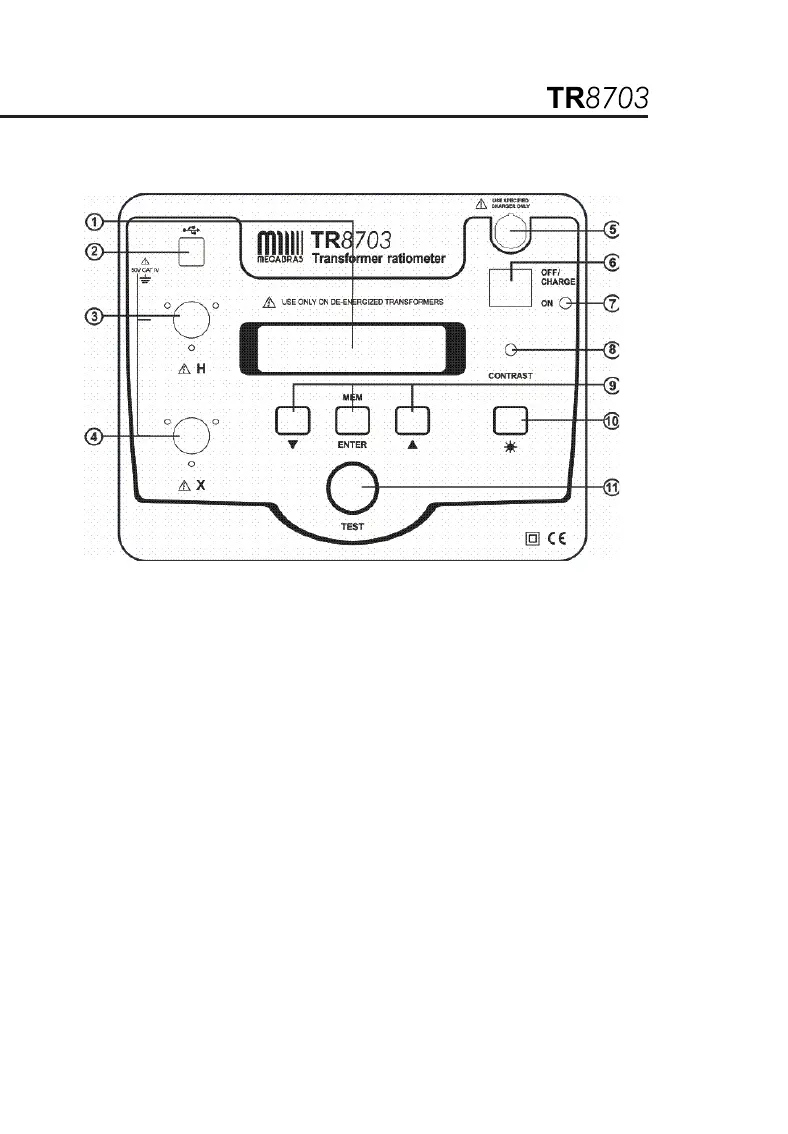
1.2. Control features
1. Display: Displays data, status and control features of the instrument.
2. USB Conector: Allows connection to a computer for instrument
configuration set-up and status check, downloading of the stored data
using the software and running a test.
3. High-side “H” Cable Connector (primary): Connection for the
primary side of the transformer.
4. Low-side “X” Cable Connector (secondary): Connection for the
secondary side of the transformer.
5. Battery Charge Input Connector: Allows the smart charger to
charge the batteries.
6. Power Switch: Turns the instrument ON or OFF (if the charger is not
connected). If the charger is connected, the batteries charge in
OFF/CHARGE position.
7. Operation and Battery Low Indicator: Green LED indicates that the
instrument is on and blinks when the batteries are getting low (<12 V).
The instrument will completely shut down when the batteries are
below 8.7 V.


 To Next Page