17
8.2 For 3 terminal instruments (MIT481/2, MIT485/2 only)
8.2.1 Using 2 test leads
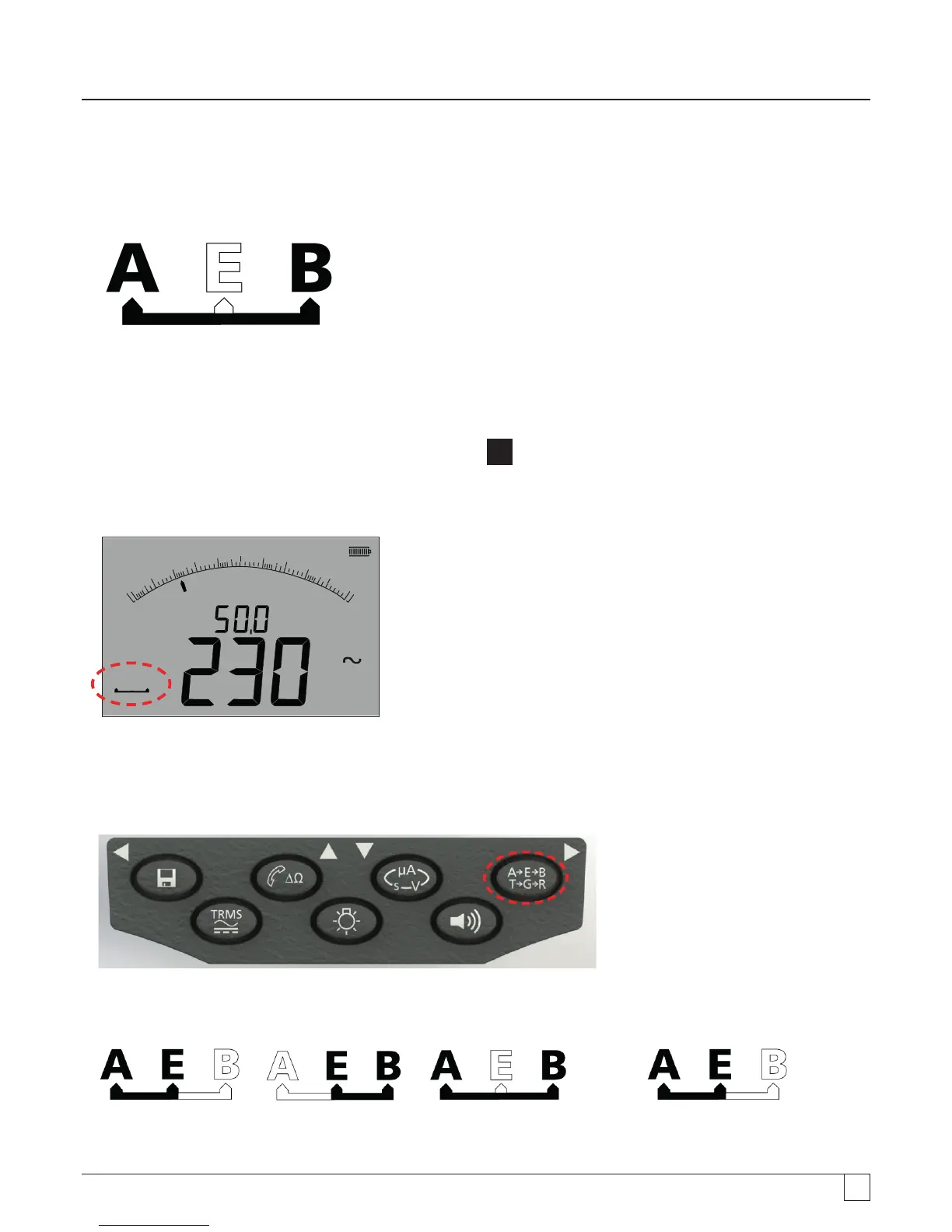
1. Ensure instrument is in the A-B mode indicated in the display, as below:
- Figure 12
For details of changing the configuration see section 7.3 - 3 terminal connections.
2. Connect test leads to the RED/BLACK (B/A) test sockets only.
3. Select the VOLTAGE measurement mode on the range knob [
V
] range).
4. Connect the test leads to the circuit to be measured.
5. The instrument will display the voltage across the test leads as below.
100 0
8 00
6 004 00
2 00
0
A B
V
z
H
- Figure 13
Note: the display shows the A-B terminals are active.
6. If the display does not show the A-B option, press the A-E-B (T-G-R) button to change this mode, as below:
- Figure 14
7. With each press, the display will change from:
to to and back to
- Figure 15
Or, if 'T-G-R' is enabled in setup:



 To Next Page