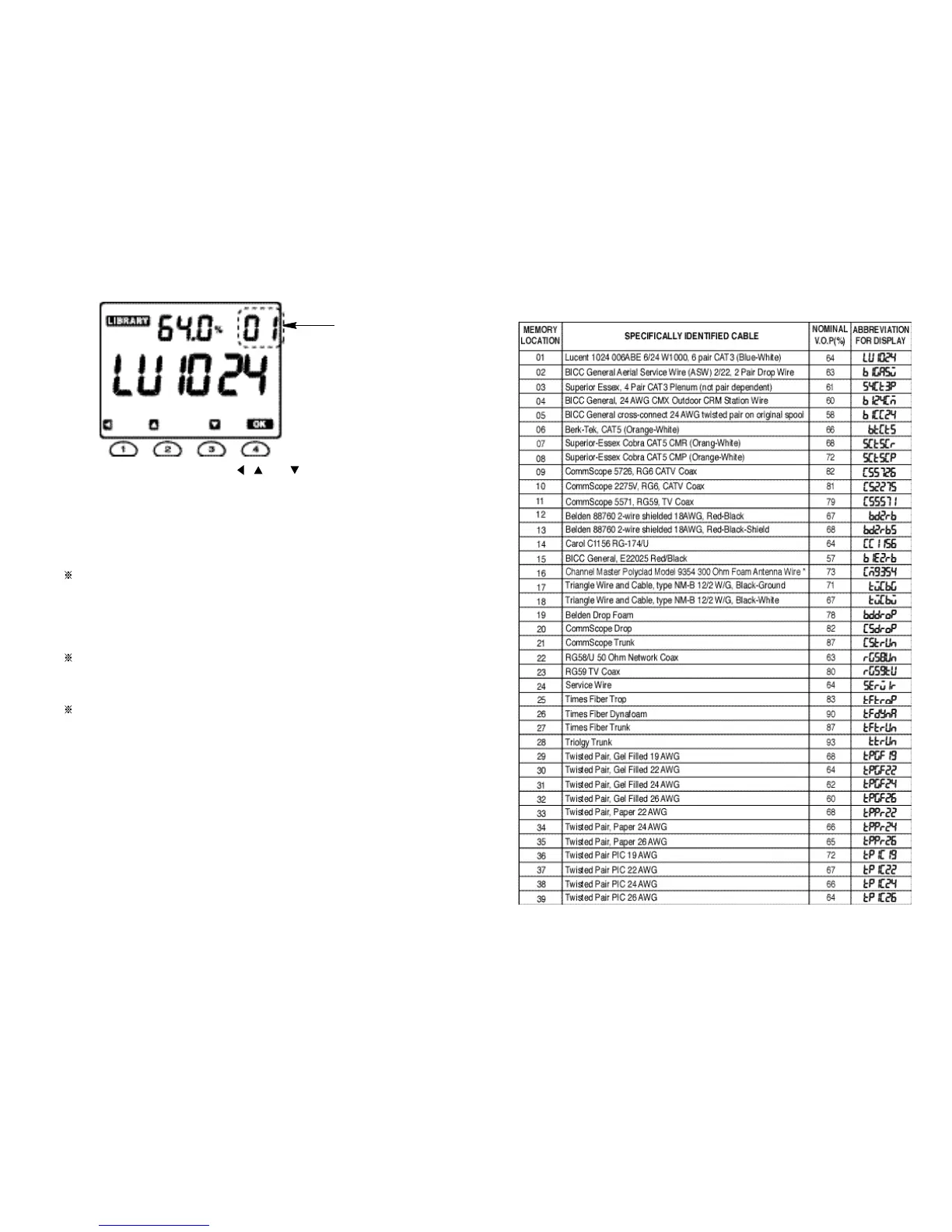
5. Scroll through the library using the , and
buttons to find the required
cable type. The types
are displayed in the Library
Number order. The 39
standard cable types are listed in Section 4.3.2 and Section 4.3.3 will explain
you how to make the library of 20
cus
t
omer cable
types using
t
he memory
mode.
6. Press the OK button to set the Meter to the required cable type.
The center line segments of 6 digits in the lower display will be blinking until
the TEST button will be depressed.
7. Connect the cable to be tested to BNC connector of the Meter.
8. Press the TEST button to take the required measurements.
The displayed V.O
.
P will
be remained on t he
LCD even after the TEST
button was depressed in order to inform the user of the V.O.P of the cable
to be tested.
When the Meter will be continuously set to the just same cable type as the
preceding cable type
,
the Meter will show the preceding display until
the
TEST button will be newly depressed.
When
t
he Meter is
turned off it au
t
oma
t
ically stores the last
setting and will
display this setting when powered up.
Fig. 4
1110
“ blinking ”
4.3.2 Cable library for 39 standard cable types



 To Next Page