Chapter 2 – Commissioning
11
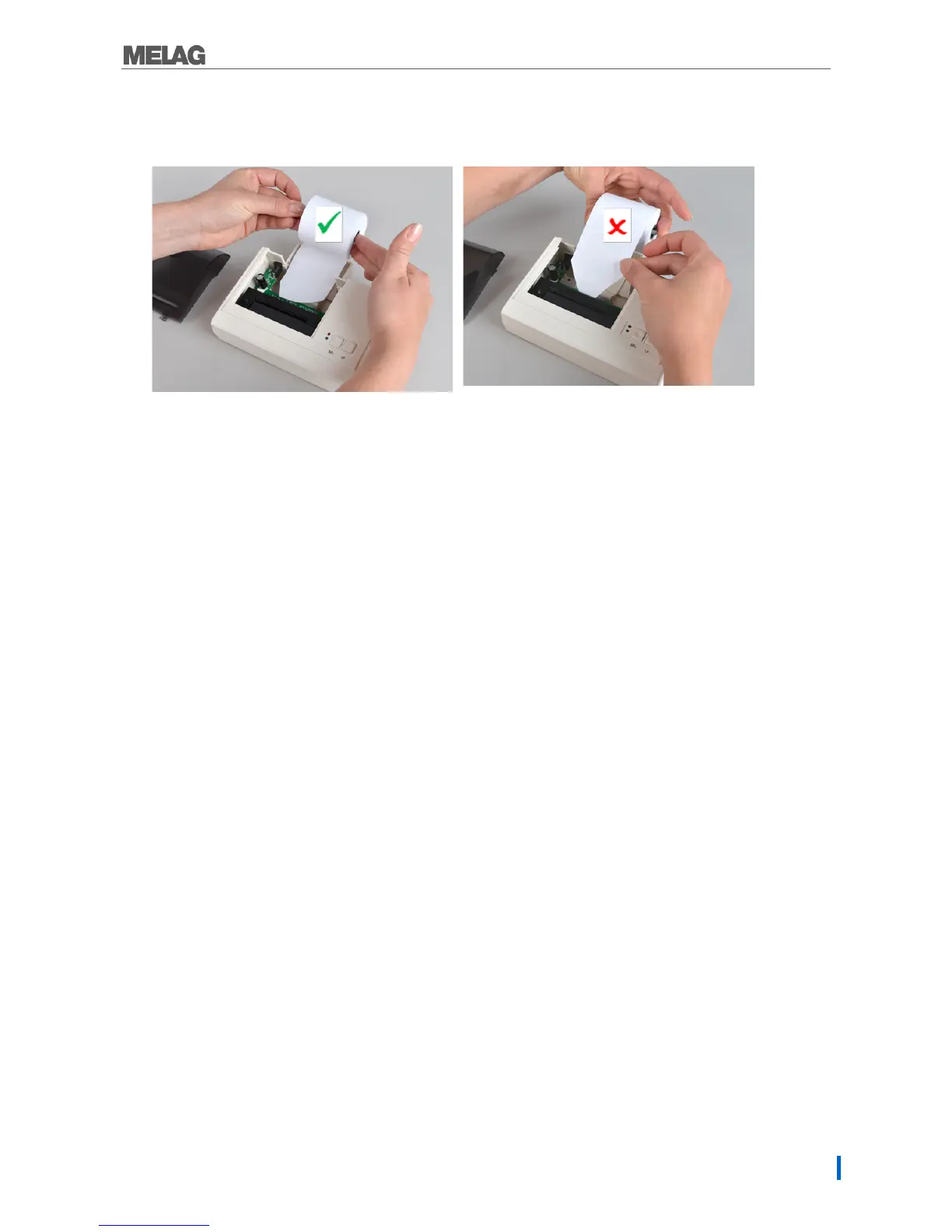
4. Guide the cut ends of the paper roll through the paper slit from behind.
The paper roll will wind off from below.
Fig. 9: Inserting the paper roll correctly
10: Incorrect!
5. Press the LF key until the end of the paper roll protrudes from the upper paper tray. The paper
may not be allowed to jam between the cover and the pint head.
6. Slide the roll dispenser in the paper roll and insert it in the brackets in the paper tray.
7. Close the paper tray. Ensure that the fore end of the paper roll protrudes from the slit in the cover.
8. Perform a function test. To do so, disconnect the power supply from the socket.
9. Hold the SEL key depressed and then re-connect the power supply to the socket.
The log printer will print, stating the settings and the character set.
Connecting a log printer to a MELAG device with a series data
connection
Applies to the devices:
Pro-Class
S-Class
Cliniklav 25
MELAtronic EN/EN+
MELAquick 12+/12+p
MELAseal Pro


 To Next Page