Chapter 2 – Commissioning
18
Adapting the IP address of the label printer to the (practice) network
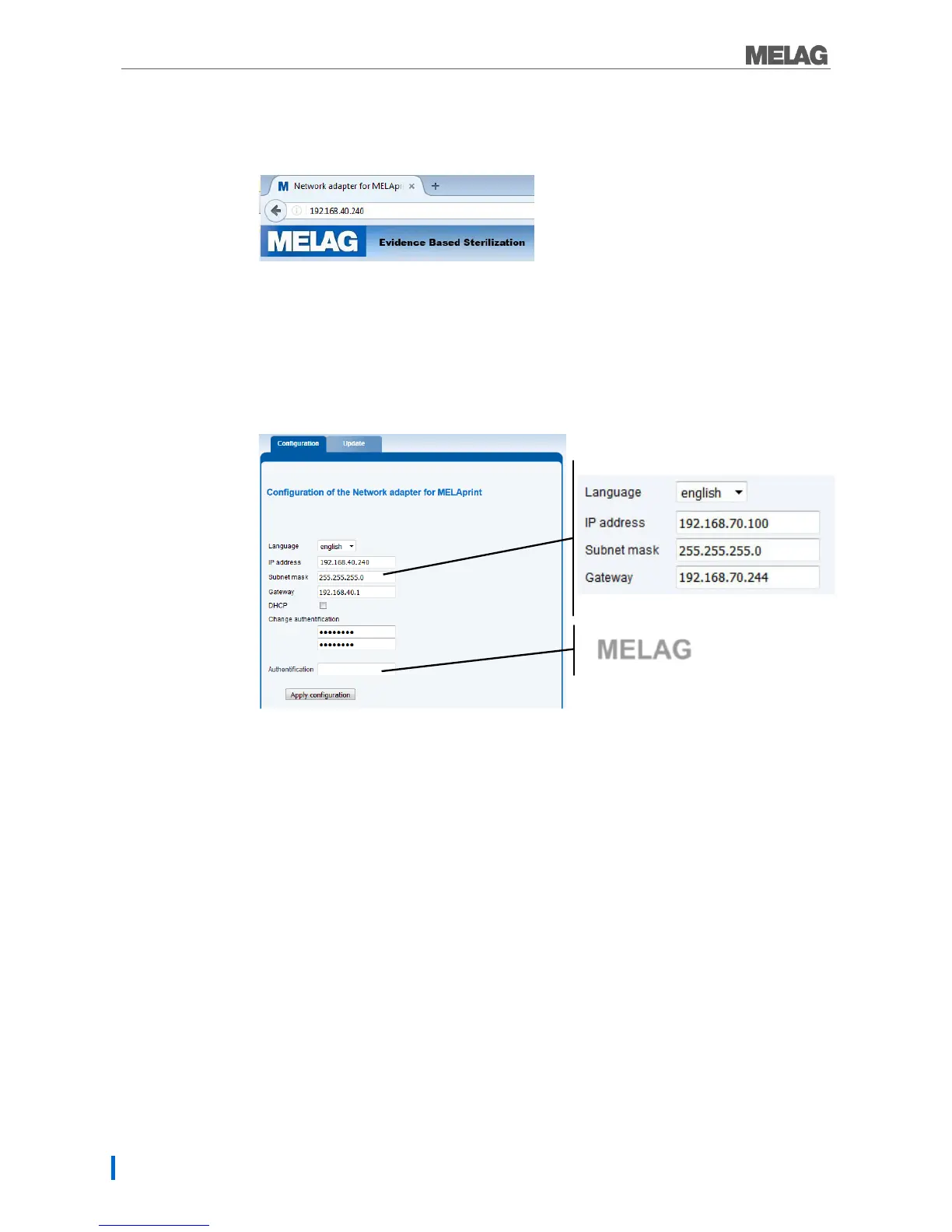
1. Open a web browser (e.g. Microsoft Internet Explorer) and enter http://192.168.40.240 in the
address bar to access the website of the label printer.
2. To adapt the IP address of the label printer to the (practice) network, select the desired version
and proceed as follows:
Assign the label printer a fixed IP address:
1. Working under IP-Address, enter the first three number blocks of the (practice) network. The last
number block is assigned to the device connected in the network. A unique number is assigned to
every device connected in the (practice) network.
2. Working under Gateway, enter the first three number blocks of the (practice) network. The fourth
number block is specified by the (practice) network administrator.
3. Enter the password “MELAG” under Authentication.
4. Accept the settings with [Apply configuration].
Connecting the label printer in the (practice) network:
1. Disconnect the Ethernet cable from the computer and connect the cable directly to the steam
sterilizer integrated in the network, or to a free network socket.
The IP address (e.g. 192.168.40.100) must be returned to the original IP address after configuration.
Re-establishing communication between the computer and the (practice) network:
1. Working on the computer, via Start → Control panel → Network and Internet open the →
Network and sharing centre.
2. Select LAN connection and open the Properties window (right mouse-click).
3. Working in the list Internet protocol version 4 (TCP/IP) select Properties.
4. To perform the original computer settings, select the applicable version:
To change the configuration manually, proceed as described in the section “The computer has a
fixed IP address”. First enter the information which you noted previously.
To perform automatic configuration, proceed as described in the section “The computer obtains
the IP address automatically”. If possible, set a checkmark under “Obtain IP address
automatically”.


 To Next Page