Chapter 2 – Commissioning
12
Connecting the log printer to the steam sterilizer
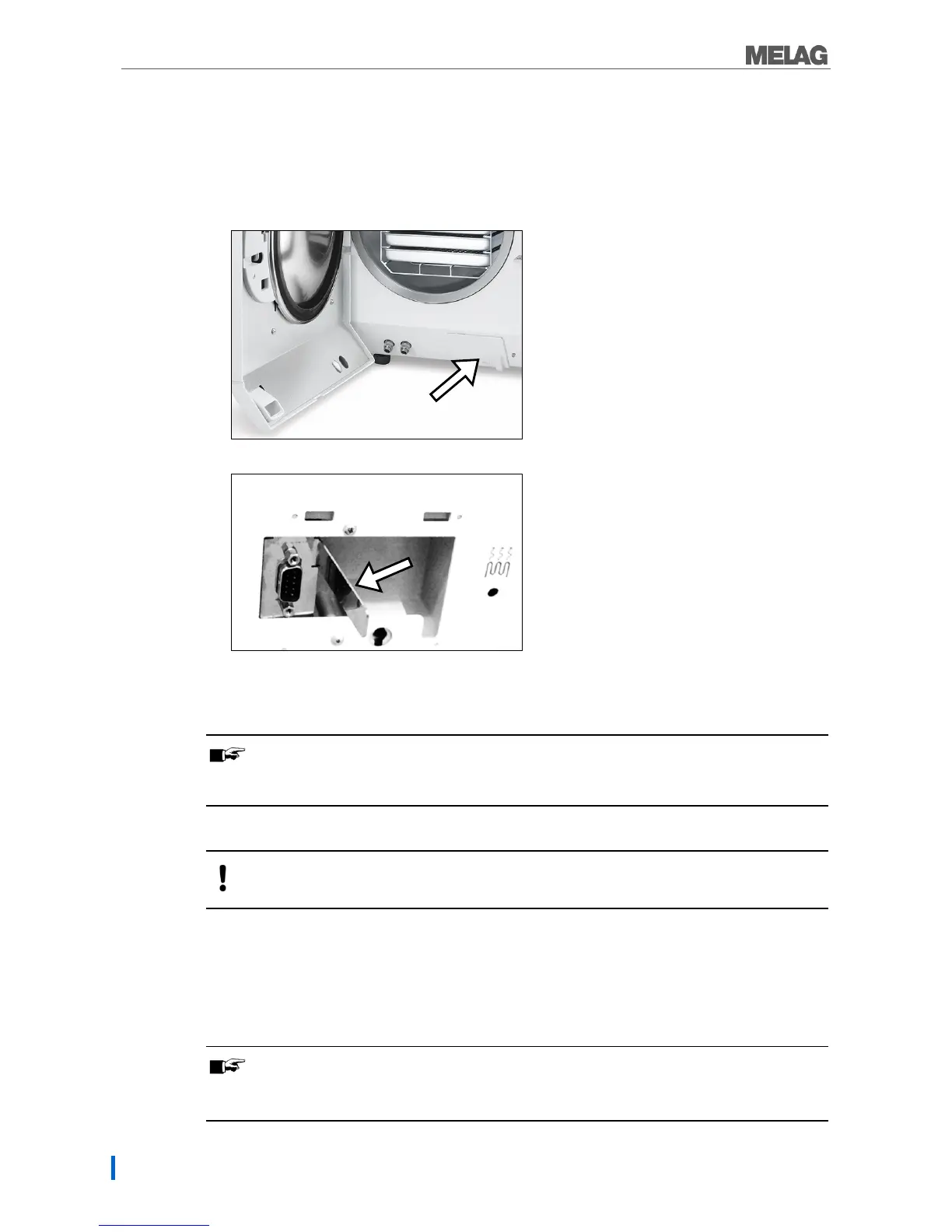
With Pro-Class or S-Class devices, please comply with the following:
Remove the white cover on the front underside of the steam sterilizer before connecting the serial cable.
1. Open the door of the steam sterilizer.
2. Insert a coin in the slot of the white cover and turn it a quarter of a revolution to the right or left;
then remove the cover.
3. Fold out the metal strap behind the cover forward to the left.
4. Push the metal frame downwards slightly until it snaps into place and can no longer fold back
independently.
PLEASE NOTE
If the log printer or a computer is constantly connected to the steam sterilizer, you can insert the
serial cable of the log printer in the cable guide, fold in the metal strap and replace the cover.
Connect the log printer as follows:
WARNING
Only ever operate the log printer with the original power supply.
1. Connect the serial cable of the log printer in the serial RS232 series data connection of the steam
sterilizer. The operating manual of the respective MELAG device contains information as to the
location of the RS232 data connection.
2. Connect the power cable of the log printer to the socket. The log printer activates automatically.
3. Press the SEL key to send data to the printer and print.
PLEASE NOTE
The printer is unable to receive data in off-line mode.
The LEDs must illuminate.


 To Next Page