EasyManua.ls Logo

MELAG MELAprint 42 - Network Adapter Status Indicators; Understanding Network Adapter LED Status

MELAG MELAprint 42
26 pages
Print Icon
To Next Page IconTo Next Page
To Previous Page IconTo Previous Page
Loading...
Chapter 1 Device description
8
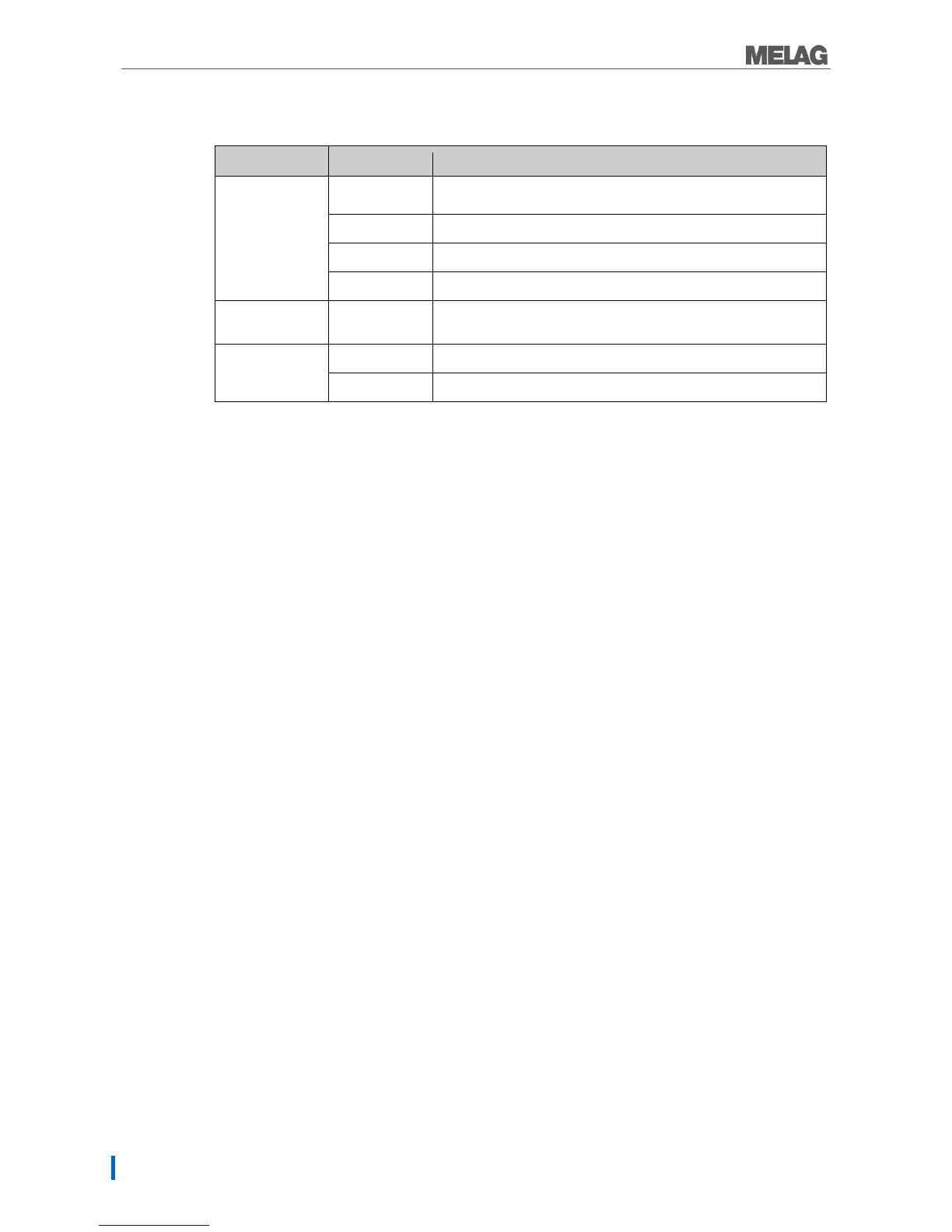
Status displays network adapter for MELAprint
Table 4 Status displays network adapter
LEDs
State
Meaning
Power
On
The network adapter is switched on / connected to the power
supply
Off
The network adapter is switched off / not live
Flashes slowly
Network adapter boots (the network adapter firmware is active)
Flashes quickly
Start configuration of the network adapter successful
Data
Flashes
Data is being exchanged via the Ethernet interface between the
computer and the network adapter
LAN
On
Connected with network
Off
Not connected with network