D24030 | Date 11/2018 35
Operation and control
Automatic temperature monitor ( ASF)
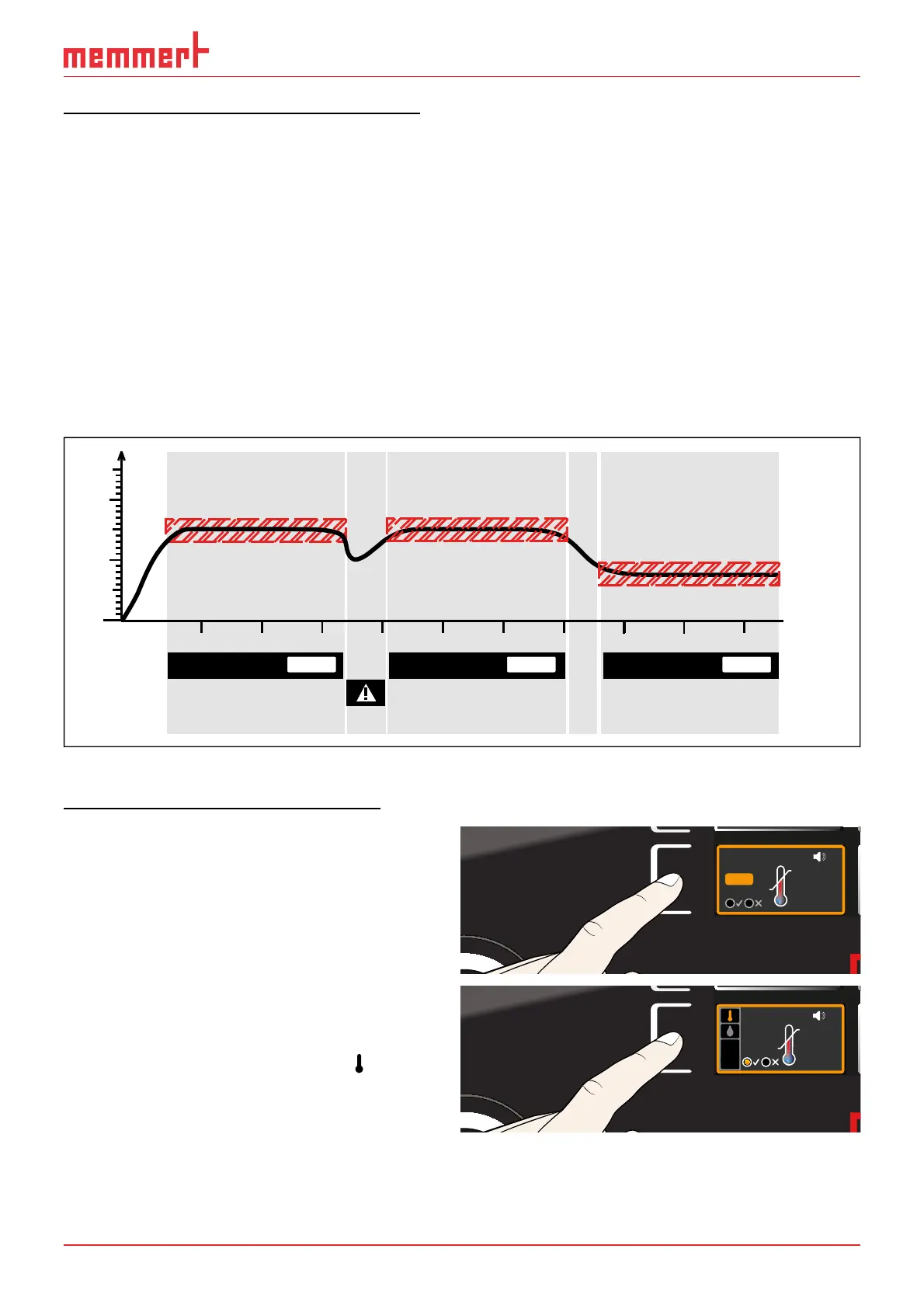
ASF is a monitoring device that automatically follows the set temperature setpoint within an
adjustable tolerance band (Fig. 21).
The ASF – if switched on – is automatically activated as soon as the actual temperature value
reaches 50 % of the set tolerance band of the setpoint (in the example: 50 °C ± 1 K) for the
first time (section A).
When the temperature violates the set tolerance band around the setpoint (in the example in
Fig. 21:
50 °C ± 2 K) – e.g. if the door is opened during operation (section B of illustration) – the alarm
is set off. The ASF alarm is automatically triggered as soon as 50 % of the set tolerance band
of the setpoint (in the example: 50 °C ± 1 K) are reached again (section C).
If the temperature setpoint is altered, the ASF is automatically disabled temporarily (in this
example: The setpoint is changed from 50 °C to 25 °C, section D) until the tolerance range of
the new temperature setpoint is reached again (section E).
52°C
48°C
ASF active
52°C
48°C
ASF alarm
ASF active ASF active
27°C
23°C
°C
50°C
25°C
t
ABCDE
AUTO AUTO AUTO
Fig. 21 Schematic diagram of how the ASF temperature monitoring works
Adjusting temperature monitoring
► For cooled incubators IPPplus:
Press the activation key to the left of the
ALARM display. The min setting (under-
temperature protection) is automatically
activated.
Continue with point 1.
min
000°C
ALARM
max
000°C
auto off
99K
-
+
ALARM
0.0K
min
°C
auto
max
40.0°C
15 0.
+
-
► For constant climate chambers HPP:
Press the activation key to the left of the
ALARM display. The temperature monitoring
setting is automatically activated (
).
min
000°C
ALARM
max
000°C
auto off
99K
-
+
ALARM
max
40.0°C
auto
0.0K
min
15.0°C
+
-



 To Next Page