27
Menu mode
7. Menu mode
In menu mode, you can make basic settings as well as adjust appliance parameters.
Caution:
Before changing menu settings, read the description of the respective functions on
the following pages to avoid possible damage to the appliance and/or chamber load.
To enter menu mode, press the MENU key.
To exit the menu mode at any time, press the MENU key
again. The appliance then returns to operating mode.
Only changes accepted by pressing the confirmation key
are saved.
7.1 Overview
Press the MENU key to change between the displays in menu mode:
SETUP
SIGNALTÖNE
ADJUST
LANGUAGE
DATE AND TIME
12 34 5
6789 1011
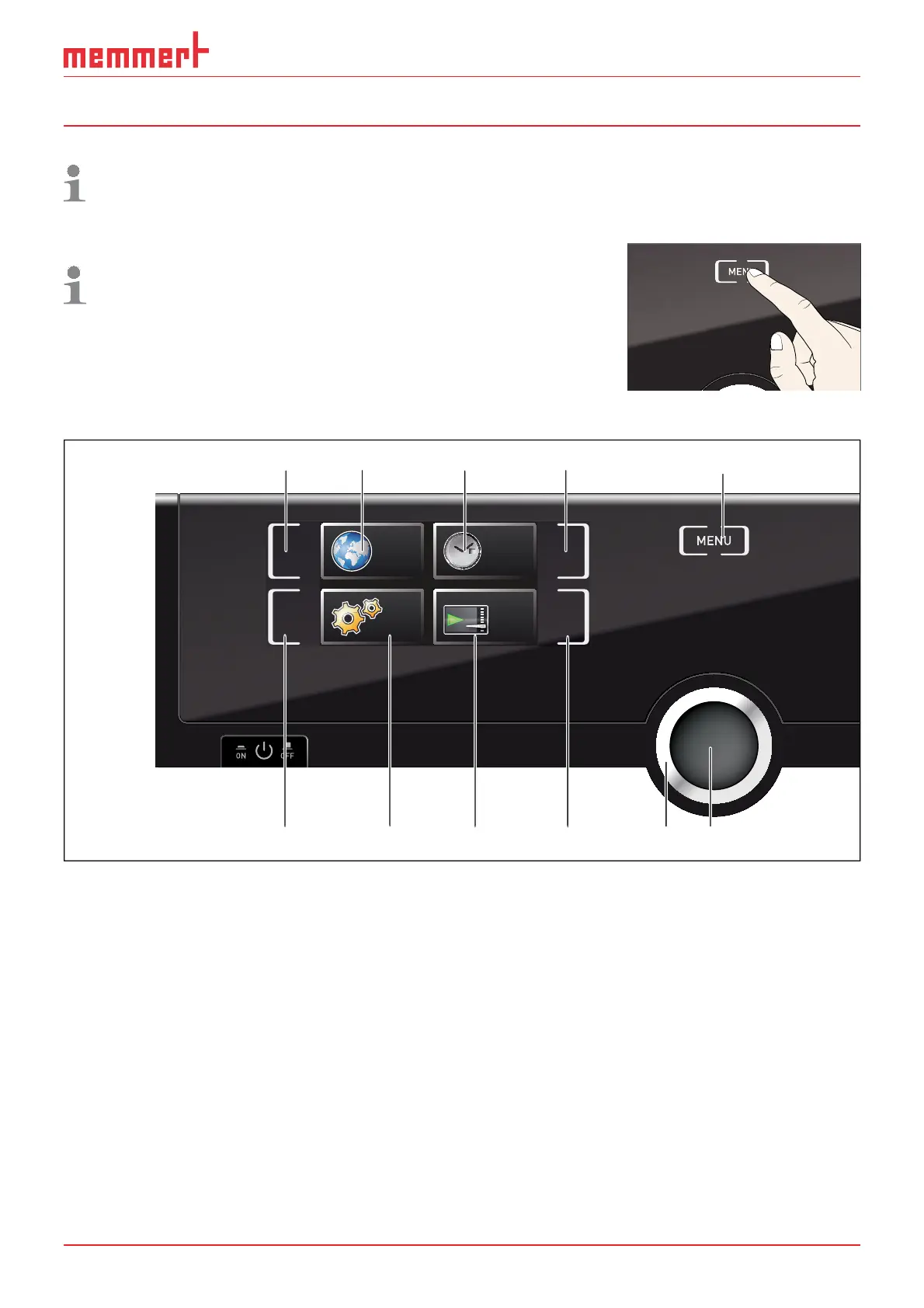
Fig. 17 ControlCOCKPIT in menu mode
1 Language selection activation key
2 Language selection display
3 Date and time display
4 Date and time setting activation key
5 Exit menu mode and return to operating
mode
6 Setup activation key (basic appliance set-
tings)
7 Setup display (basic appliance settings)
8 Adjustment display
9 Adjustment activation key
10 Turn control for adjustment
11 Confirmation key (accepts setting made
with the turn control)



 To Next Page